Real buildClaude's output, uneditedRecorded demo
I want AI to build me an app
Five plain-English prompts made a shared job list that saves to a database. Upload two files to GitHub and Cloudflare puts it live, and every change after: free, no terminal.
- Prompts
- 5
- Claude's time
- 8 min 17 s
- Got wrong
- 7 things
- Tests passed
- 7 of 8
- Model
- claude-sonnet-5-5
- Run on
- 1 October 2026
For: A volunteer group, club or small team that organises jobs in a chat group, wants one shared list with no sign-ups, and has never built an app or opened a terminal.
What the five prompts made The shared list

01 · Before you start
Before you start.
You need three free accounts, set up once: Claude, GitHub and Cloudflare. The set-up page walks through each. In Claude, switch on “Code execution and file creation” (Settings, then Capabilities; it’s on the Free plan) so Claude can hand you files to download. On GitHub, make an empty repository with “Add README” switched on; ours was called elm-street-jobs. Connecting Claude to GitHub is part of the set-up too, but on the Free plan it only reads your files. It can’t save anything to GitHub from a chat, so you upload what Claude gives you.
Nothing to install, and no terminal.
Our example is made up: Elm Street Community Garden, about 15 volunteers, with jobs like watering, weeding and fixing the shed. They organise it all in a WhatsApp group, so jobs get missed or done twice. Swap in your own club, team or street.
02 · Set up once
Set up once, then just talk to Claude.
Free accounts you make one time and reuse for every build. Each links to the step-by-step on the set-up page, with what each screen looks like.
- 1. Get a free Claude account. It's where you describe what you want and Claude makes it. The Free plan covers every guide on this site; Pro adds the shortcut where Claude saves changes to GitHub itself.
- 2. Let Claude hand you files. A website is a handful of files. With this switched on, Claude can make them and give them to you to download, ready to upload to GitHub.
- 3. Get a free GitHub account and an empty repository. A repository is a folder on GitHub that keeps every version of your files. It's the one place your site lives: you (or Claude) change the files there, and Cloudflare publishes whatever is in it.
- 4. Get a free Cloudflare account and connect it to your repository. Cloudflare is where your site is live on the internet. Once it is connected to your repository, every change to the files on GitHub goes live by itself, in a minute or two. A site made of plain files costs nothing to host: Cloudflare says requests to static files are "free and unlimited".
- 5. Connect Claude to GitHub. So Claude can read the files that are live now before it changes them, even in a brand new chat. On Pro, the same connection is what lets Claude Code on the web save its changes to your repository.
03 · The prompts
Paste these five, in order.
Plain English, typed into an ordinary Claude chat. On the left, exactly what we sent, word for word; change the details to yours. On the right, what came back. One conversation with claude-sonnet-5-5, run on 1 October 2026. Read the full transcript.
Prompt 1 of 5
Describe the problem, and ask for a plan before anything is made.
You say: I help run a small community garden called Elm Street Community Garden. We have about 15 volunteers. At the moment we organise the jobs (watering, weeding, fixing the shed, that sort of thing) in a messy WhatsApp group, and things either get missed or done twice. I'd like a simple app that all of us can open on our phones: a shared list of jobs where anyone can add a job, say "I'll do it", and tick it off when it's done. Everyone has to see the same list, so it needs to be saved online, not just on one phone. I don't want people to have to sign up for accounts, but random strangers on the internet shouldn't be able to mess with our list. I'd like it to be free to run, and I've heard Cloudflare can do that. I'm not technical and I've never made an app. Before you make anything, ask me anything you need to know, and tell me in plain English what you're going to make, where the list will be kept, and how strangers will be kept out.
1,044 output tokens back · read the full reply
Prompt 2 of 5
Answer its questions, show it a design you like, and ask for copy and paste only.
Attach: a screenshot of a website you like the look of · the one we attached
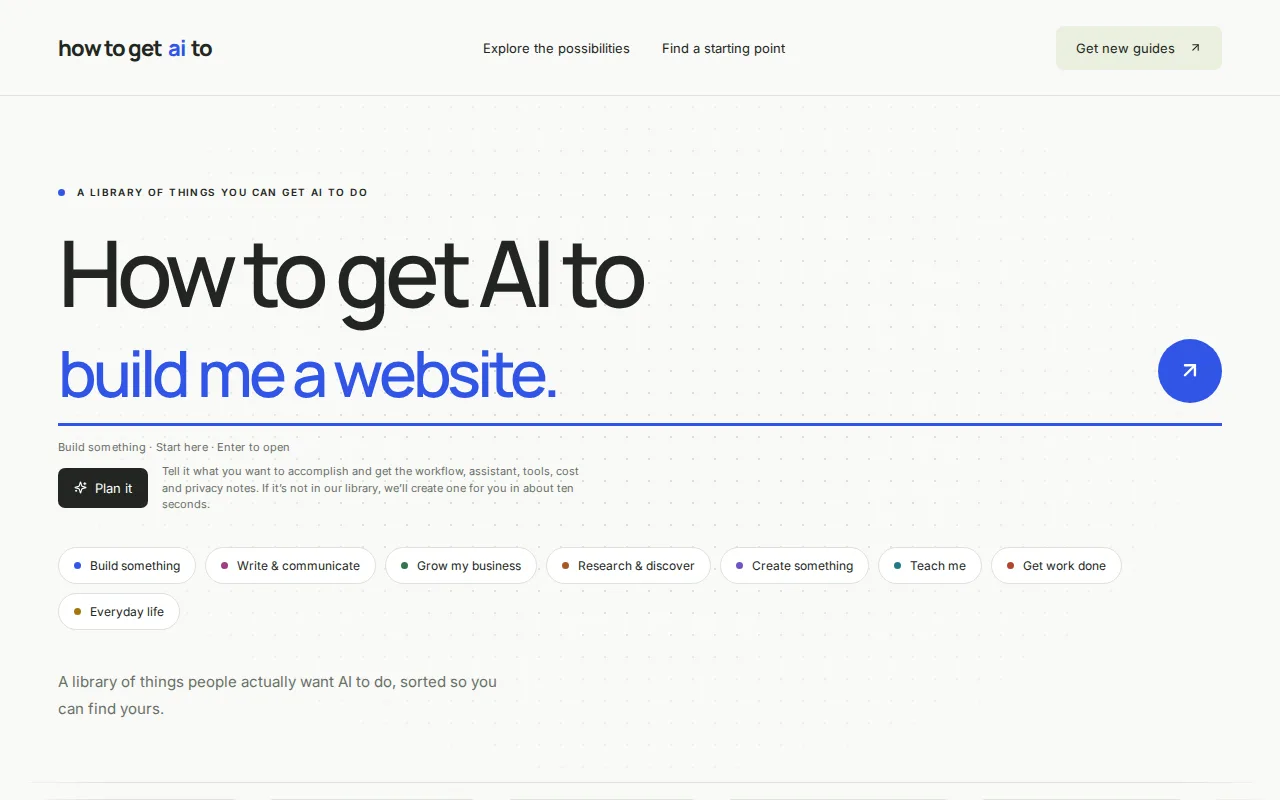
You say: Thanks, that sounds right. My answers: 1. Type their name once and the phone remembers it. 2. Yes, I've made a free Cloudflare account. 3. I'll do it myself, but I don't want to run commands or install anything. I've read that Cloudflare lets you paste code into its website and set up a database by clicking, so please make it so all I have to do is copy and paste. 4. Just a title for now. 5. Yes, anyone can hand a job back. 6. Anyone can delete a job, but ticked-off jobs should stay in a "done" list for a while so we can see what's been done. 7. Call it "Elm Street Garden Jobs". I've attached a screenshot of a website I like the look of. I like the light background, the rounded buttons with little coloured dots, and the one strong blue. Don't copy its words, just the feel. Big, easy-to-tap buttons please. Please make it now. Keep it as simple as possible: just what I'll need to paste into Cloudflare, nothing I have to install. It must work well on a phone. Tell me in plain English what each file is for.
13,149 output tokens back · read the full reply
Prompt 3 of 5
Ask it to check its work like a volunteer, and like someone trying to break it.
You say: Thanks. Before I put it online and share it with the volunteers, please check it carefully, as if you were a volunteer on a small phone screen and as if you were trying to break it: - two people pressing "I'll do it" on the same job at the same moment - someone ticking off or editing a job that another person has just deleted - a very long job title, or a blank one - someone typing odd symbols, web code or a script into a job title or their name - a stranger who has the link but not the garden code, trying to guess the code or to read or change the list some other way - a bad signal halfway through pressing a button Tell me in plain English what you found, then fix it in the files.
28,804 output tokens back · read the full reply
Prompt 4 of 5
Change something, the way you will once people are using it.
You say: One more thing before we start. Some jobs need doing by a certain day, like "water the seedlings before Saturday's open day". Please let people add an optional "by when" day to a job, show it on the job, and put the ones that are due soonest at the top. Imagine we've already been using the app for a few weeks, so it mustn't lose the jobs that are already on the list. Then tell me exactly what I need to paste into Cloudflare again to put the change live.
17,179 output tokens back · read the full reply
Prompt 5 of 5
Ask how to put it live from GitHub, by clicking, not typing commands.
You say: I've made free GitHub and Cloudflare accounts, and a new repository on GitHub called elm-street-jobs (I switched on "Add README"). I'd like Cloudflare to put the app live by itself every time the files on GitHub change. I've read that Cloudflare can do this from Workers & Pages, Create application, "Import a repository". I don't want to use the terminal or install anything. If Cloudflare needs any extra files for that, please make them. Then tell me, step by step, how to get the files into my repository using the GitHub website, how to connect it in Cloudflare, where the garden code goes and how I change it if it leaks, what I should see at each step, and how I put a change live later (like the "by when" day). Also, how do I keep a backup copy of the list now and then?
7,207 output tokens back · read the full reply
After prompt 1 of 5
Reply to prompt 1 · 11.4 s · 1,044 output tokens
Describe the problem, and ask for a plan before anything is made.
A plan and some questions, and nothing made yet. Ours proposed a web page you add to your phone's home screen, the list kept in a small Cloudflare database, and one shared garden code checked by the server. It asked seven questions, and said putting it online would need a few commands typed on a computer.
Reply to prompt 2 · 1 min 26 s · 13,149 output tokens
Answer its questions, show it a design you like, and ask for copy and paste only.
Files to download. Ours saved two: worker.js, the whole app in one file (490 lines), and SETUP.md, six click-by-click steps. There was no database file: the app makes its own table the first time it runs. It said it hadn't run any of it.
Reply to prompt 5 · 1 min 1 s · 7,207 output tokens
Ask how to put it live from GitHub, by clicking, not typing commands.
One new settings file, wrangler.jsonc, with a line to paste your database's ID into, and click-by-click steps: make the database, upload the files, paste in the ID, connect the repository in Cloudflare with a matching name, add the garden code as a secret. It also added a "Download a backup copy of the list" link, and said it hadn't run any of it.
04 · The result
The real thing, on the stage.
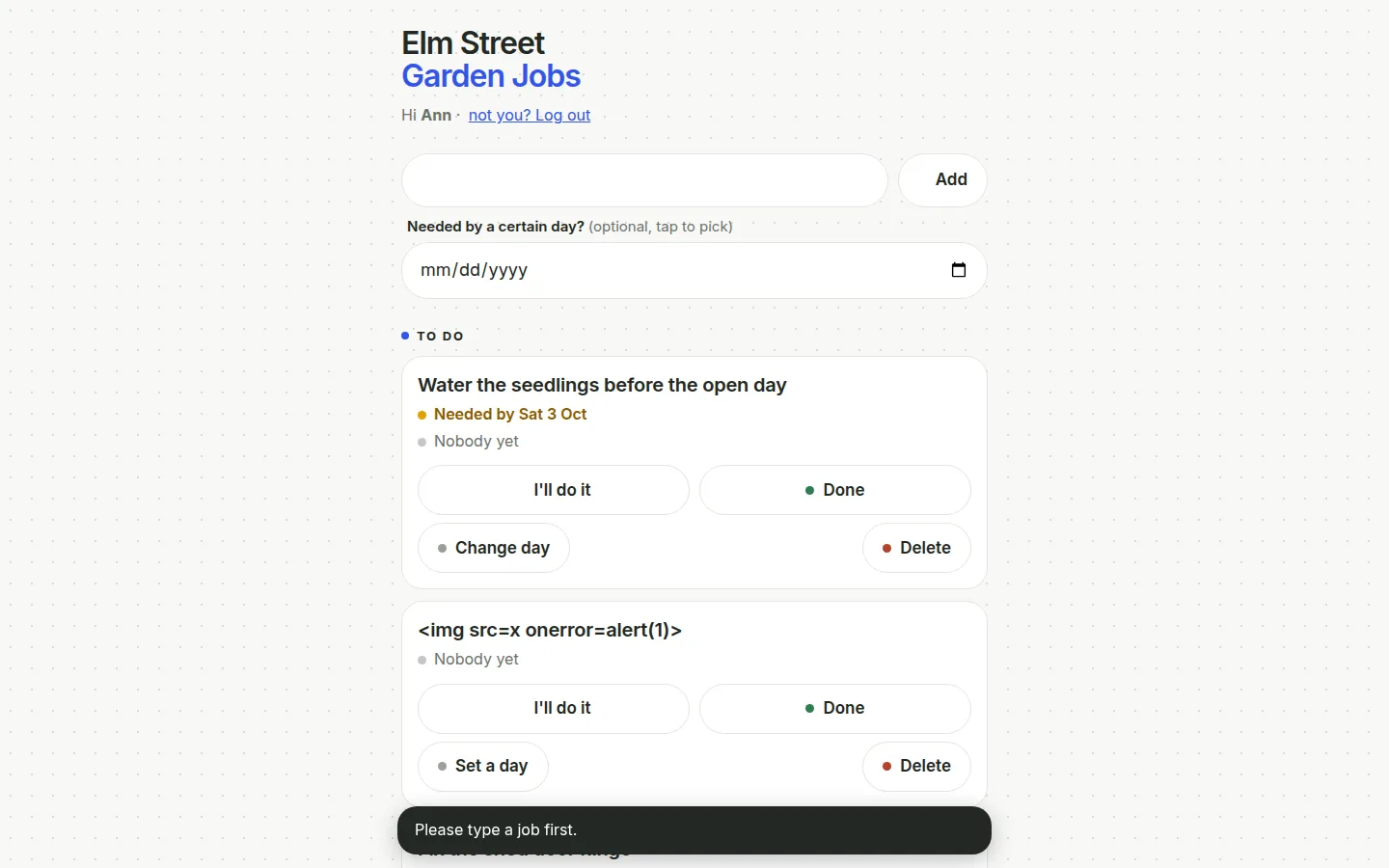
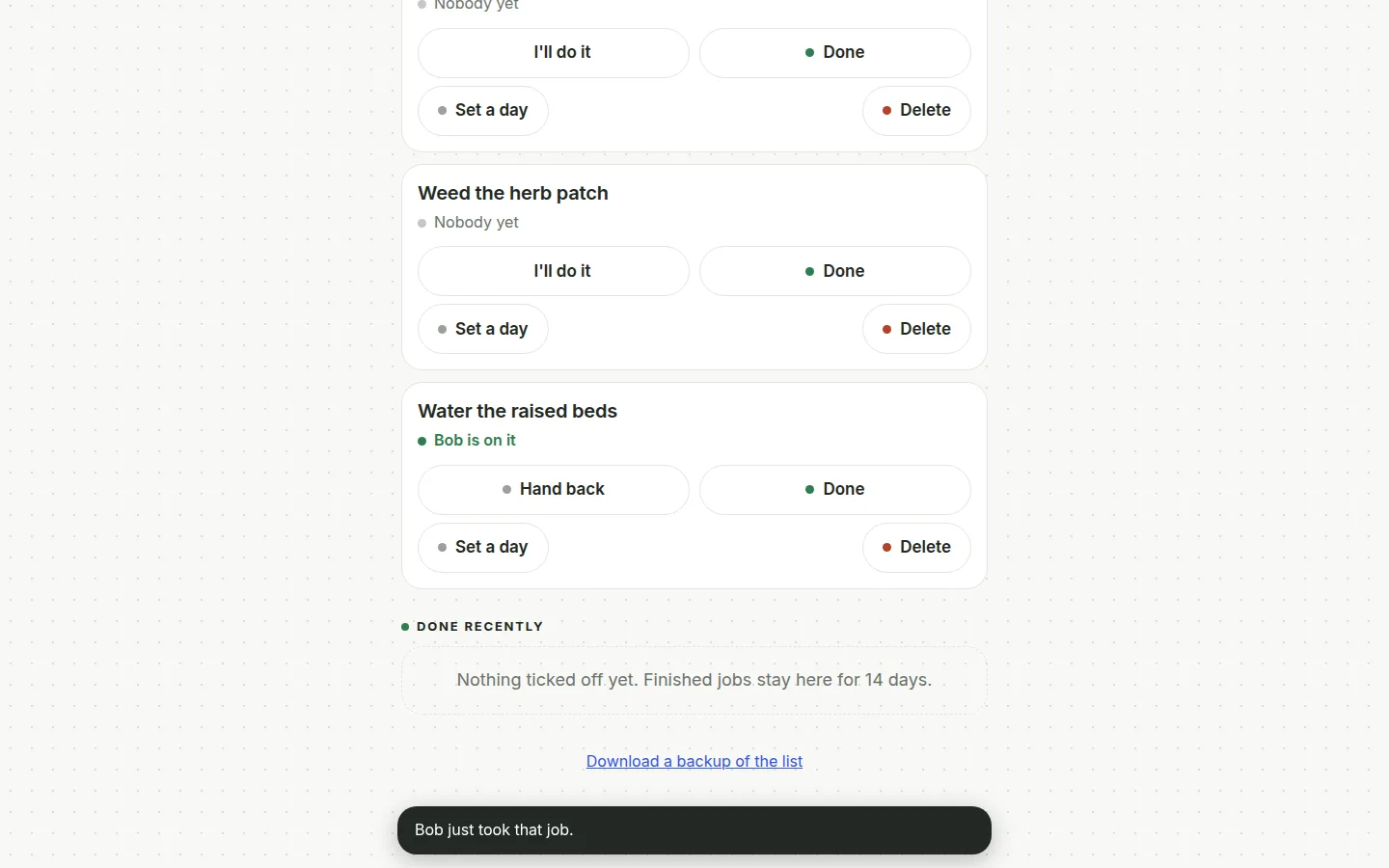
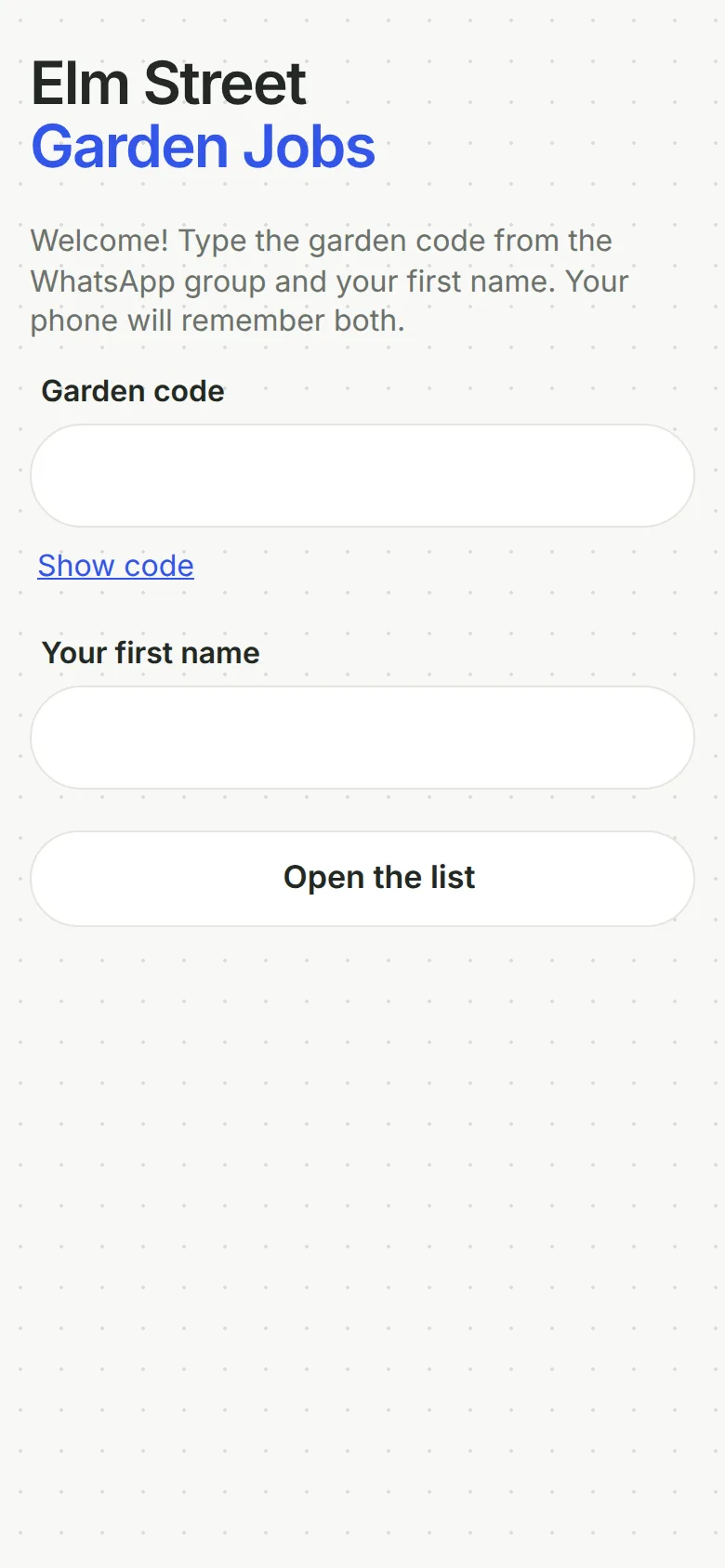
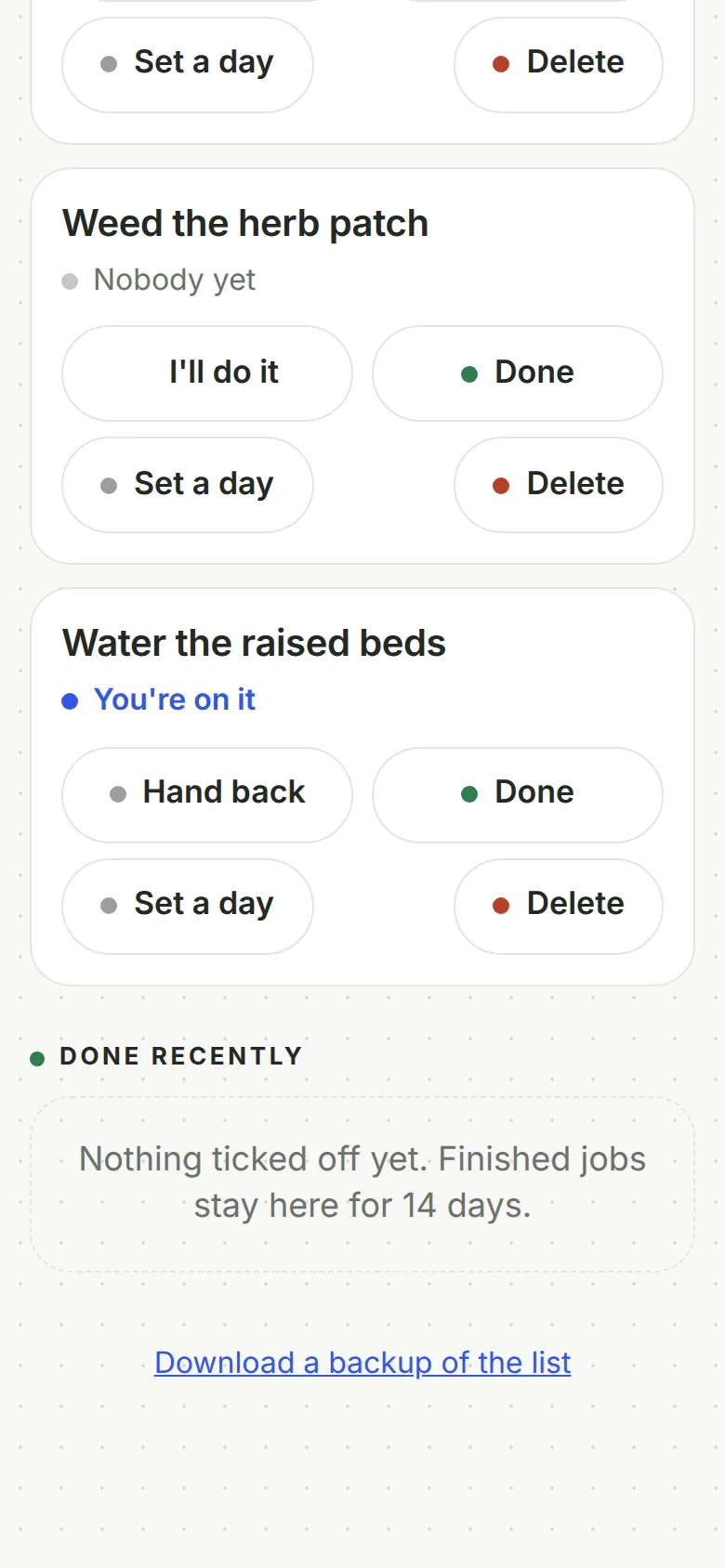
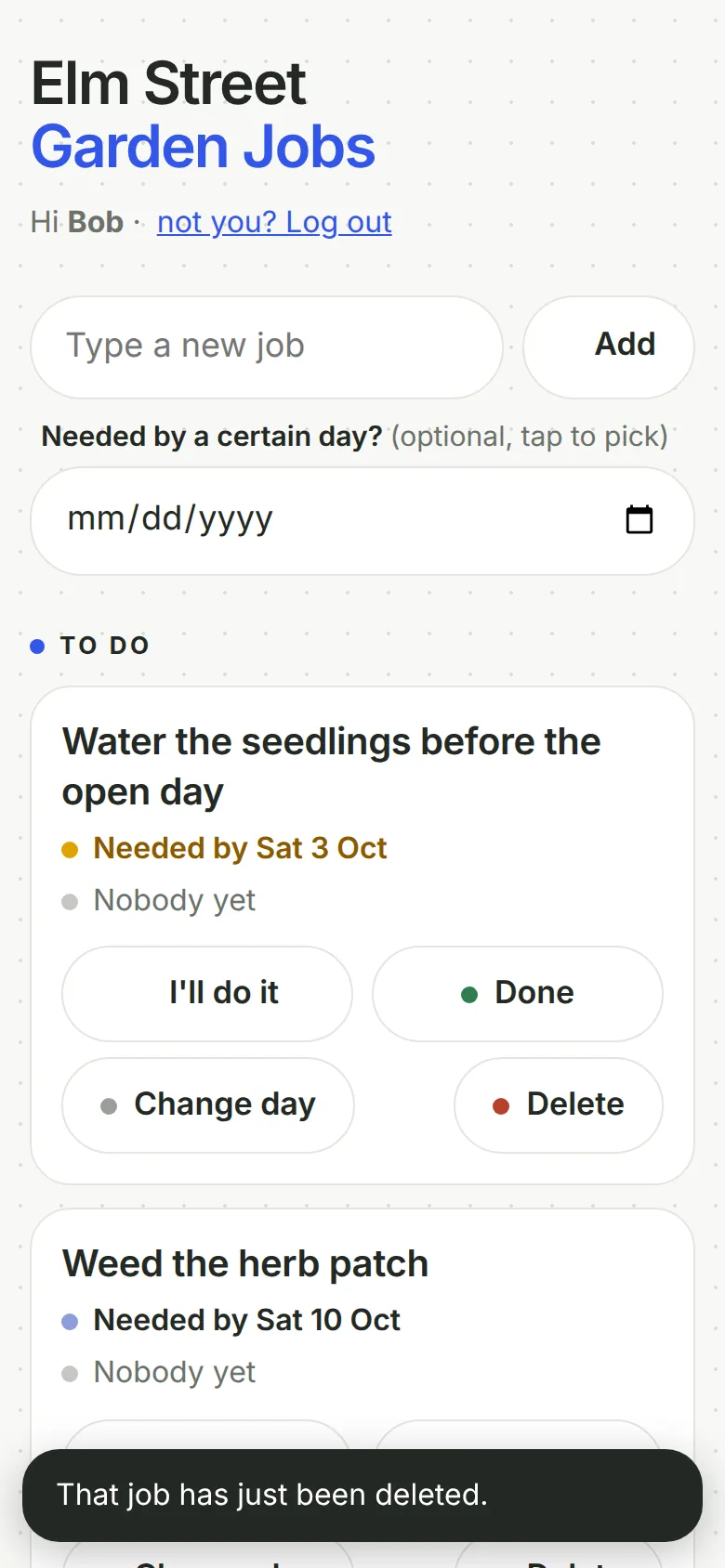
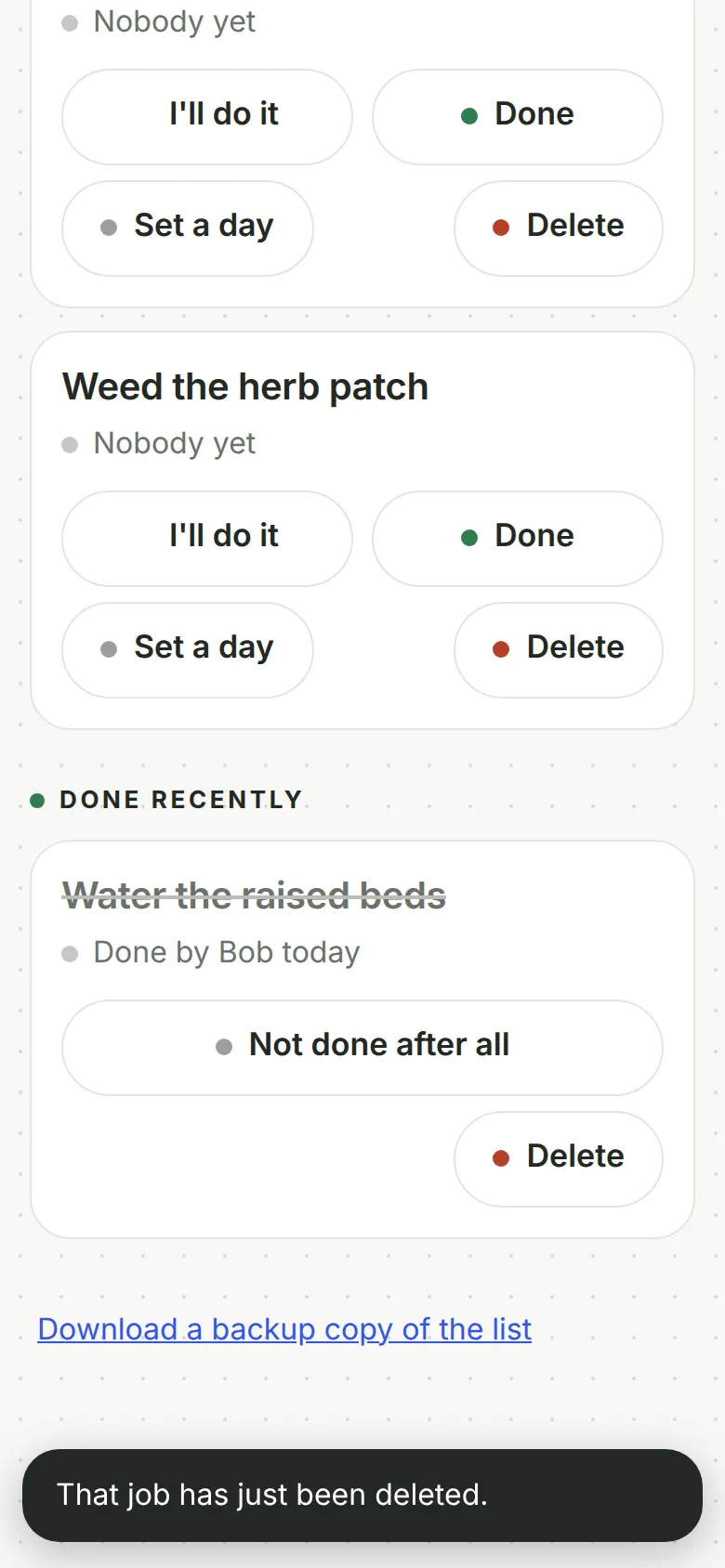
Screenshots of exactly what Claude produced, running on our machine on 1 October 2026. Nothing retouched.
We typed five plain-English prompts into one conversation with claude-sonnet-5-5 on 1 October 2026. One caveat: we ran them through Anthropic’s command-line tool with only its file tools switched on, so Claude could save files into an empty folder, much like file creation on claude.ai. We didn’t use the claude.ai website itself, so your screen will look different. Prompt 5 was asked again later for the GitHub route, carrying on from exactly where prompt 4 left off, so Claude saw the whole conversation. The replies are published as they came back and we edited nothing by hand. Claude spent 497.2 seconds writing them.
The first prompt described the garden and the WhatsApp problem, and asked for a plan and questions before anything was made. Claude planned a web page you add to your phone’s home screen, a list kept in a small Cloudflare database, and one shared garden code, checked by the server, to keep strangers out. It asked seven questions, and said putting it online would need “a few commands run on a computer”.
The second prompt said no commands, no installing. Claude saved worker.js, the whole app in one file (490 lines), and a set-up guide. There’s no database file to deal with: the app makes its own table the first time it runs.
Claude never ran its code, and said so each time. So prompt 3 asked it to try to break its own work, and it found real problems. Two people pressing “I’ll do it” together were both told they’d got the job. Ticking off a deleted job said OK. A retry after a bad signal could add the same job twice. It fixed those and more. Prompt 4 added an optional “by when” day, soonest first, without losing the jobs already on the list.
Prompt 5 asked how to get Cloudflare to put the app live by itself whenever the files on GitHub change. Claude made one extra file, wrangler.jsonc: a short settings file with the app’s name, which file to run and which database to connect, plus a placeholder for the database’s ID that you swap for the real one. It wrote GITHUB-SETUP.md with “You should see” after each step, and added a “Download a backup copy of the list” link to the app, because the dashboard has no simple backup button for it. It got the one thing Cloudflare warns about right: the name in the settings file must match the name you give the app in Cloudflare.
Then we tested it ourselves on a local copy, with Claude’s settings file (a made-up ID in place of the placeholder) and its worker.js unchanged. Nothing went on GitHub or Cloudflare. Cloudflare’s own checking tool read the settings file without complaint. The final build passed all 21 server checks and, on a fresh database, all 20 browser checks with Ann on a laptop and Bob on a phone (an earlier run failed one, which we put down to timing in our test). When 20 people pressed “I’ll do it” at the same instant, exactly one got the job. A list made with the first build survived the final file with every job intact.
Not hosted live: the shared job list is protected by one code and saves to a database, so a public copy would mean publishing the code and letting anyone add, change or delete jobs. The screenshots and the full transcript are the recorded output of our run.
GITHUB-SETUP.md
SETUP.md
worker.js
wrangler.jsonc
05 · What we tested
We tried to break it. 7 of 8 held.
Run on our own machine against the unedited files. Nothing deployed while testing.
| What we tried | What happened | Result |
|---|---|---|
| Claude's wrangler.jsonc, read by Cloudflare's own tool (a dry run, nothing uploaded) | Name elm-street-jobs, worker.js, the database bound as DB; 35.43 KiB. The dry run doesn't check the database ID, so the placeholder must be replaced before the first real build | Pass |
| Final files (after prompt 5), as a stranger with the link but not the code | Reading the list, adding a job and downloading the backup are all refused; the page itself holds no jobs and not the code | Pass |
| Final files: 20 people press I'll do it on the same job at the same instant | Exactly 1 got it; the other 19 were told "Volunteer2 just took that job." | Pass |
| Final files: two volunteers on two devices in headless Chrome (Ann on a laptop, Bob on a phone) | 20 of 20 on a fresh database: wrong code refused, same list on both, Ann told "Bob just took that job.", Done on a deleted job says "That job has just been deleted.", backup file downloads, HTML typed into a title shows as plain text, no sideways scrolling, no errors. An earlier run failed one check (setting a day on an old job), which we put down to timing in our test | Pass |
| Final files: every other check on the server | 21 of 21 passed: a retry after a bad signal adds the job once, blank, 500-character and invisible titles refused, 30 February refused, a title starting with = is made harmless in the backup spreadsheet | Pass |
| Uploading the final worker.js over a list made by the first build (same database) | 12 of 12: all 3 jobs kept, Bob's claim and the ticked-off job kept, old jobs get an empty day, a new job with a day goes to the top | Pass |
| 30 wrong guesses at once, final files | 22 got an ordinary "wrong code" answer and 8 were blocked: the limit is 20, but guesses sent at the same instant slip a couple past it. Then even the right code from that connection was blocked for 15 minutes | Pass |
| First build (after prompt 2), same server checks | 12 of the 18 that apply passed. All 20 people were told they had the job, a retry added a job twice, a 500-character title was cut and saved, invisible titles were accepted, and ticking or claiming a deleted job said OK. Prompt 3 fixed all of these | Fail |
06 · Ship it
Put it live from GitHub, no terminal.
Your files go into your GitHub repository and Cloudflare publishes them by itself. The steps start from Claude's own answer and are checked by us against GitHub's and Cloudflare's documentation, which the sources below link to.
These clicks follow GitHub’s and Cloudflare’s documentation, so the button names are theirs. Claude’s order is right: the database comes first, because the settings file needs its ID before Cloudflare’s first build. We haven’t hosted this demo publicly, because it would mean publishing the code and letting anyone change the jobs; the screenshots are from our own machine.
- Pick a garden code of at least 10 characters, such as three random words. The app refuses anything shorter. Never put it in a file.
- In the Cloudflare dashboard, go to the D1 SQL database page, select Create Database, name it elm-street-jobs-db and select Create. Copy the database’s ID from its page in the dashboard. There are no tables to make.
- Download Claude’s worker.js and wrangler.jsonc. On GitHub, open your elm-street-jobs repository and select Add file, then Upload files. Drag in those two files (the files, not the folder they’re in) and select Commit changes. The other two files Claude made, GITHUB-SETUP.md and SETUP.md, are notes for you; the old SETUP.md describes the paste-it-in route and can be ignored.
- On GitHub, open wrangler.jsonc and select the pencil icon at the top right. Replace PASTE-YOUR-DATABASE-ID-HERE with your ID, keeping the quote marks, and commit. Do this before the next step, or the first build fails.
- In Cloudflare, go to Workers & Pages, select Create application, then Get started next to “Import a repository”. Choose your GitHub account (sign in and allow Cloudflare access the first time), pick elm-street-jobs, and keep the name exactly elm-street-jobs, as in the settings file. Leave the build settings as they are and select Save and Deploy. You should see a build finish and an address ending in workers.dev.
- Open the app in Cloudflare, then Settings, then Variables and Secrets, and select Add. Choose Secret, name it GARDEN_CODE (exactly), type your code as the value and select Deploy. A secret stays put when the app is rebuilt later.
- Open the workers.dev address on your phone. You should see the sign-in screen. Add a test job, take it, tick it off, then share the address and the code with the group.
- To put a change live, such as the “by when” day, ask Claude in the same chat and download the files it changed. On GitHub, select Add file, then Upload files, drag them in and select Commit changes. Files with the same name are replaced; the rest stay. Cloudflare rebuilds by itself within a minute or two, and the jobs stay in the database. Download a backup from the app first.
If the code leaks, edit GARDEN_CODE under Variables and Secrets and deploy; no files change. If an update goes wrong, open the app, then Deployments, select the three dots next to the previous version and choose Rollback; GitHub still holds the broken file, so put a working worker.js back there too. For your own domain, the domain has to be on Cloudflare first; then it’s Settings, Domains & Routes, Add, Custom Domain.
On Claude Pro, you can skip the downloading and uploading. Ask Claude Code on the web for the change and it saves it to a branch of your repository; you merge it on GitHub and Cloudflare puts it live. The set-up page shows how.
No GitHub? You can paste worker.js straight into Cloudflare’s online code editor instead, and add the database and the code by clicking, but every change means pasting it in again.
Free plan: Claude makes the files, you upload them
FreeTo change something: ask Claude, download the files it changed, and upload just those the same way. Files with the same name are replaced; the rest stay as they are.
£0: Claude Free, GitHub Free and Cloudflare's free plan.
Pro: you chat, Claude saves the change, Cloudflare publishes it
Claude Pro, $20 a monthClaude edits the files and saves them to GitHub on a separate branch, a draft copy. Cloudflare gives that branch its own preview address, so you can look before anything changes. Happy with it? Select Create PR, then on GitHub select Merge pull request, then Confirm merge. Cloudflare puts it live by itself.
07 · What it costs
What it costs.
£0 a month on Cloudflare's free plan at this size. No domain needed; your own is optional.
£0 a month at this size. On Cloudflare’s free plan as of October 2026, Workers get 100,000 requests a day with 10 ms of CPU each. D1, the database, allows 5 million rows read and 100,000 rows written a day, 5 GB in total, 500 MB per database and 10 databases. Fifteen volunteers ticking off jobs won’t come near that.
GitHub’s Free plan holds the files, and Claude’s Free plan covered everything here. You don’t need a domain; the workers.dev address works without one.
08 · What it got wrong
7 things Claude got wrong, or left to you.
If Claude gets something wrong, we say so here. We never fix its files by hand; a fix is a follow-up prompt you can see above.
It never ran its own code
Claude said so every time. All the testing on this page is ours, on a local copy on our own machine; we did not put it on GitHub or Cloudflare or try it on a real phone.
Its first plan needed commands
In prompt 1 Claude said putting it online needs a few commands typed on a computer. When we asked for no commands, it put the whole app in one file.
It left an out-of-date guide in the folder
Claude wrote GITHUB-SETUP.md for the GitHub route but left the older SETUP.md, which says to paste the app into Cloudflare's code editor, unchanged and called it a note for you. Follow GITHUB-SETUP.md (or the steps below) and ignore SETUP.md.
Button names that don't quite match Cloudflare's
Claude said to go to "Storage & databases" for the database; Cloudflare's guide calls it the D1 SQL database page. It said to choose Import a repository and select Next; Cloudflare's guide says Get started next to Import a repository, then set it up and select Save and Deploy. Claude warned names might differ, and the steps below use Cloudflare's.
A guesser can lock out the whole wifi
After 20 wrong codes from one connection, the right code from that connection is refused too, for 15 minutes. Volunteers on the same wifi as a guesser are locked out for a while.
Names are on trust
Anyone with the garden code can type any first name. Claude said so in its plan and in prompt 3.
Backups are by hand, and only a record
The backup link saves a spreadsheet; there's no button to put a list back from it. Claude said so.
Ours, disclosed
Built it? Where we can help next.
Ours: made by the same studio that runs this site. None of them changes anything above.
Ours
Adapt Progress Evolve
We build apps like this properly, if you'd rather not do it yourself.
Questions
Questions people ask.
Can Claude build me an app that saves data?
A small web app, yes. Five prompts in one Claude conversation made a shared job list that saves to a Cloudflare database, and it passed all our checks on a local copy. Claude never ran it itself, so try it before you rely on it.
Do I need to use a terminal or install anything?
No. You make the database and add the garden code by clicking in Cloudflare, and upload two files on the GitHub website. Cloudflare does the rest.
Can Claude put the app online for me?
Not from a chat on the Free plan, as of October 2026: Claude's GitHub connection there only reads your files. But once the repository is connected to Cloudflare, uploading the files to GitHub is putting the app live. On Claude Pro, Claude Code on the web can save a change to a branch of your repository for you; you merge it on GitHub and Cloudflare puts it live.
Do people need to sign up?
No. Everyone types one shared garden code and their first name once, and their phone remembers both. The trade-off is that anyone with the code can type any name.
Will an update lose our jobs?
Not in our test. The jobs live in the database, not in the files on GitHub. We made a list with the first version, put the final one over it, and every job was still there.
Is the garden code on GitHub?
No, and it mustn't be. It goes into Cloudflare as a secret, which stays put when the app is rebuilt. The settings file on GitHub holds only the app's name and the database's ID.
Sources for this page
16- Claude help: create and edit files with Claude (all plans; Settings > Capabilities)
- Claude docs: GitHub integration (every plan, reads files only)
- GitHub Docs: adding a file to a repository (Add file > Upload files; 100 files at once, 25 MiB each)
- GitHub Docs: editing files (the pencil icon)
- Cloudflare Workers Builds: Create application > Import a repository; the Worker name must match the settings file
- Cloudflare Workers Builds configuration (default deploy command; the auto-created API token's permissions)
- Cloudflare Wrangler configuration: automatic provisioning of D1 databases, including deploys from GitHub
- Cloudflare D1 get started, dashboard steps (D1 SQL database page > Create Database)
- Cloudflare D1 and Prisma tutorial (a database's ID can be found in the dashboard)
- Cloudflare Workers secrets: add a secret in the dashboard (Settings > Variables and Secrets)
- Cloudflare Workers rollbacks (dashboard: Deployments > Rollback)
- Cloudflare Workers custom domains (Settings > Domains & Routes; needs an active Cloudflare zone)
- Claude Code on the web: get started (Pro, Max and Team plans)
- Cloudflare Workers pricing (free: 100,000 requests a day, 10 ms CPU each)
- Cloudflare D1 pricing (free: 5 million rows read, 100,000 written a day, 5 GB)
- Cloudflare D1 limits (free: 10 databases, 500 MB each)
For developers
For developers.
Skip this if you've never used a terminal. You don't need it.
The command-line route
With the repository connected through Workers Builds, every push to main runs npx wrangler deploy (the default deploy command) and pushes to other branches can build previews:
git clone https://github.com/<you>/elm-street-jobs.gitcp worker.js wrangler.jsonc elm-street-jobs/cd elm-street-jobsgit add worker.js wrangler.jsoncgit commit -m "Add the app"git push origin mainClaude’s wrangler.jsonc names an existing D1 database by ID. Cloudflare also documents automatic provisioning: leave database_id out ("d1_databases": [{ "binding": "DB" }]) and the database is created on deploy, including deploys from GitHub. Workers Builds’ auto-generated API token lists Workers Scripts, KV and R2 edit permissions, not D1, so we haven’t confirmed that works from a Builds deploy; making the database first, as Claude did, avoids the question.
We tested with Claude’s own wrangler.jsonc: wrangler deploy --dry-run put it at 35.43 KiB (10.92 KiB gzipped) with env.DB bound, and wrangler dev with a local D1 and GARDEN_CODE in .dev.vars ran our server, browser and upgrade tests. Without GitHub, the first, command-line version of this page (claude-sonnet-5-5, 1 October 2026) deployed with Wrangler directly; its commands, condensed:
npx wrangler loginnpx wrangler d1 create elm-street-garden --location=weurnpx wrangler d1 execute elm-street-garden --remote --file=schema.sqlnpx wrangler deploynpx wrangler secret put GARDEN_PASSCODEnpx wrangler d1 export elm-street-garden --remote --table=jobs --output=backup.sqlThis version’s worker.js needs no schema file (it creates its tables) and reads env.DB and env.GARDEN_CODE. Our test scripts are in demos/build-me-an-app/tests/.