Real buildClaude's output, unedited
Open the live demo (Claude's unedited files, a made-up example)
I want AI to build me a wedding website
Five plain-English prompts made a one-file wedding website: date, map link, timetable, a reply button that writes an email, gifts and where to stay. Upload it to GitHub and Cloudflare hosts it free.
- Prompts
- 5
- Claude's time
- 3 min 53 s
- Got wrong
- 5 things
- Tests passed
- 3 of 5
- Model
- claude-sonnet-5-5
- Run on
- 9 October 2026
For: A couple getting married who want one place for guests to find the date, the venue, the timetable and how to reply, who have never built a website, have never opened a terminal, and don't want to run a database or make guests sign up.
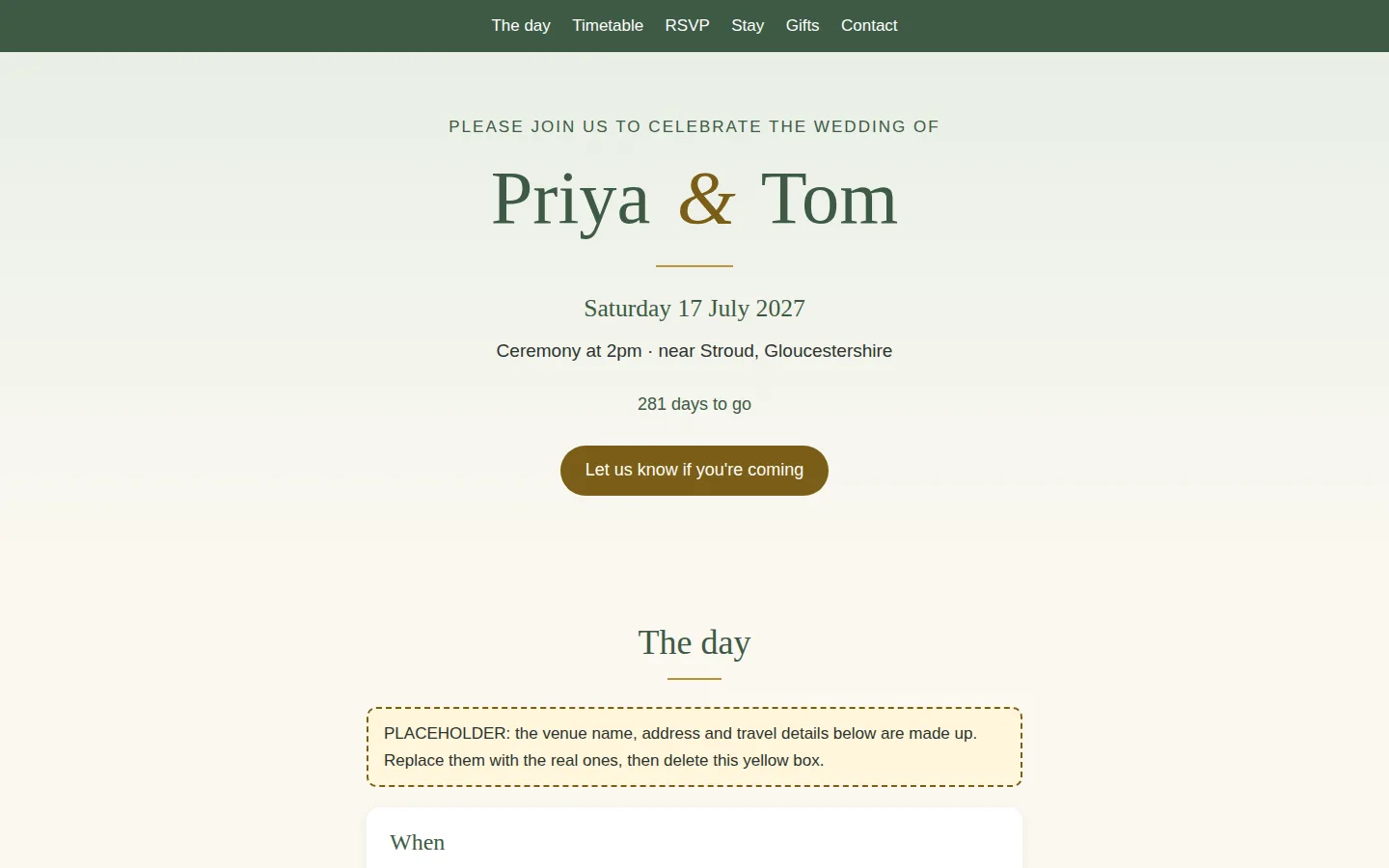
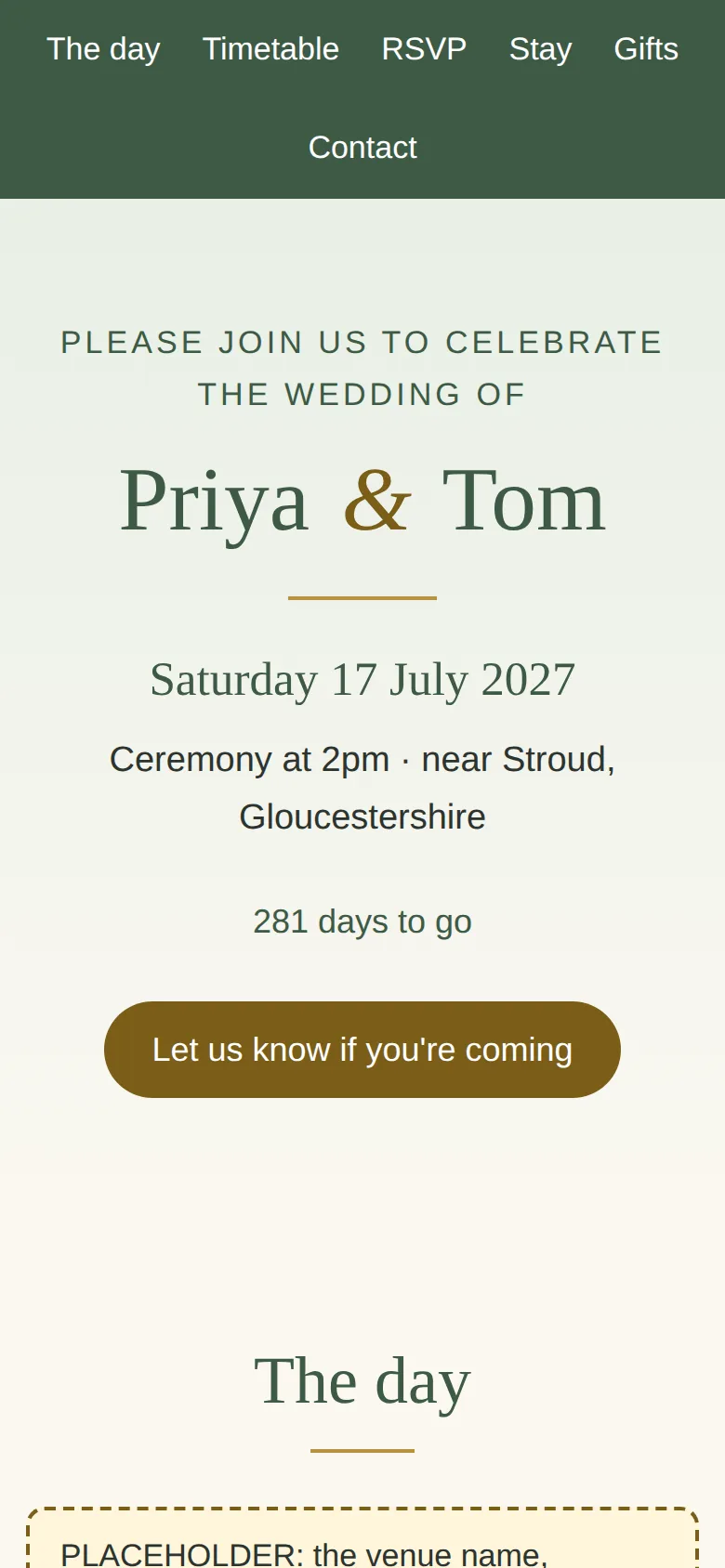
What the five prompts made The top of the page
01 · Before you start
Before you start.
You need three free accounts and nothing else. A Claude account with “Code execution and file creation” switched on (Settings, then Capabilities; it’s on the Free plan), so Claude can hand you a file to download. A GitHub account with an empty repository, where the file will live. And a Cloudflare account connected to that repository, which puts it on the internet. The set-up page walks through all three, once.
Nothing to install, and no terminal. Everything below happens in a chat and a web browser.
Our example is a made-up couple, Priya and Tom, marrying on Saturday 17 July 2027 at a village hall near Stroud. They want one page their guests can open from a message: when, where, how to get there, what happens on the day, and how to reply, with no database and no accounts. The hall, the travel details and the places to stay are made up too. Swap in your own.
02 · Set up once
Set up once, then just talk to Claude.
Free accounts you make one time and reuse for every build. Each links to the step-by-step on the set-up page, with what each screen looks like.
- 1. Get a free Claude account. It's where you describe what you want and Claude makes it. The Free plan covers every guide on this site; for websites, Pro adds the shortcut where Claude saves changes to GitHub itself.
- 2. Let Claude hand you files. Everything on this site is a handful of files: a website, an app, an extension. With this switched on, Claude can make them and give them to you to download.
- 3. Get a free GitHub account and an empty repository. A repository is a folder on GitHub that keeps every version of your files. It's the one place your site lives: you (or Claude) change the files there, and Cloudflare publishes whatever is in it.
- 4. Get a free Cloudflare account and connect it to your repository. Cloudflare is where your site is live on the internet. Once it is connected to your repository, every change to the files on GitHub goes live by itself, in a minute or two. A site made of plain files costs nothing to host: Cloudflare says requests to static files are "free and unlimited".
- 5. Connect Claude to GitHub. So Claude can read the files that are live now before it changes them, even in a brand new chat. On Pro, the same connection is what lets Claude Code on the web save its changes to your repository.
03 · The prompts
Paste these five, in order.
Plain English, typed into an ordinary Claude chat. On the left, exactly what we sent, word for word; change the details to yours. On the right, what came back. One conversation with claude-sonnet-5-5, run on 9 October 2026. Read the full transcript.
Prompt 1 of 5
Describe your wedding website, and ask Claude to ask questions first.
You say: My partner and I are getting married next summer and we'd like a small website for our guests, so everyone can find the date, where it is, how to get there and what's happening on the day. I've never made a website and I'm not technical. What we'd like: - the date, the time and the venue, with a map link and how to get there by train and by car - a timetable for the day - a place for guests to tell us if they're coming and if they have any food needs, but we don't want to run a database or have guests make accounts - a page for gift ideas, a bit of information about where to stay, and a short contact section for questions - it should look lovely on a phone, because most of our guests will open the link from a message We want it to be free to run. Before you make anything, ask me anything you need to know, and tell me in plain English what you're going to make.
1,232 output tokens back · read the full reply
Prompt 2 of 5
Answer its questions and ask it to make the site.
You say: Thanks, that sounds right. Here are our answers. Please make up anything I haven't told you and I'll swap in the real details later. - We're Priya and Tom, getting married on Saturday 17 July 2027, at a village hall with a garden near Stroud in Gloucestershire. Please invent a believable venue name and address for now. - Ceremony at 2pm, drinks in the garden, a meal at 5pm, speeches, then dancing from 8pm, finishing at midnight. - For replies, guests should be able to tap a button that opens an email to us with the details filled in. Use the address priya.and.tom@example.com for now. - A relaxed, warm look with soft greens and a little gold. Nothing too fussy, and easy to read for older relatives. - Yes to an accommodation section with three made-up places at different prices, and a short gift section saying we'd love contributions to our honeymoon fund rather than presents. Please make it now. Keep it as simple as possible: something I can open by double-clicking and later put online, nothing I have to install.
8,168 output tokens back · read the full reply
Prompt 3 of 5
Ask it to check the site like a guest on a small phone, and like your grandmother.
You say: I opened it by double-clicking and had a look around. Before I send the link to our guests, please check it carefully, as if you were one of our guests on a small phone, and as if you were trying to find mistakes: every link and button should do what it says, the email button should fill in the details properly, the page should be easy to read for my grandmother, and nothing should be too small, too faint or spill off the side of the screen. Also look for anything that would trouble someone who uses a screen reader or only a keyboard. Tell me in plain English what you found, then fix it in the file.
17,498 output tokens back · read the full reply
Prompt 4 of 5
Change something, the way you will once it is live.
You say: Thank you, it's working well. We've just heard the venue can't start the meal until 5.30pm, so everything after the drinks moves back half an hour, and dancing will now be 8.30pm until midnight. Please change the timetable. We'd also like to add a short "Children" section saying that children are very welcome until the evening party, and a "Dress code" section saying smart but comfortable, with the garden in mind. Then tell me which files you changed, so I know what to put online again.
2,628 output tokens back · read the full reply
Prompt 5 of 5
Ask how to put it live from GitHub, and who can see the replies.
You say: Now I'd like to put it online so I can send the link to our guests. I've made free GitHub and Cloudflare accounts. On GitHub I made a new repository called priya-and-tom (I switched on "Add README"), and in Cloudflare I went to Workers & Pages, Create application, Pages, Connect to Git, and picked that repository, so it should go live by itself whenever the files on GitHub change. I don't want to use the terminal or install anything. Please tell me, step by step, how to get the website into my repository using the GitHub website, what I should see at each step, how I find the address where it's live, and how I put a change live later (like moving the timetable). Also tell me whether guests' replies will be visible to anyone but us.
2,927 output tokens back · read the full reply
After prompt 1 of 5
Reply to prompt 1 · 11.3 s · 1,232 output tokens
Describe your wedding website, and ask Claude to ask questions first.
A plan and 16 questions, and nothing made yet. Ours promised a one-page site that works on a phone, with a reply form, and suggested free hosting and a free form service for the replies.
Reply to prompt 5 · 27.2 s · 2,927 output tokens
Ask how to put it live from GitHub, and who can see the replies.
Click-by-click steps and no new files. Ours: Add file, Upload files, Commit changes; Success under Deployments; the pages.dev address; the pencil icon to change words later. It also warned that the page and your email address are visible to anyone with the link.
04 · The result
The real thing, on the stage.
Screenshots of exactly what Claude produced, running on our machine on 9 October 2026. Nothing retouched.
We typed five plain-English prompts into one conversation with claude-sonnet-5-5 on 9 October 2026. We ran them through Anthropic’s command-line tool with only its file tools switched on, much like file creation on claude.ai, so your screen will look different. The replies are published as they came back and we edited nothing by hand. Claude spent 233.0 seconds writing them, a little under four minutes.
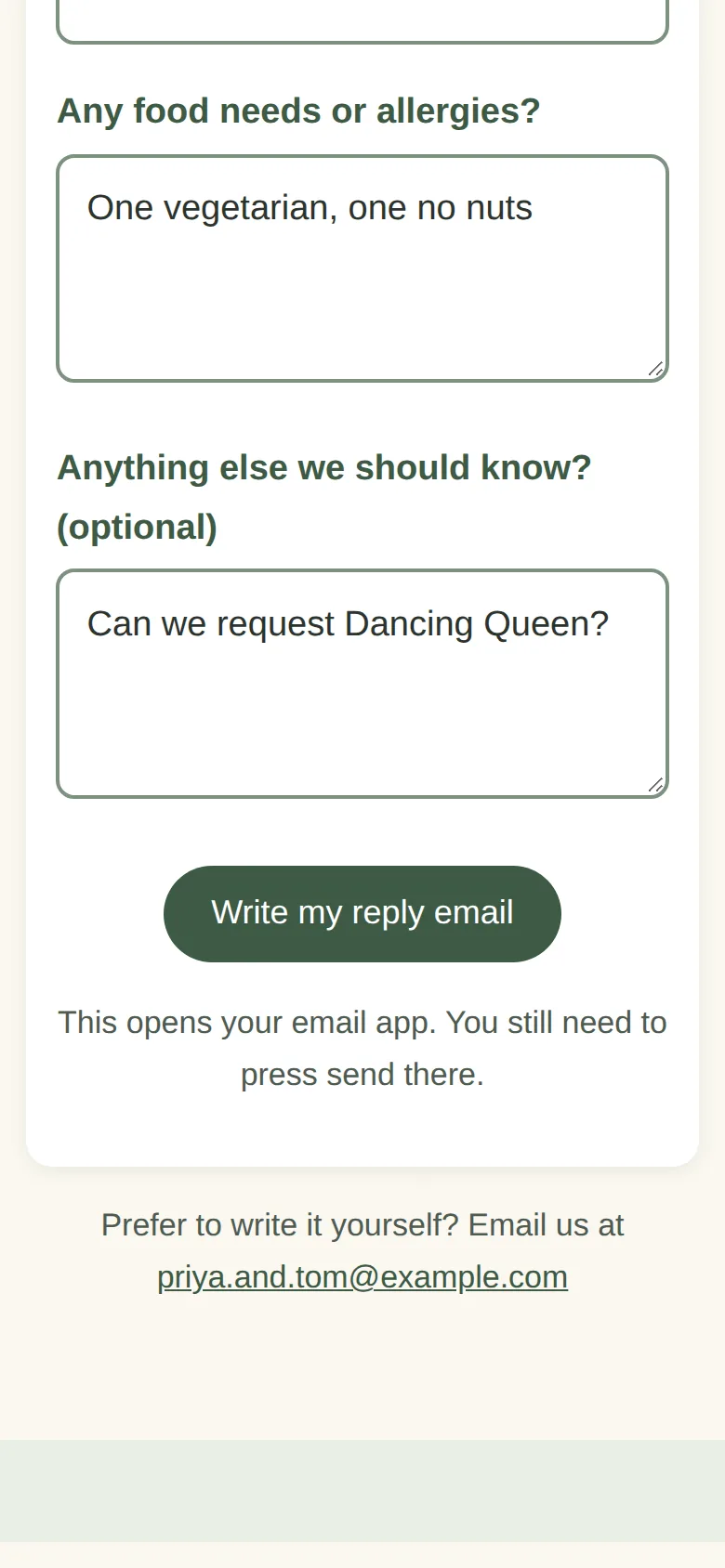
The first prompt made nothing. We described the site and asked Claude to ask questions first, and it answered with a plan and 16 questions. In prompt 2 we answered: names, the date, a timetable, a warm green and gold look that older relatives can read, and a button that opens an email. We told it to make up anything we hadn’t said. Claude saved one file, index.html. Everything it invented was marked with a yellow PLACEHOLDER tag, and it listed them: the venue, the travel details, some timetable times, the hotels and the example email address.
Prompt 3 asked Claude to check the site as a guest on a small phone, and as a grandmother, hunting for mistakes. It said it could only read the code, not open a browser. It fixed about a dozen things: menu links that slid off small phones, pale gold text, small text, faint form outlines, a cramped timetable, “Number of guests: 1” showing for guests who can’t come, and nothing happening for a guest with no email app. It added a skip link and screen reader labels.
We tested it too, in a browser at laptop and phone size with real clicks, taps and typing. The first build passed 42 of 50 checks. The gold “&” between the names was too pale to read comfortably, the first Tab press went to a menu link rather than a skip link, and there was no fallback for a guest with no email app. After prompt 3, 50 of 50 passed.
Plenty worked from the start: no errors, nothing loaded from other websites, no sideways scrolling, buttons big enough for a thumb, links that go to real sections, and a countdown that was right on the day we ran it. An empty reply form opened no email. A filled-in one opened an email to the made-up address with the name, two guests, the food needs and the message in place, and a guest who couldn’t come no longer said “Number of guests: 1”.
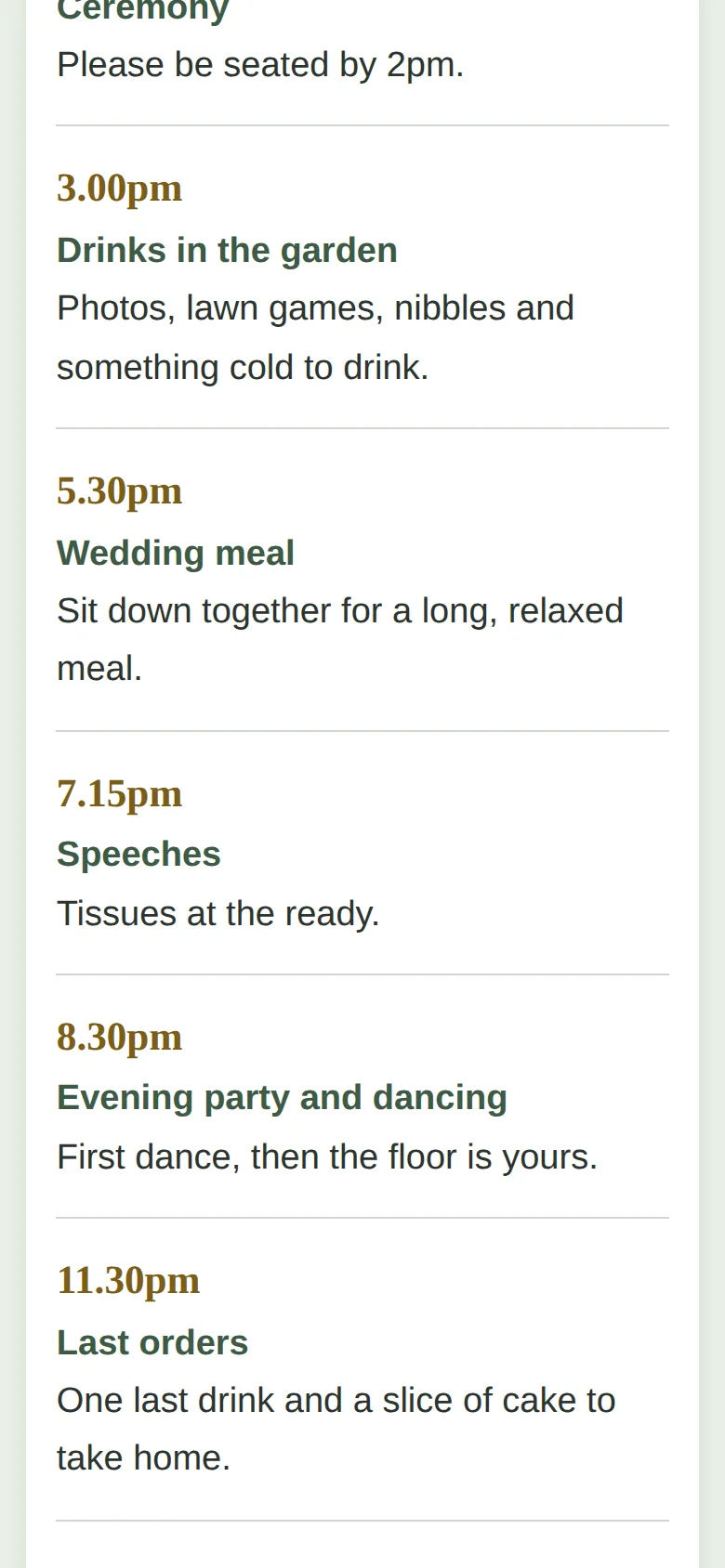
Prompt 4 was a change of plan: the meal couldn’t start until 5.30pm, so everything after the drinks moved back half an hour. We also asked for a Children section and a Dress code section. Claude moved the meal to 5.30pm, speeches to 7.15pm and dancing to 8.30pm, left the 11.30pm last orders and the midnight finish alone, and added both sections. It said only index.html had changed. That final file passed 64 of 64.
What we couldn’t test: a real email app opening on a real phone, a real phone at all, and a screen reader. We checked that the page asked for the email with the right words in it, and that is as far as we got.
demo.iwantaito.com/make-me-a-wedding-website/: Claude's unedited files, a made-up example.
index.html
05 · What we tested
We tried to break it. 3 of 5 held.
Run on our own machine against the unedited files. Nothing deployed while testing.
| What we tried | What happened | Result |
|---|---|---|
| Final file (prompt 4), opened by double-click, used with real clicks, taps and typing at laptop (1440x900) and phone (390x844) size in headless Chrome | 64 of 64 checks passed: no errors, nothing loaded from other websites, no sideways scrolling, text contrast and size fine, every button at least 44 pixels on a phone, every in-page link goes to a real section, the first Tab press offers a skip link | Pass |
| The reply form | An empty form opened no email. A filled-in one opened an email to the made-up address with the name, 2 guests, the food needs and the message filled in. A reply saying "can't make it" no longer said "Number of guests: 1", and 0 guests was refused. We checked the email the page asked for; we could not open a real email app | Pass |
| The timetable change (prompt 4) | The page shows 5.30pm, 7.15pm and 8.30pm and no longer shows 5.00, 6.45 or 8.00. The Children and Dress code sections are on the page | Pass |
| First build (prompt 2), same checks | 42 of 50. The gold "&" between the names was 2.77:1 against its background (we look for 4.5:1), the first Tab press went to a menu link rather than a skip link, and nothing was shown for a guest with no email app. Prompt 3 fixed all three | Fail |
| On a real phone, with a real email app and a screen reader | Not tested. Our browser has no email app, and we did not use a screen reader or a real phone | Fail |
06 · Ship it
Put it live from GitHub, no terminal.
Your files go into your GitHub repository and Cloudflare publishes them by itself. The steps start from Claude's own answer and are checked by us against GitHub's and Cloudflare's documentation, which the sources below link to.
These clicks follow GitHub’s and Cloudflare’s documentation and Claude’s answer to prompt 5. Claude’s unedited file is live at demo.iwantaito.com/make-me-a-wedding-website/ (we host it ourselves, with a thin bar on top saying it’s a made-up example).
- Download the file Claude made, index.html. Keep the name exactly as it is, and don’t put it inside a folder.
- On GitHub, open your repository and select Add file, then Upload files. Drag index.html in, or select “choose your files”. You should see the file name listed. Select Commit changes. The repository now lists README.md and index.html.
- If you left Cloudflare’s setup screen open, check the production branch is main, the framework preset is None and the build command is blank, then select Save and Deploy. If you’d already finished it, your upload starts a new deployment by itself. A first deployment can fail if it ran before the file existed; uploading the file starts another.
- In Cloudflare, open Workers & Pages, then your project. Under Deployments, wait for the newest one to say Success. The address ends .pages.dev, such as priya-and-tom.pages.dev. Open it on your own phone before you tell anyone.
- Search the file for the PLACEHOLDER tags before you send the link. In ours there were five yellow boxes, and every one shows to guests until you delete it. Change the made-up venue, the map link, the hotels and the email address to the real ones.
- To change something later, open index.html on GitHub, select the pencil icon, edit the words only, and select Commit changes. Claude’s tip: leave the angle brackets and everything around them alone. Cloudflare publishes it by itself within a minute or two; if you still see the old page, try a private tab.
On who can see what: a reply is an ordinary email from the guest to you, and the site stores and passes on nothing. But anyone with the link can read the whole page, including your email address, and a public GitHub repository can be read by anyone. Claude told us to use a dedicated wedding email address, not to put bank details on the page, and said that asking search engines not to list it is a request, not a lock.
Free plan: Claude makes the files, you upload them
FreeTo change something: ask Claude, download the files it changed, and upload just those the same way. Files with the same name are replaced; the rest stay as they are.
£0: Claude Free, GitHub Free and Cloudflare's free plan.
Pro: you chat, Claude saves the change, Cloudflare publishes it
Claude Pro, $20 a monthClaude edits the files and saves them to GitHub on a separate branch, a draft copy. Cloudflare gives that branch its own preview address, so you can look before anything changes. Happy with it? Select Create PR, then on GitHub select Merge pull request, then Confirm merge. Cloudflare puts it live by itself.
07 · What it costs
What it costs.
£0 a month on Claude's Free plan, GitHub Free and Cloudflare's free plan. No account for your guests, and no domain needed.
£0. Claude’s Free plan covered all five prompts, GitHub’s Free plan holds the file, and Cloudflare says “Requests to static assets are free and unlimited”. The whole site is one file of 19,363 bytes, and you don’t need a domain.
The catches aren’t about money. The reply button depends on your guests having an email app, or on them copying the text from the page. The page is visible to anyone who gets the link. And the made-up details stay in the file until you replace them.
If you’d like guests to reply without email, the next step up is a shared app that saves to a database. We built a database-backed app with five plain-English prompts: a shared job list for a community garden. You upload two files to GitHub, Cloudflare puts it live, and it’s free, with no terminal.
08 · What it got wrong
5 things Claude got wrong, or left to you.
If Claude gets something wrong, we say so here. We never fix its files by hand; a fix is a follow-up prompt you can see above.
Pale gold text in the first build
The gold "&" between the names, and other gold text, was too pale to read comfortably. Claude did not name it until we asked it to check, and the fixed file no longer has it.
Output folder
Claude said to leave the build output folder "empty (or /)". Cloudflare's documentation says the build command and output directory depend on what you are deploying; for one plain file we would leave the build command blank and try the default folder first.
Invented details stay in the file
The venue, travel details, hotels and the example email address are made up, and stay in the page under yellow PLACEHOLDER tags until you delete them. There were five boxes in the final file. A guest would see all of them if you forgot.
The email needs an email app
The reply button opens the guest's own email app; the guest still has to press send. For guests with no email app set up, the fixed page shows the reply text to copy. We could not test a real email app.
A private repository
Claude said a private GitHub repository can still be published by Cloudflare. We didn't test that.
Ours, disclosed
Built it? Where we can help next.
Ours: made by the same studio that runs this site. None of them changes anything above.
Ours
How to get AI to
Its 'write a speech' guide helps you get AI to draft the toast or speech you'll read out on the day.
Ours
Adapt Progress Evolve
We build these properly, if you'd rather not do it yourself.
Questions
Questions people ask.
Can AI build me a wedding website?
Yes, in our run. Five prompts gave us one file: the date, a map link, a timetable, a reply button, places to stay, gifts and contact, in soft green and gold. It's yours to change, and it costs nothing to host.
Can I make a wedding website for free?
Yes. Claude's Free plan made it, GitHub's Free plan holds the file, and Cloudflare says requests to static assets are free and unlimited. You don't need to buy a domain; you get an address ending .pages.dev.
How do guests say whether they are coming?
In our version, a button opens the guest's own email app with their name, the number of guests, food needs and a message filled in, addressed to you. They press send. There's no database and no account. For guests with no email app, the page shows the reply text to copy.
Who can see my wedding website?
Anyone with the link, and the page includes your email address. Claude asked search engines to leave it out of their results, which is only a request and no lock. A public GitHub repository can also be read by anyone, so don't put bank details or anything private in the file.
How do I change the details later?
Open the file on GitHub, select the pencil icon, change the words (not the symbols around them), and choose Commit changes. Cloudflare publishes the new version in a minute or two. We changed the timetable this way in our run: the meal moved from 5pm to 5.30pm.
Do I need to use a terminal or install anything?
No. You type in a Claude chat, download the one file it makes, and upload it to your repository on the GitHub website. Cloudflare publishes it from there.
Sources for this page
5- Claude help: create and edit files with Claude (all plans; Settings > Capabilities)
- GitHub Docs: adding a file to a repository (Add file > Upload files; 100 files at once, 25 MiB each)
- Cloudflare Pages: Git integration (Connect to Git; deploys on every push)
- Cloudflare Workers pricing ('Requests to static assets are free and unlimited')
- GitHub Docs: setting repository visibility (public or private; a private repository on GitHub Free has fewer features)