Skip to the content
I Want AI To
9 builds on showA website

Set up once. Then every build is a chat.

The free accounts every build on this site uses, set up once in your browser: Claude, GitHub and Cloudflare, connected so that every change on GitHub goes live by itself. Then two honest ways to work: free, or Claude Pro.

  1. 1. Get a free Claude account
  2. 2. Let Claude hand you files
  3. 3. Get a free GitHub account and an empty repository
  4. 4. Get a free Cloudflare account and connect it to your repository
  5. 5. Connect Claude to GitHub

The honest version, up front

Two ways to work. Same set-up, same free hosting.

Your site lives in a GitHub repository, and Cloudflare publishes whatever is in it. The only difference is who saves the changes to GitHub. Read on 1 October 2026 on Anthropic's, GitHub's and Cloudflare's own pages, linked below.

Free plan: Claude makes the files, you upload them

Free
  1. Ask for what you want in a Claude chat. Claude makes the files and hands them to you to download.
  2. On your repository on GitHub, select Add file, then Upload files, drag the files in and select Commit changes.
  3. Cloudflare notices the change and puts it live by itself, usually within a minute or two.
  4. To change something: ask Claude, download the files it changed, and upload just those the same way. Files with the same name are replaced; the rest stay as they are.

£0: Claude Free, GitHub Free and Cloudflare's free plan.
Pro: you chat, Claude saves the change, Cloudflare publishes it

Claude Pro, $20 a month
  1. Go to claude.ai/code (or the Code tab in the Claude app) and connect GitHub when asked. For a private repository, also install the Claude GitHub App on it when prompted. On Pro, it sets up a "Default" environment for you.
  2. Pick your repository under the message box and type what you want changed, in plain English.
  3. Claude edits the files and saves them to GitHub on a separate branch, a draft copy. Cloudflare gives that branch its own preview address, so you can look before anything changes.
  4. Happy with it? Select Create PR, then on GitHub select Merge pull request, then Confirm merge. Cloudflare puts it live by itself.

Claude Pro: $20 a month, or $17 a month paid yearly ($200 up front), Anthropic's US prices. GitHub and Cloudflare stay free. We ran this for real.

Step 01 of 05

Get a free Claude account

Takes
2 minutes
Costs
Free (Pro is optional)

It's where you describe what you want and Claude makes it. The Free plan covers every guide on this site; Pro adds the shortcut where Claude saves changes to GitHub itself.

  1. Go to claude.ai and sign up with your email address or a Google account.
  2. That puts you on the Free plan. You can chat on the web, on a computer or on your phone.
  3. You can attach pictures to a message, such as a screenshot of a website you like (up to 20 files per chat).

What you'll see: A chat box. Everything in the guides starts by typing in it.

Worth knowing

The Free plan has less usage than the paid ones, so a long session can hit a limit and ask you to wait. Claude Pro is $20 a month, or $17 a month paid yearly ($200 up front). Those are the prices Anthropic's pricing page showed us, in US dollars; check the price for your country when you sign up.

Sources

2
  1. Claude plans and pricingclaude.com · read 1 October 20261
  2. Claude help: uploading files to Claude (20 files per chat, 500MB each)support.claude.com · read 1 October 20262

Step 02 of 05

Let Claude hand you files

Takes
1 minute
Costs
Free

A website is a handful of files. With this switched on, Claude can make them and give them to you to download, ready to upload to GitHub.

  1. In Claude, open Settings, then Capabilities.
  2. Switch on "Code execution and file creation". It is available on the Free plan.
  3. When Claude has made your files, download each one into a single folder on your computer.

What you'll see: A list of capabilities with switches. The one you want is "Code execution and file creation".

Worth knowing

Anthropic's help page names Word, Excel, PowerPoint and PDF files and doesn't mention web pages. In our runs Claude saved web pages as files, but we ran it through Anthropic's own command-line tool, not the claude.ai website. If Claude shows a file in the chat instead of offering a download, ask it to "give me each file to download". If that still doesn't work, copy each file into a plain text editor and save it with the exact name Claude gave it.

Diagram, not a screenshot

claude.ai · SettingsGeneralAccountCapabilitiesPrivacyCapabilitiesCode execution and file creationClaude can make files for you to download
Diagram, not a screenshot: where the switch lives. The wording is from Anthropic's help page; the layout of the real screen may differ.

Sources

1
  1. Claude help: create and edit files with Claude (all plans, Settings > Capabilities)support.claude.com · read 1 October 20261

Step 03 of 05

Get a free GitHub account and an empty repository

Takes
5 minutes
Costs
Free

A repository is a folder on GitHub that keeps every version of your files. It's the one place your site lives: you (or Claude) change the files there, and Cloudflare publishes whatever is in it.

  1. Sign up at github.com. The Free plan is enough.
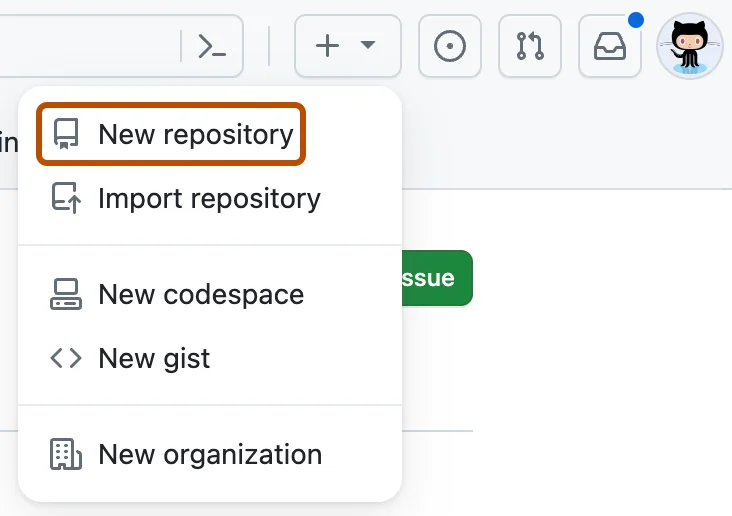
  2. Select + at the top right of any page, then New repository.
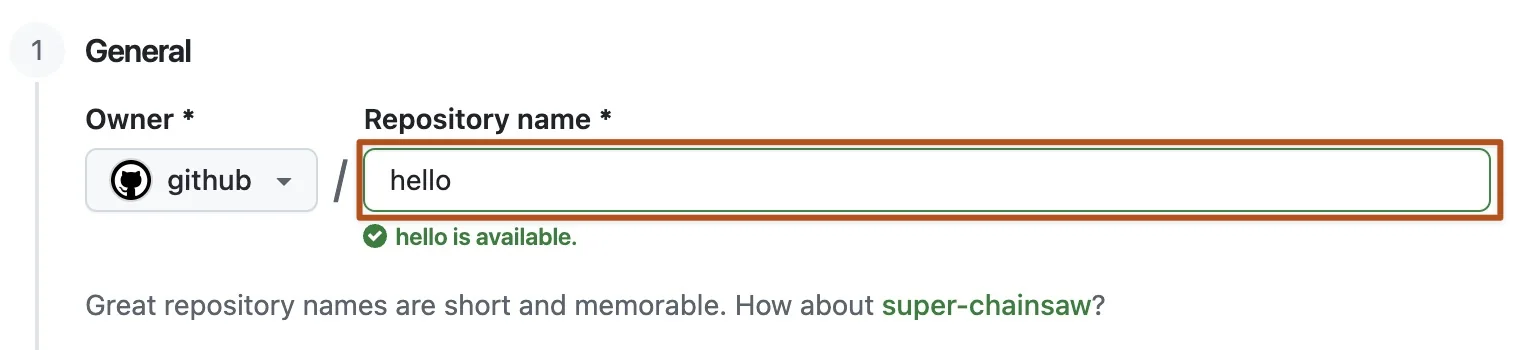
  3. Type a short name, such as toms-towpath-walks. Switch "Add README" on, so the repository isn't completely empty (Cloudflare needs something in it to connect to).
  4. Select Create repository.

What you'll see: Your new repository with one file in it, README.md. That file never shows on your website.

Worth knowing

A public repository can be read by anyone, and a private one by only you. Either works with everything here. Don't put passwords or keys in your files: secret keys go into Cloudflare's settings instead, as the guides that need one show.

GitHub's + menu open at the top right of the page, with New repository highlighted.
Making a repository on GitHub. Real screenshot from GitHub Docs, CC BY 4.0.
The Repository name field on GitHub, outlined in orange, with hello typed in and the note "hello is available."
Give it a short name. Real screenshot from GitHub Docs, CC BY 4.0.
A GitHub repository's file list with the Add file menu open and Upload files highlighted.
Later, on the Free plan: Add file, then Upload files, is how Claude's files get into the repository. Real screenshot from GitHub Docs, CC BY 4.0.

Sources

3
  1. GitHub Docs: quickstart for repositoriesdocs.github.com · read 1 October 20261
  2. GitHub Docs: adding a file to a repository (Add file > Upload files; 100 files at once, 25 MiB each)docs.github.com · read 1 October 20262
  3. GitHub pricing (Free plan: unlimited public and private repositories)github.com · read 1 October 20263

Step 04 of 05

Get a free Cloudflare account and connect it to your repository

Takes
5 minutes
Costs
Free

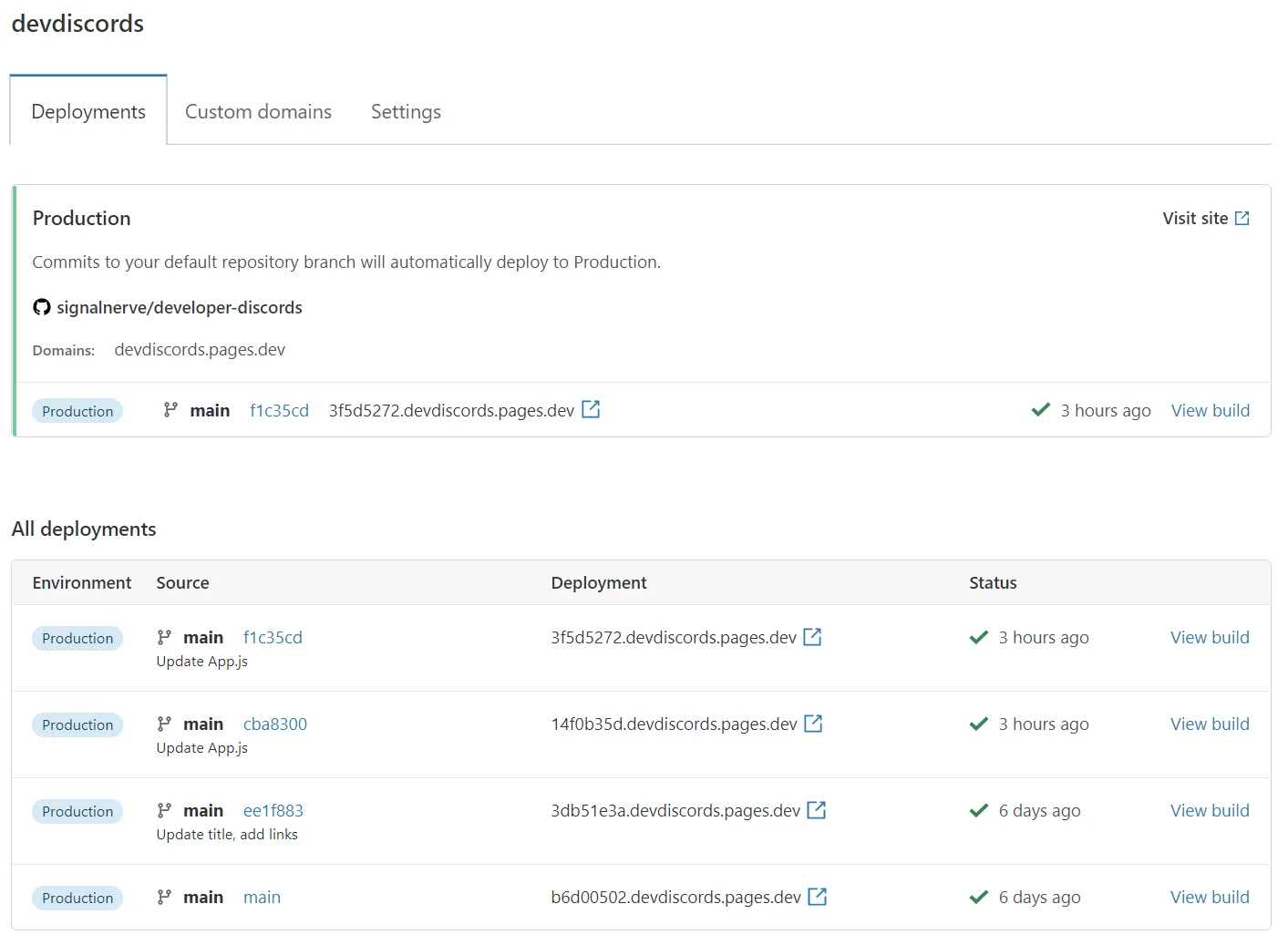
Cloudflare is where your site is live on the internet. Once it is connected to your repository, every change to the files on GitHub goes live by itself, in a minute or two. A site made of plain files costs nothing to host: Cloudflare says requests to static files are "free and unlimited".

  1. Sign up at dash.cloudflare.com/sign-up and confirm your email address.
  2. For a website made of plain files (most builds here): in the Cloudflare dashboard, go to Workers & Pages, select Create application, then Pages, then Connect to Git. For the chatbot, the app and the dashboard, stop after signing up: their guides connect Cloudflare after your first upload.
  3. Sign in to GitHub when asked and let Cloudflare see your repository (Install & Authorize). Pick the repository, then Begin setup.
  4. Leave the production branch as main and the build command blank. Select Save and Deploy.
  5. Your site's address is your-project-name.pages.dev. Until you upload your files it has nothing to show; after that, every change you commit on GitHub redeploys it.

What you'll see: A Cloudflare project that lists its deployments, each with the GitHub change that started it.

Worth knowing

Builds that run code on the server (the chatbot, the app and the dashboard) use Cloudflare's other route: Create application, then "Import a repository". It needs a settings file Claude makes, so those guides connect it after your first upload and show the clicks. No GitHub? Cloudflare's "Drag and drop your files" works too, but every change means dragging the whole folder in again, and a project made that way can't be switched to GitHub later.

A Cloudflare Pages project connected to a GitHub repository: the Production panel says commits to the default branch will automatically deploy, with a list of past deployments.
A Cloudflare Pages project connected to GitHub. Real screenshot from Cloudflare documentation, CC BY 4.0.

Diagram, not a screenshot

github.com → dash.cloudflare.com → your-project.pages.devGitHubAdd file →Upload files →Commit changesCloudflaresees the commit,builds it(a minute or two)Liveyour-project.pages.devEvery later change: upload the changed files, commit,and Cloudflare publishes it by itself. No other step.
Diagram, not a screenshot: what happens after you commit a change on GitHub, from Cloudflare's Git integration documentation.

Sources

4
  1. Cloudflare Pages: Git integration (Create application > Pages > Connect to Git; leave the build command blank; deploys on every push)developers.cloudflare.com · read 1 October 20261
  2. Cloudflare Workers Builds: Create application > Import a repository; builds and deploys on every pushdevelopers.cloudflare.com · read 1 October 20262
  3. Cloudflare Workers pricing ("Requests to static assets are free and unlimited")developers.cloudflare.com · read 1 October 20263
  4. Cloudflare Pages: Direct Upload, drag and drop (1,000 files, 25 MiB each)developers.cloudflare.com · read 1 October 20264

Step 05 of 05

Connect Claude to GitHub

Takes
2 minutes
Costs
Free

So Claude can read the files that are live now before it changes them, even in a brand new chat. On Pro, the same connection is what lets Claude Code on the web save its changes to your repository.

  1. In Claude, go to Customize, then Connectors, select GitHub Integration, then Connect, and sign in to GitHub.
  2. In a chat, select + at the bottom left, then Add from GitHub, pick your repository and select Add repository.
  3. If your repository is private, Claude asks for access to it the first time: follow its link to GitHub and allow it.

What you'll see: GitHub listed under your connectors, and "Add from GitHub" in the + menu of a chat.

Worth knowing

On the Free plan this connection reads only: Anthropic's page says Claude reads file names and contents, nothing else, and can't save changes there from a chat. You upload the files Claude gives you. Saving changes straight to GitHub is Claude Code on the web, on Pro or above (below).

Diagram, not a screenshot

claude.ai · Customize · ConnectorsConnectors+← browse the directoryCloudflare Developer PlatformAnthropic verifiedConnectGitHub IntegrationReads your repositoriesConnectThen in a chat: + (bottom left) → Connectors → switch it on
Diagram, not a screenshot: Customize, then Connectors, as Anthropic's help page describes it.

Sources

2
  1. Claude help: connectors from the directory (available to all users)support.claude.com · read 1 October 20261
  2. Claude docs: GitHub integration (every plan, reads files only)claude.com · read 1 October 20262

Pro, tested · 1 October 2026

What happened when we asked Claude Code on the web for a change.

On a throwaway public repository holding Tom's Towpath Walks (the four files from our website guide). We started the session from our own server rather than by typing at claude.ai/code. Anthropic documents both as starting the same kind of cloud session, which appears in your claude.ai/code list. The model was the session default, Claude Opus 5.5, as the commit Claude made records.

What we typed: "I've just done a new walk, so please add it as my latest one on my website: Kintbury to Great Bedwyn. Starts at Kintbury station and finishes at Great Bedwyn Wharf. About 8 miles, roughly 3 hours. Good for: dogs, tea room halfway. My note: "Quiet water meadows, the Dun aqueduct and a heron that followed me for a mile." I'm not technical. When you've finished, tell me in plain English what you changed and what I need to do so it goes live on my website."

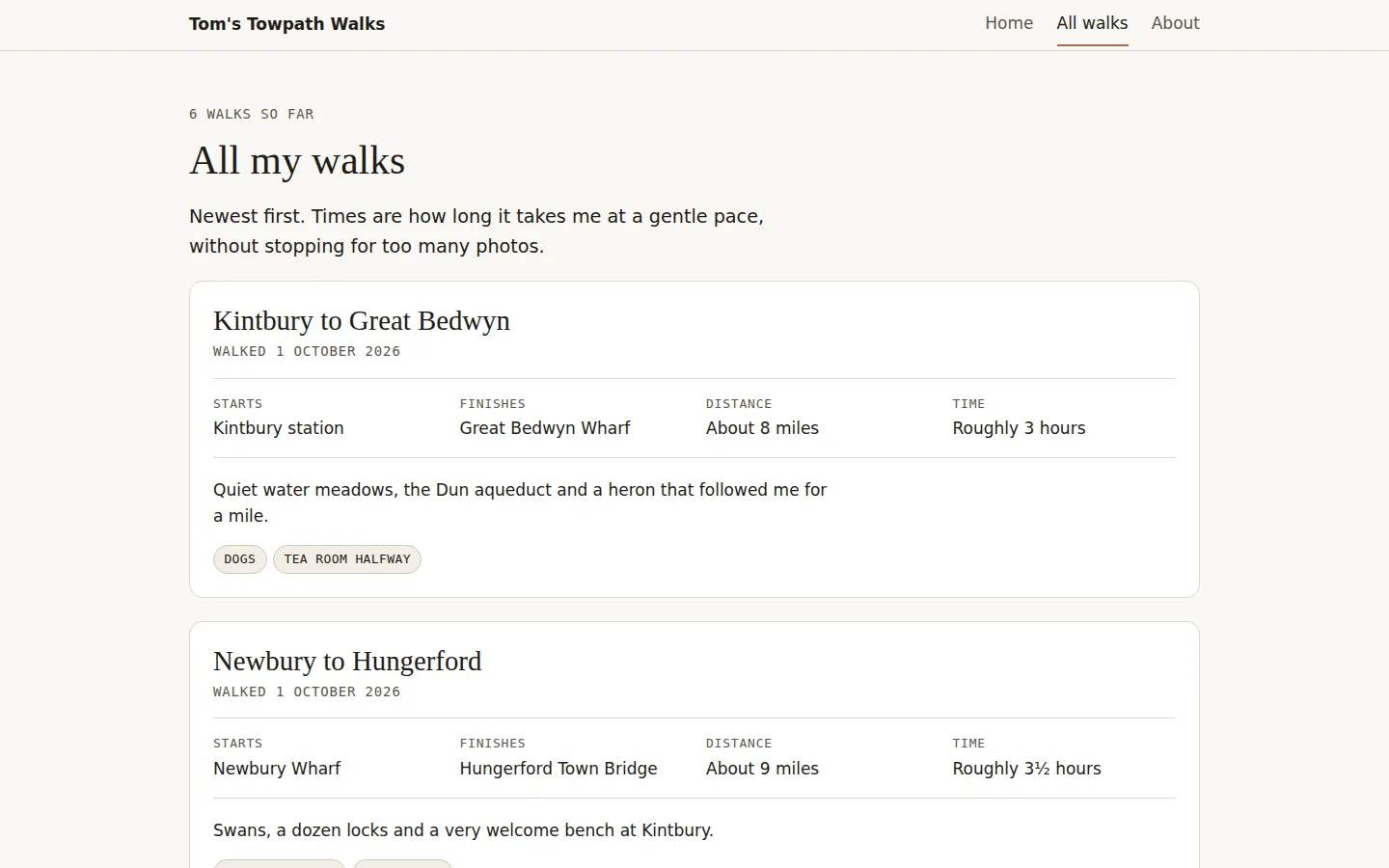
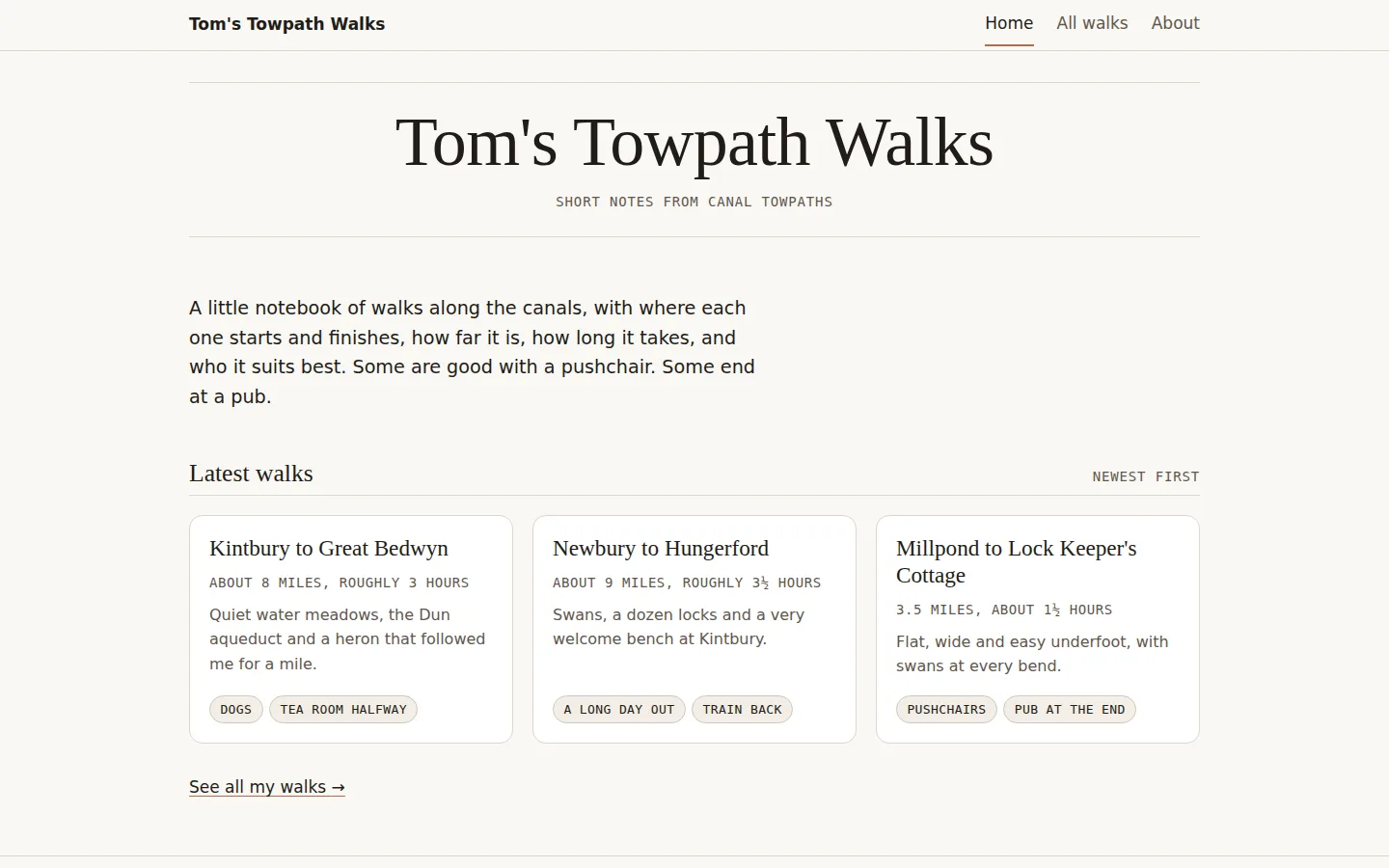
  • Claude changed two files, walks.html and index.html: the walk went to the top of both pages with the note word for word, and the count became "6 walks so far". It dated the walk 1 October 2026 because we hadn't given a date, and said so.
  • It saved the change on a new branch, claude/add-kintbury-walk-oj795y, not on main, and said plainly: "it isn't on your live site yet". Then it gave three clicks on GitHub: Compare & pull request, Create pull request, then Merge pull request and Confirm merge.
  • We made the pull request and merged it, as a reader would. The main branch then held exactly Claude's change, which is what Cloudflare publishes.

What we didn't run

Cloudflare's half. Connecting Cloudflare to a GitHub account needs a sign-in in a browser, and our test ran on a server, so we didn't connect the throwaway repository to a Cloudflare project. That step is from Cloudflare's documentation, linked below, and is the same one you do once in step 4.

Diagram, not a screenshot

claude.ai/code · Pro and above"Add my new walk: Kintbury to Great Bedwyn…"repo ▾1. Claude editssaves to a branch,not to main2. PreviewCloudflare buildsthe branch apart3. You mergeCreate PR, thenMerge on GitHubLive on mainNothing goes live until you merge.
Diagram, not a screenshot: the Pro route, from Anthropic's Claude Code on the web documentation and our run.
Tom's Towpath Walks, All walks page, after the merge: '6 walks so far', and Kintbury to Great Bedwyn first, starting at Kintbury station and finishing at Great Bedwyn Wharf, about 8 miles, roughly 3 hours, with the heron note and the labels Dogs and Tea room halfway.
All walks, after the merge: our own screenshot of the throwaway site's main branch, opened in a browser.
Tom's Towpath Walks home page after the merge, with Kintbury to Great Bedwyn as the first of three latest walk cards.
Home page, after the merge: our own screenshot of the throwaway site's main branch, opened in a browser.

Read Claude's whole reply, unedited.