Real buildClaude's output, unedited
Open the live demo (Claude's unedited files, a made-up example)
I want AI to build me a landing page
Five plain-English prompts in a Claude chat made one page for a made-up class, with an 'I'm interested' form that opens an email. Upload it to GitHub and Cloudflare puts it live: free.
- Prompts
- 5
- Claude's time
- 2 min 41 s
- Got wrong
- 6 things
- Tests passed
- 4 of 6
- Model
- claude-sonnet-5-5
- Run on
- 2 October 2026
For: Someone launching one small thing (a class, a product, a newsletter) who needs one page that says what it is and lets people register interest, has never built a website, has never opened a terminal, and wants it free.
What the five prompts made Top of the page

01 · Before you start
Before you start.
You need three free accounts and nothing else. A Claude account with “Code execution and file creation” switched on (Settings, then Capabilities; it’s on every plan, including Free), so Claude can hand you a file to download. A GitHub account with an empty repository, which is where your page will live. And a Cloudflare account connected to that repository, which puts whatever is in it on the internet. The set-up page walks through all three, once, in about 15 minutes.
Nothing to install, and no terminal. Everything below happens in a chat and a web browser.
Our example is Saturday Sourdough, a beginners’ bread class run by Ellie. Both are made up. Saturday mornings, 10am to 1pm, at Elm Road Community Hall, £35 including a jar of starter and the loaf you shape, six places a class. Ellie has no website, no mailing list and no other accounts. She wants one page that says what the class is and lets people say they’re interested. If you’re launching one small thing, a class, a product or a newsletter, change the details to yours.
This is one page with one job. If you want several pages, such as a hobby site, see I want AI to build me a website.
02 · Set up once
Set up once, then just talk to Claude.
Free accounts you make one time and reuse for every build. Each links to the step-by-step on the set-up page, with what each screen looks like.
- 1. Get a free Claude account. It's where you describe what you want and Claude makes it. The Free plan covers every guide on this site; for websites, Pro adds the shortcut where Claude saves changes to GitHub itself.
- 2. Let Claude hand you files. Everything on this site is a handful of files: a website, an app, an extension. With this switched on, Claude can make them and give them to you to download.
- 3. Get a free GitHub account and an empty repository. A repository is a folder on GitHub that keeps every version of your files. It's the one place your site lives: you (or Claude) change the files there, and Cloudflare publishes whatever is in it.
- 4. Get a free Cloudflare account and connect it to your repository. Cloudflare is where your site is live on the internet. Once it is connected to your repository, every change to the files on GitHub goes live by itself, in a minute or two. A site made of plain files costs nothing to host: Cloudflare says requests to static files are "free and unlimited".
- 5. Connect Claude to GitHub. So Claude can read the files that are live now before it changes them, even in a brand new chat. On Pro, the same connection is what lets Claude Code on the web save its changes to your repository.
03 · The prompts
Paste these five, in order.
Plain English, typed into an ordinary Claude chat. On the left, exactly what we sent, word for word; change the details to yours. On the right, what came back. One conversation with claude-sonnet-5-5, run on 2 October 2026. Read the full transcript.
Prompt 1 of 5
Describe what you're launching, and ask how the sign-up will really work.
You say: I'm starting a beginners' sourdough bread class and I need one web page for it. Nothing big: just one page I can share in the local Facebook group and on a poster, that says what the class is and lets people tell me they're interested. About the class: - It's called "Saturday Sourdough". I'm Ellie and I've been baking sourdough at home for six years. This is my first class. - Saturday mornings, 10am to 1pm, at Elm Road Community Hall. - £35 a person, and that includes a jar of starter and the loaf you shape to take home. - 6 places per class. I haven't set the first date yet. - My email is ellie@example.com. I don't have a website, a mailing list or any other accounts. I just want people to be able to say "I'm interested" and for me to end up with their name and email. I'm not technical, and I want it to be free. Before you make anything, ask me anything you need to know, and tell me in plain English what you're going to make and how the "I'm interested" part will actually work.
1,485 output tokens back · read the full reply
Prompt 2 of 5
Choose how sign-ups reach you, and show it a page you like.
Attach: a screenshot of a page you like the look of · the one we attached
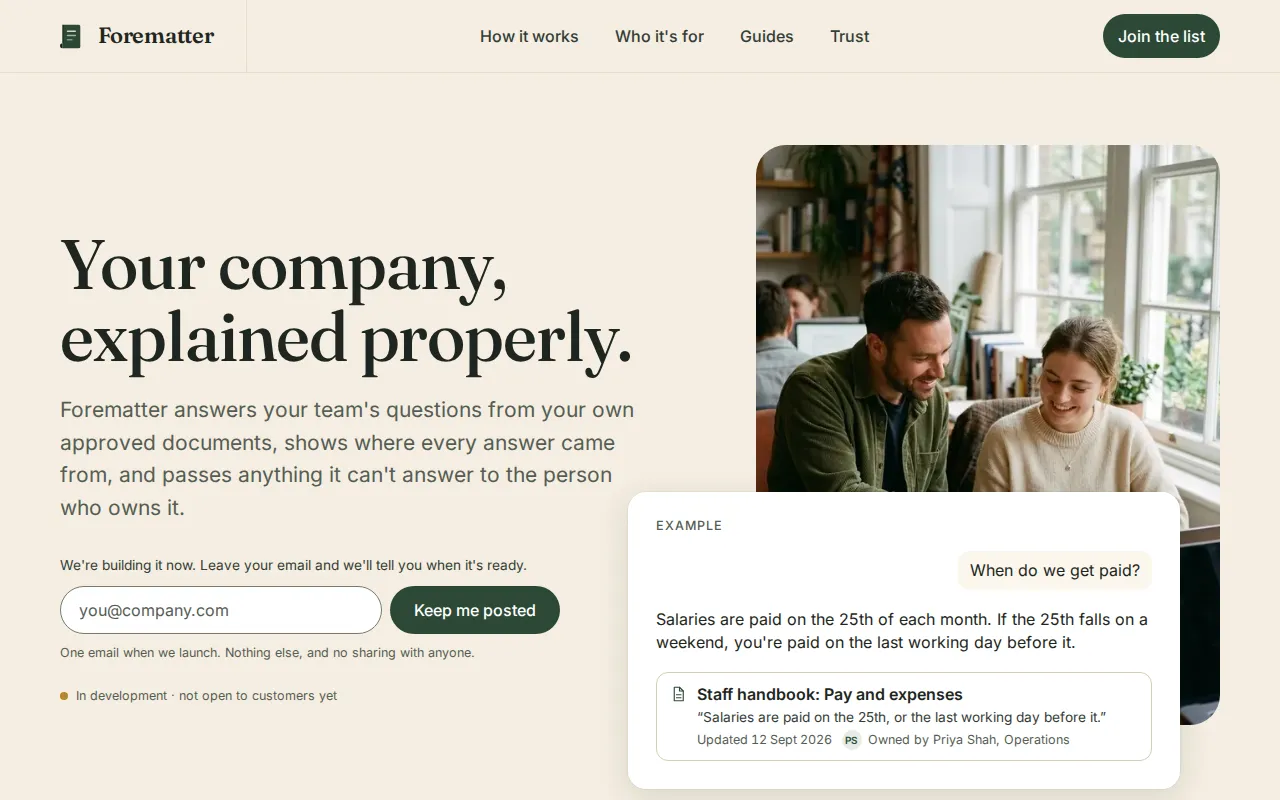
You say: Thanks, that's clear. My answers: 1. I'd rather not set up a Google Form today. Please make the "I'm interested" part work with the email way for now, so it works the moment the page is online, and tell me in plain English what I'd have to do later to switch to a Google Form instead. 2. Use ellie@example.com for now. I'll swap in my real one. 3. Just "Elm Road Community Hall" for now. I'll add the full address when the first date is set. 4. No photo yet. 5. Yes to "no experience needed". Yes to asking about allergies or anything else they want me to know. 6. No QR code yet. I've attached a screenshot of a page I like the look of. I like the cream background, the big old-fashioned heading, the one dark green button and how calm it feels. Don't copy its words, just the feel. Please make the page now. Keep it as simple as possible: just the files I'll need to upload, nothing I have to install. It must look good on a phone.
4,801 output tokens back · read the full reply
Prompt 3 of 5
Ask it to try to break the page like a visitor on a phone.
You say: I opened it by double-clicking and it looks lovely. Before I share it, please check it carefully, as if you were someone who saw my post on a small phone and as if you were trying to break it: the "I'm interested" part (what happens if they leave something out, type their email wrong, or don't have an email app), every button and link, anything that spills off the side of the screen, writing that's too small or too faint, and anything that would trouble someone who uses a screen reader or only a keyboard. Tell me in plain English what you found, then fix it in the file.
9,281 output tokens back · read the full reply
Prompt 4 of 5
Change something, the way you will once it's live.
You say: Good news: I've set the first date. It's Saturday 14 November, same time and place. Please put the date on the page, and make it clear that once 6 people have said they're interested in that date, anyone else goes on a waiting list for the next class. Then tell me which files you changed, so I know what to upload again.
3,924 output tokens back · read the full reply
Prompt 5 of 5
Ask how to put it live from GitHub by clicking, and how to test the sign-up first.
You say: I've made free GitHub and Cloudflare accounts. On GitHub I made a new repository called saturday-sourdough (I switched on "Add README"), and in Cloudflare I went to Workers & Pages, Create application, Pages, Connect to Git, and picked that repository, so it should go live by itself whenever the files on GitHub change. I don't want to use the terminal or install anything. Please tell me, step by step, how to get the page into my repository using the GitHub website, what I should see at each step, how I find the address I can share, and how I put a change live later (like when the class is full). And before I share the link, how do I check that the "I'm interested" button really works?
2,198 output tokens back · read the full reply
After prompt 1 of 5
Reply to prompt 1 · 14.6 s · 1,485 output tokens
Describe what you're launching, and ask how the sign-up will really work.
A plan and questions, and nothing made yet. Ours proposed one page with name and email boxes and an "I'm interested" button, and said a web page can't store anything by itself. Its first choice was a Google Form (it needs a free Google account); the alternative was a button that opens an email to you, which it called clunky. It asked six questions.
Reply to prompt 5 · 19.8 s · 2,198 output tokens
Ask how to put it live from GitHub by clicking, and how to test the sign-up first.
Click-by-click steps and a test plan. Ours: put your real email on the "Questions?" line first; on GitHub, Add file, Upload files, index.html, Commit changes; framework preset None and a blank build command; find the .pages.dev address; later, edit the file on GitHub with the pencil icon. Then test on the live address: empty form, a bad email, a real sign-up to yourself, on a phone, and from inside the Facebook app.
04 · The result
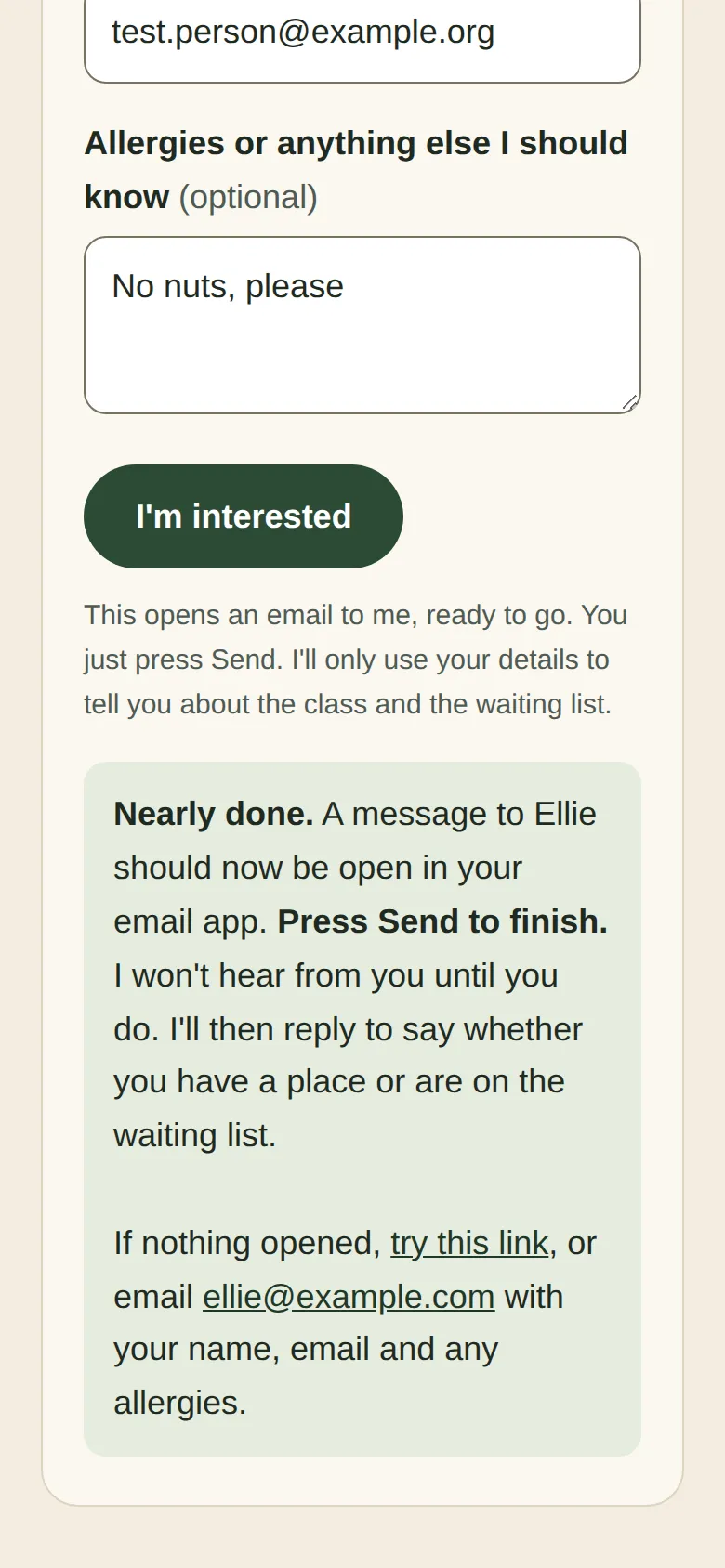
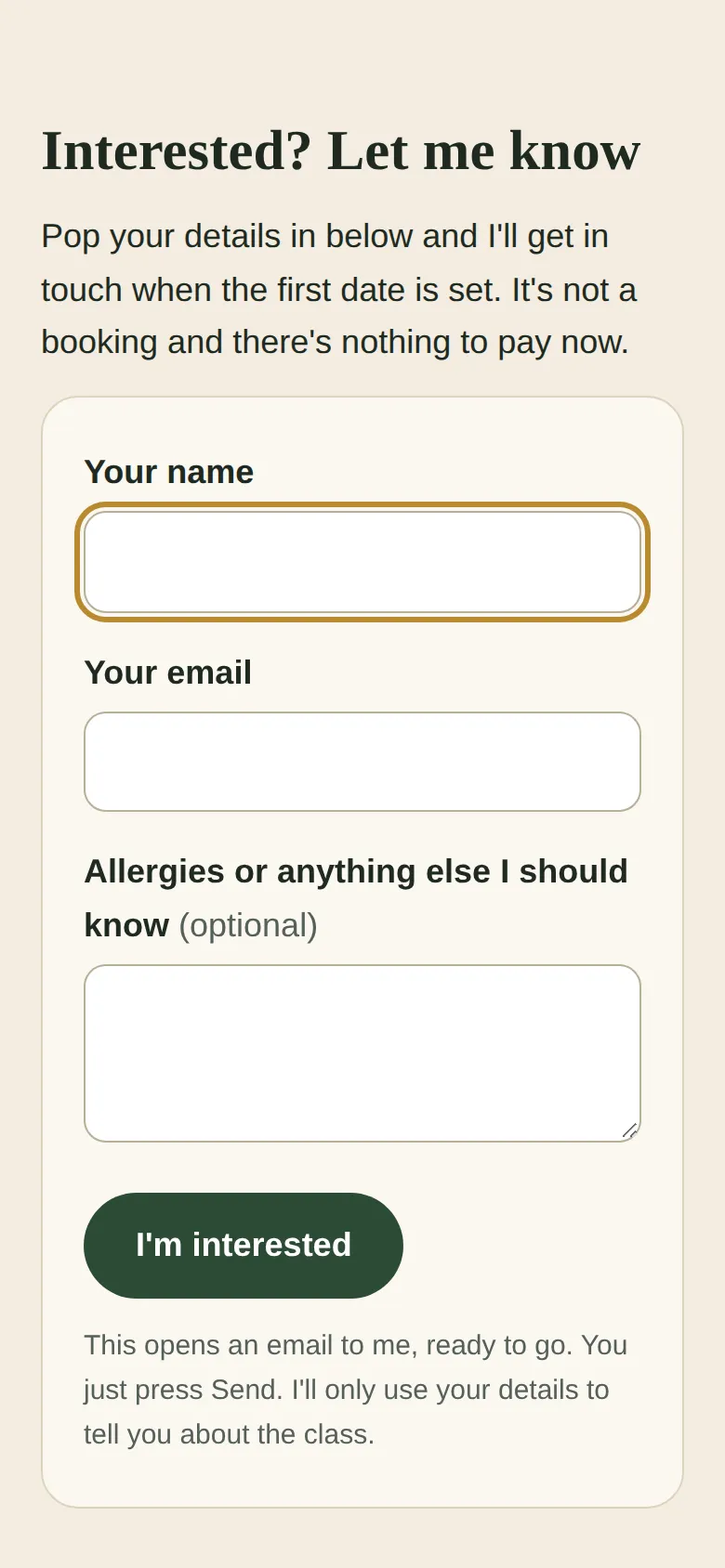
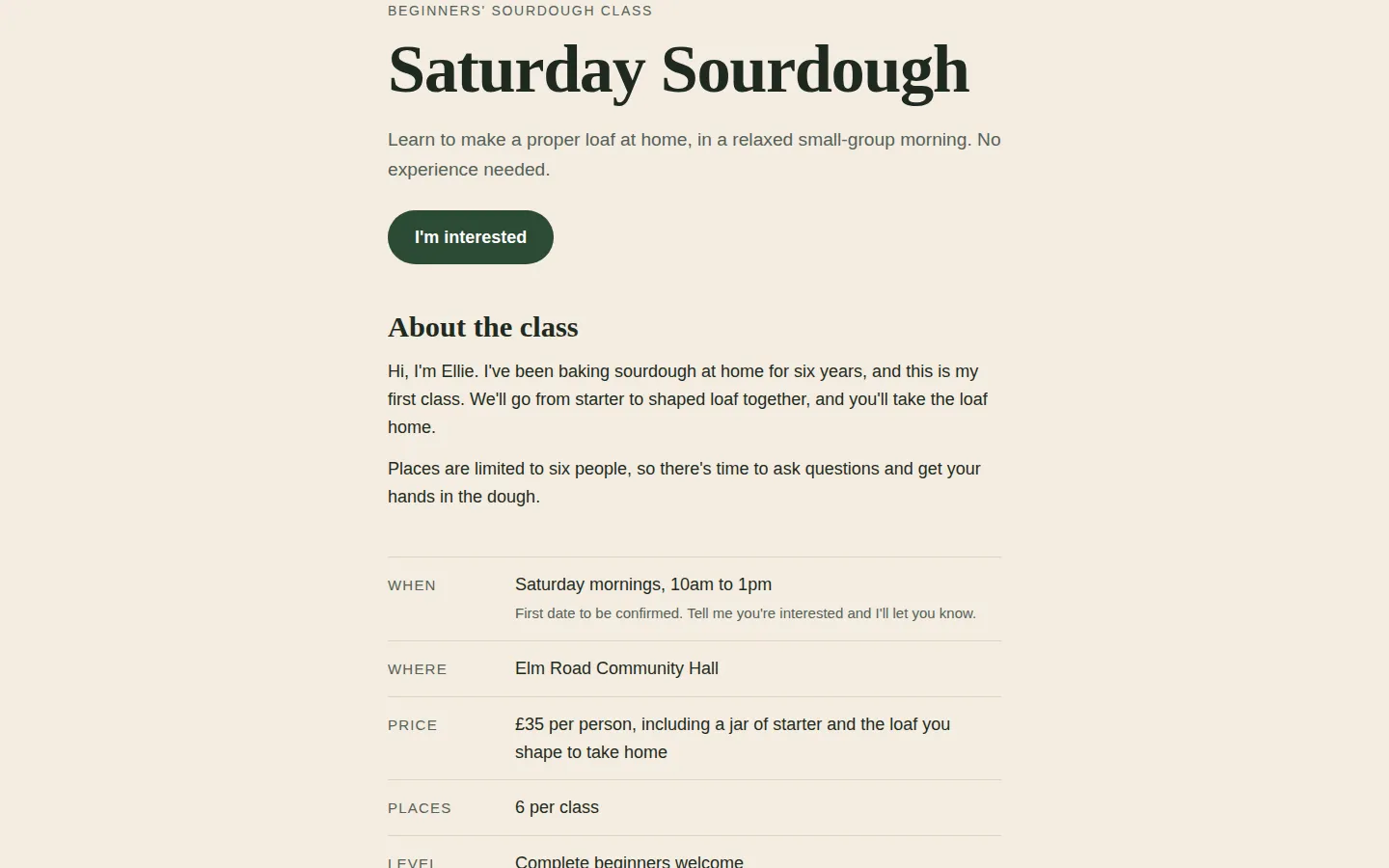
The real thing, on the stage.
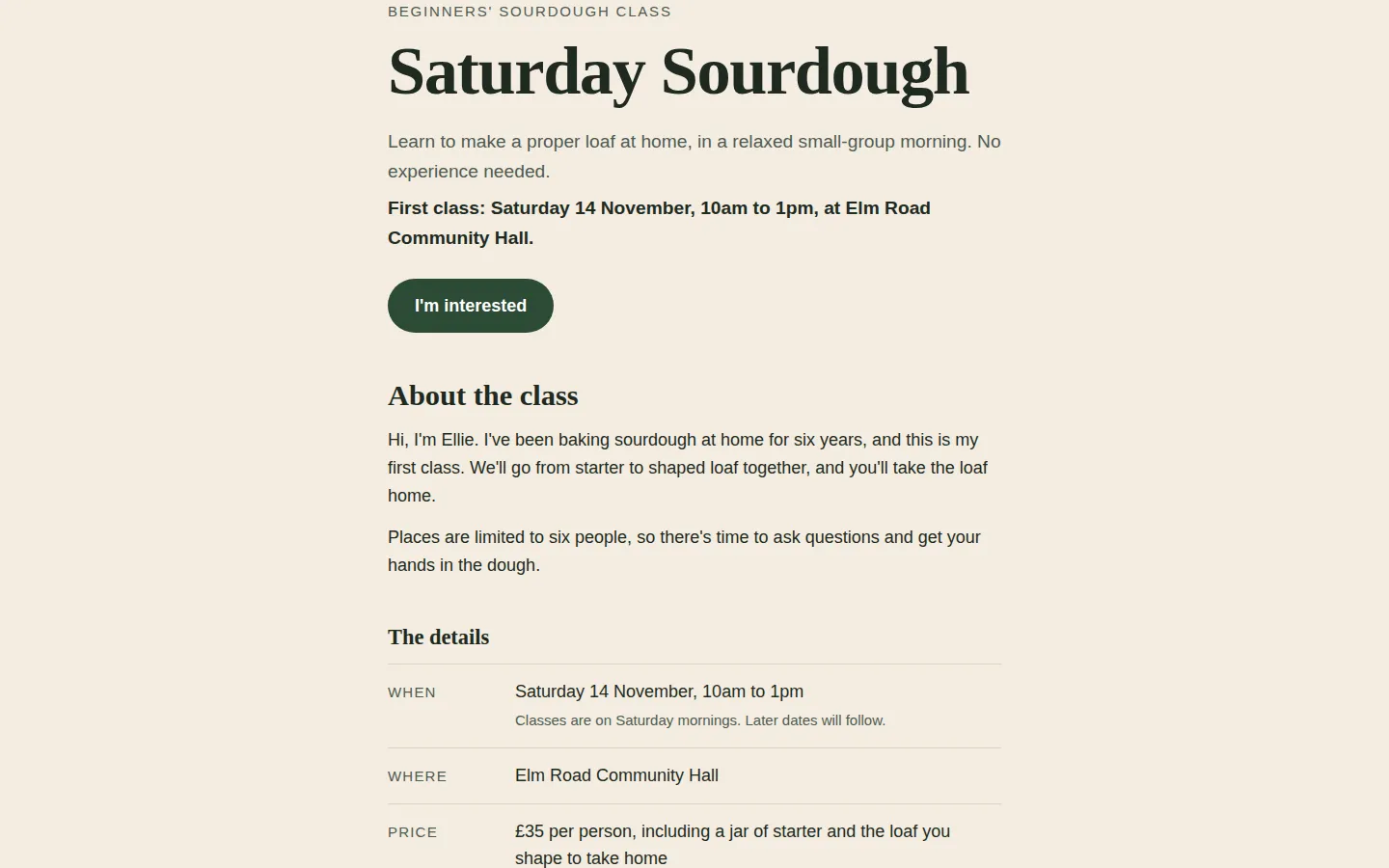
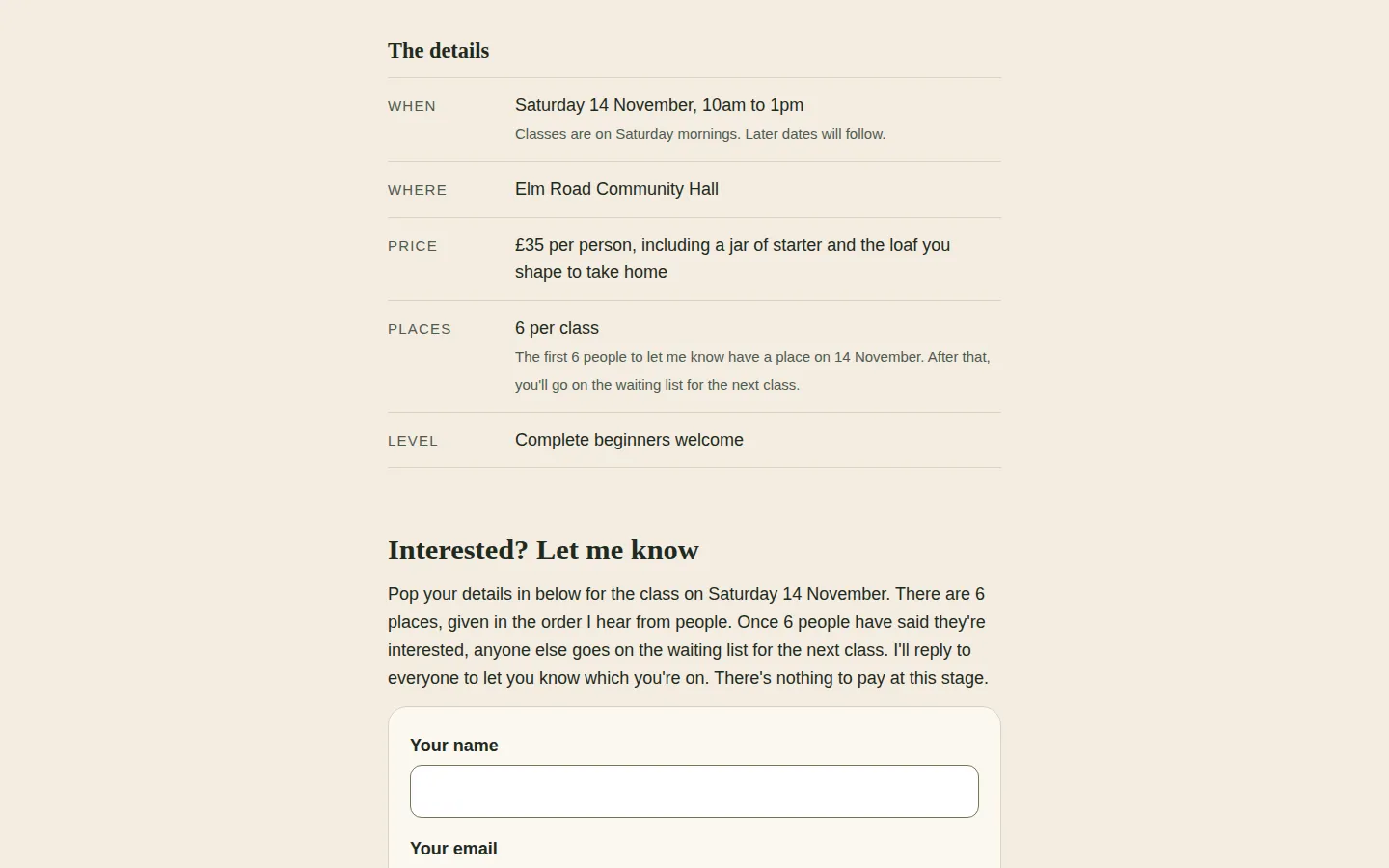
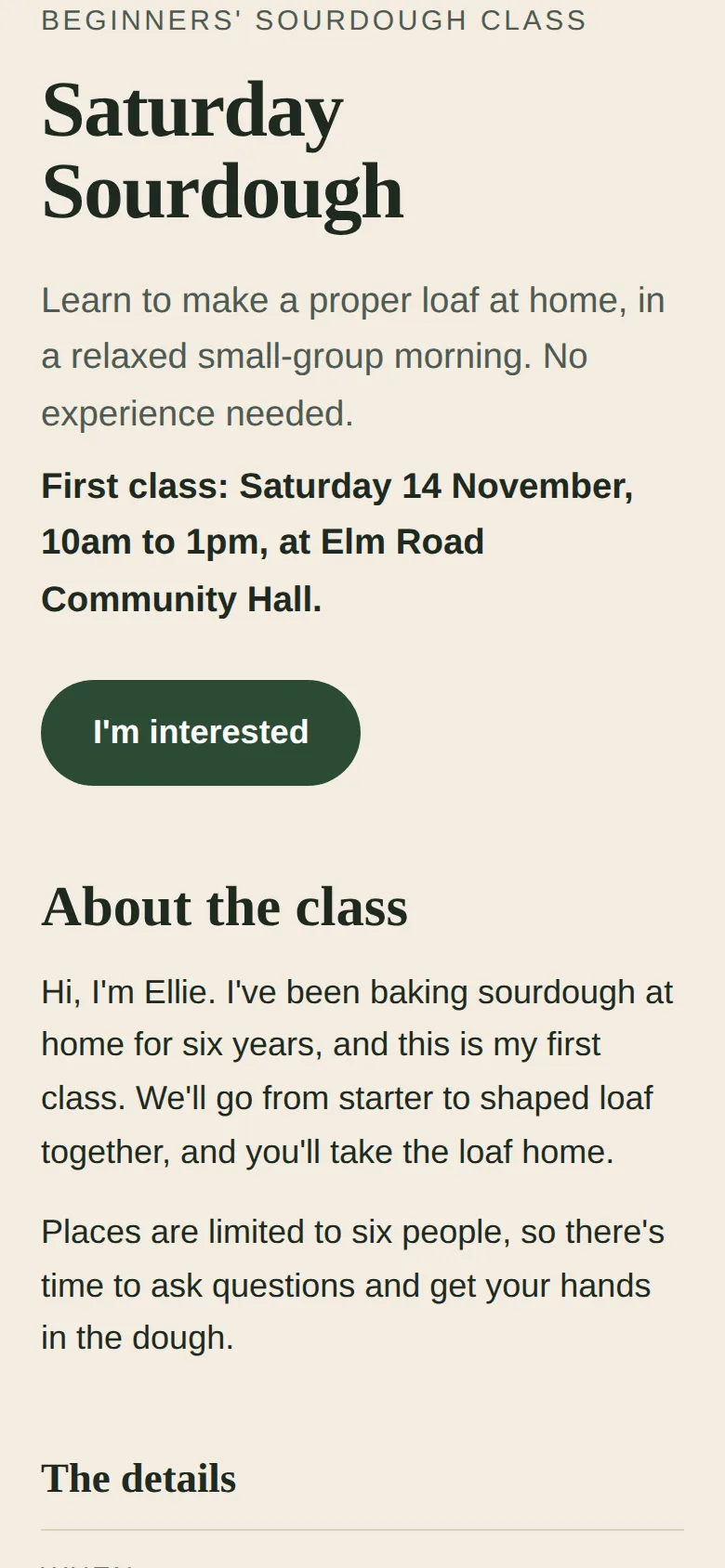
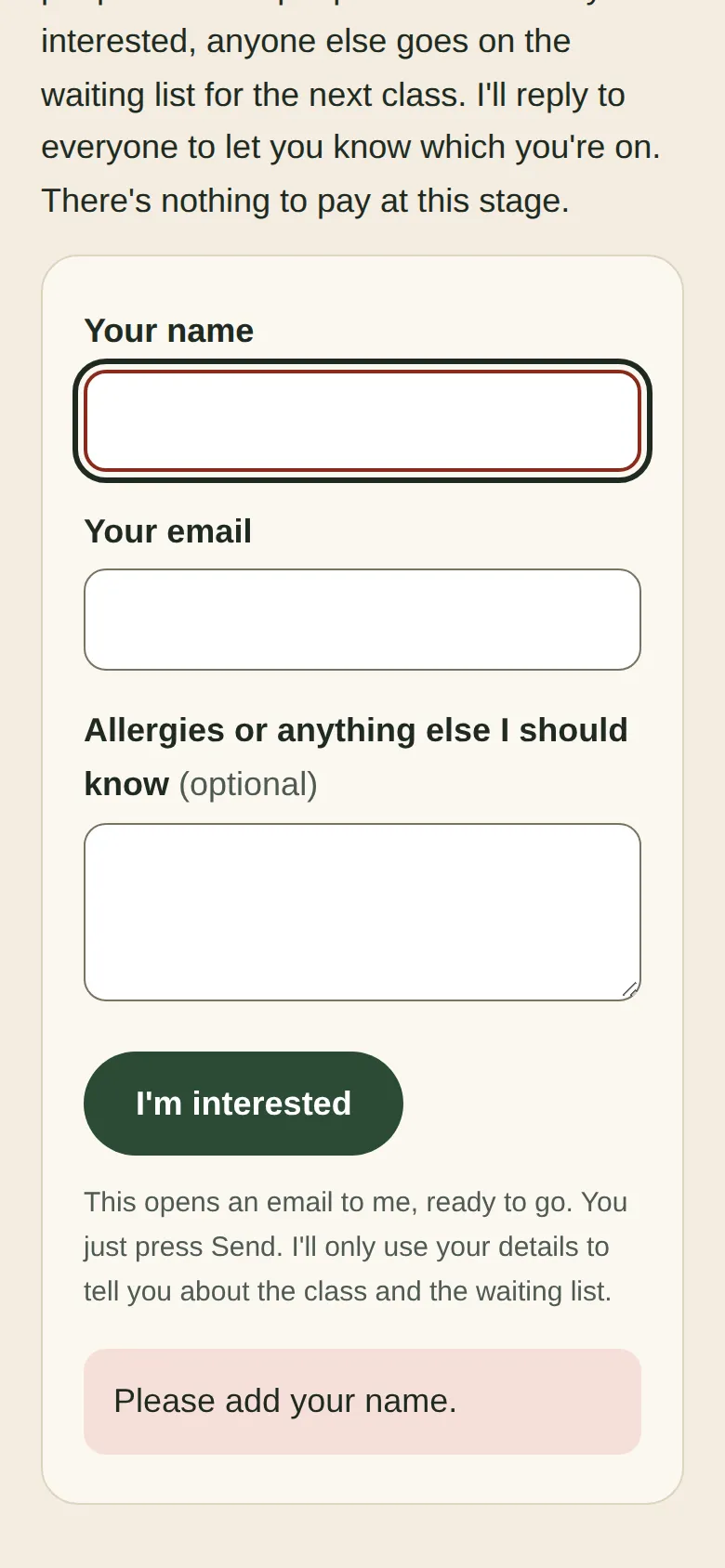
Screenshots of exactly what Claude produced, running on our machine on 2 October 2026. Nothing retouched.
We typed five plain-English prompts into one conversation with claude-sonnet-5-5 on 2 October 2026. One caveat: we ran them through Anthropic’s command-line tool with only its file tools switched on, so Claude could save files into an empty folder, much like file creation on claude.ai. We didn’t use the claude.ai website itself, so your screen will look different. The replies are published as they came back and we edited nothing by hand. Claude spent 161.1 seconds writing them.
The first prompt described the class and asked how the “I’m interested” part would actually work. Claude made nothing yet, and said what matters most on this page: a web page can’t store anything by itself. Its first choice was a Google Form, which puts each sign-up in a Google Sheet but needs a free Google account. The alternative was a button that opens an email to you, which it called clunky. It asked six questions, from whether Ellie had a Google account to whether she wanted a QR code for the poster.
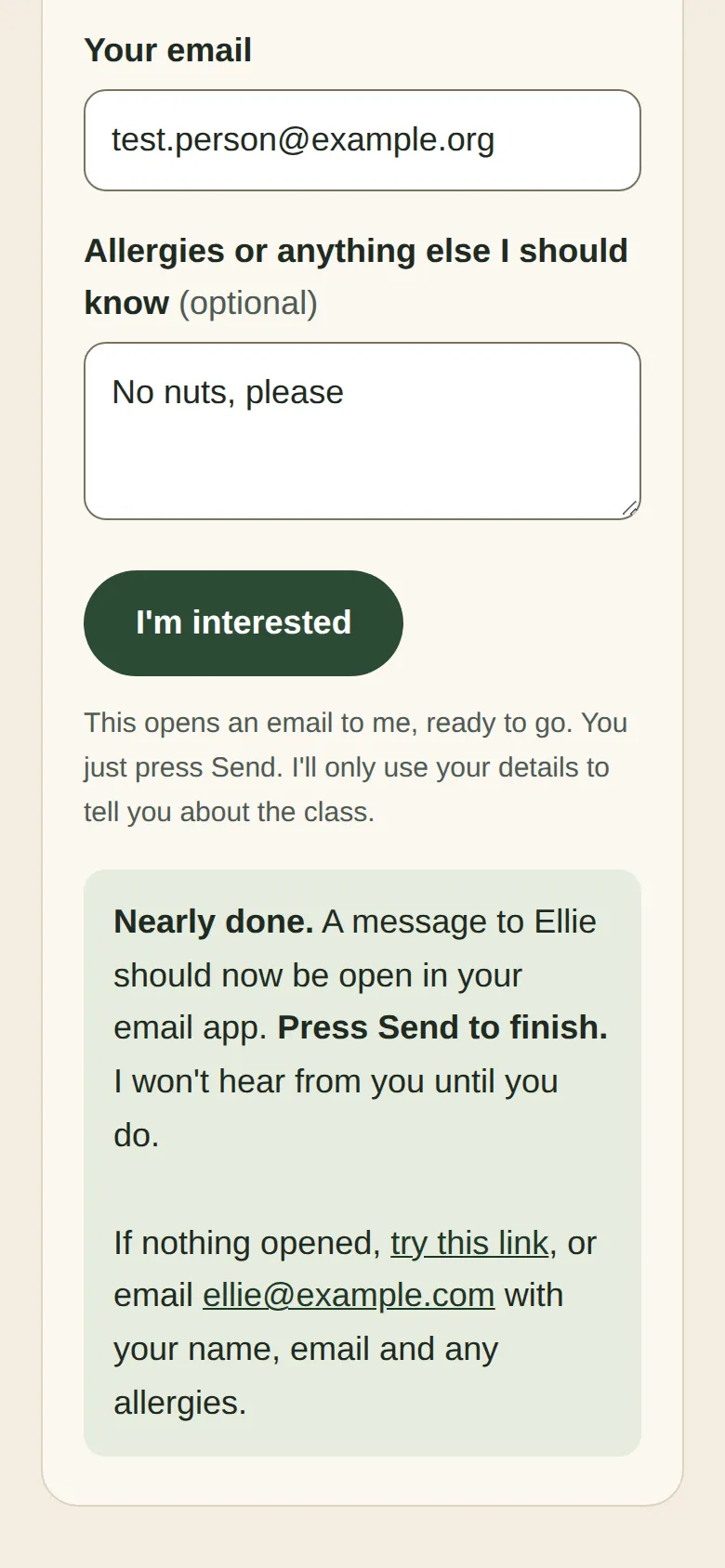
In prompt 2 we said no Google Form today: use the email route, and explain how to switch later. We attached a screenshot of one of our own sites and said we liked the cream background, the big old-fashioned heading and the one dark green button. Claude saved one file, index.html. The form checks the name and email, then opens the visitor’s email app with a message to Ellie already written. They still have to press Send, and Claude named that weak point itself: some people won’t, and some have no email app.
Then we tested it in a browser at laptop and phone size, opened from disk like a double-click. We filled the form in and caught the email the browser was asked to open. 38 of 48 checks passed. The email was right, but no message ever appeared on the page: not for an empty form, not for “hello@”, and not after a good sign-up.
So prompt 3 asked Claude to try to break the page like a visitor on a phone. It found “one serious fault”: its script used a name that browsers already reserve, so the messages were silently swallowed. We confirmed that was exactly the cause. It also tightened the email check, capped the box lengths, darkened faint text and the keyboard outline, and put Ellie’s email address in one place. After that, 46 of 48 checks passed. The two that didn’t are a missing skip link, and with no menu to skip, the first Tab lands on the “I’m interested” button.
Prompt 4 set the first date, Saturday 14 November, and asked for a waiting list after six. Claude changed the one file, put the date in the email’s subject line, and was honest about the limit: the page can’t count sign-ups, so places go in the order emails arrive and Ellie replies to each person.
Prompt 5 asked how to put the page live by clicking, and how to check the sign-up first. Claude’s upload steps matched GitHub’s and Cloudflare’s documentation closely, and its test plan was good. It also got one thing wrong: it said a test sign-up would arrive from the address you typed in the form. It comes from the email account on the phone or computer that sends it.
demo.iwantaito.com/build-me-a-landing-page/: Claude's unedited files, a made-up example.
index.html
05 · What we tested
We tried to break it. 4 of 6 held.
Run on our own machine against the unedited files. Nothing deployed while testing.
| What we tried | What happened | Result |
|---|---|---|
| Prompt 3 file opened by double-click, at laptop (1440x900) and phone (390x844) size in headless Chrome, with the form filled in for real | 46 of 48 checks passed: no errors, nothing loaded from other websites, no sideways scrolling, a label on every box, an empty form says 'Please add your name', 'hello@' gets a message about the email, good details open an email to ellie@example.com carrying the name, email and notes, and the page then says 'Press Send' | Pass |
| Text size and contrast | Smallest text 15px; lowest text contrast 6.17:1 (the WCAG AA minimum is 4.5:1) | Pass |
| Skip link | There isn't one, so the first Tab lands on the 'I'm interested' button, with a visible outline (the 2 failed checks above). The page has no menu to skip, so we don't count this against it | Fail |
| Prompt 4 file (date and waiting list added) | Same 46 of 48; the email's subject reads 'Saturday Sourdough 14 November: I'm interested' | Pass |
| Claude's instruction for using your real email, on a copy with only the 'Questions?' line changed | The form and every email link on the page use the new address. 2 of 2 | Pass |
| Prompt 2 first build, same checks | 38 of 48: the email opened correctly, but no message ever appeared on the page, whether the form was empty, the email was 'hello@' or the details were good. Prompt 3 found and fixed the cause | Fail |
06 · Ship it
Put it live from GitHub, no terminal.
Your files go into your GitHub repository and Cloudflare publishes them by itself. The steps start from Claude's own answer and are checked by us against GitHub's and Cloudflare's documentation, which the sources below link to.
These clicks follow GitHub’s and Cloudflare’s documentation. Claude’s unedited page is live at demo.iwantaito.com/build-me-a-landing-page/ (we host it ourselves, with a thin bar on top saying it’s a made-up example; its sign-ups go to the placeholder address); the screenshots are from our own machine.
- Download index.html. Open it in a plain text editor (Notepad, or TextEdit with Format, then Make Plain Text) and find the line that starts “Questions? Email Ellie at”. Change ellie@example.com to your address in both places on that line and save. We checked: that one line changes the address everywhere on the page.
- On GitHub, open your saturday-sourdough repository and select Add file, then Upload files. Drag in index.html itself, not the folder it’s in, and select Commit changes. The repository now lists index.html next to README.md.
- If you left Cloudflare’s “Set up builds and deployments” screen open, check the production branch is main, the framework preset is None and the build command is blank, then select Save and Deploy. If you’d already finished it, your commit starts a new deployment by itself.
- In Cloudflare, open Workers & Pages, then your project. Its address ends .pages.dev and starts with the project name, which by default is the repository’s name, such as saturday-sourdough.pages.dev. Decide on the name before you print a poster.
- Before you share the link, test the sign-up on the live address. Press the button with nothing filled in, then with a bad email, then sign up properly with a real address of yours and press Send. Check your inbox, and your spam folder. Do it once on your phone, and once from inside the Facebook app, if that’s where you’ll share it. Delete the test emails so you don’t count them.
- To change something later, such as “class full”, ask Claude in the same chat for the new file and upload it the same way, or open index.html on GitHub, select the pencil (Edit file), make the change and select Commit changes. Cloudflare publishes it by itself in a minute or two.
If you’d rather collect sign-ups in a spreadsheet, make a Google Form with name, email and allergies, then ask Claude to point the page at it. In Google’s help, Responses, then Link to Sheets, sends every answer to a sheet; “Set close date or response limit” can stop the form after six; and Preview, then Copy responder link, gives you the link to send Claude.
Free plan: Claude makes the files, you upload them
FreeTo change something: ask Claude, download the files it changed, and upload just those the same way. Files with the same name are replaced; the rest stay as they are.
£0: Claude Free, GitHub Free and Cloudflare's free plan.
Pro: you chat, Claude saves the change, Cloudflare publishes it
Claude Pro, $20 a monthClaude edits the files and saves them to GitHub on a separate branch, a draft copy. Cloudflare gives that branch its own preview address, so you can look before anything changes. Happy with it? Select Create PR, then on GitHub select Merge pull request, then Confirm merge. Cloudflare puts it live by itself.
07 · What it costs
What it costs.
£0 a month on Cloudflare's free plan and Claude's Free plan. A Google Form for sign-ups is optional and free with a Google account; a domain is optional and the only cost.
Hosting is £0 a month. Cloudflare says requests to static files are free and unlimited, and GitHub’s Free plan is enough to hold one file.
Claude’s Free plan covered everything here. A Google Form is optional and free with a Google account. A domain is the only possible cost, and it’s optional; the free pages.dev address works without one.
08 · What it got wrong
6 things Claude got wrong, or left to you.
If Claude gets something wrong, we say so here. We never fix its files by hand; a fix is a follow-up prompt you can see above.
Its first version said nothing
The prompt 2 page used a name for its message box that browsers already use for something else, so 'Please add your name' and 'Press Send' never showed. Claude found this itself, but only because prompt 3 asked it to try to break the form. We confirmed the cause in a browser.
Who the email comes from
In prompt 5 Claude said a test sign-up 'should be sent from the address you typed'. It won't be. The button opens the visitor's own email program, so the message comes from whichever account that program uses, whatever they typed in the box. The address they typed is in the message itself.
Google Form button names
Claude's steps for switching to a Google Form said Responses, then the spreadsheet icon, and Send, then the link icon. Google's help says Responses, then 'Link to Sheets', and Preview, then 'Copy responder link'. Its step for email notifications matches. We didn't build a form, so we haven't checked the rest.
The class can't fill itself
The page can't count sign-ups, which Claude said. It added that a Google Form would fix this. A Google Form can stop taking answers 'After a number of responses', but the words on Ellie's page still won't change by themselves.
The top gap is missing
Claude gave the top of the page a 56px gap, but another of its own rules cancels it, so the small 'Beginners' sourdough class' label touches the top of the screen. Ask Claude for 'more space above the heading' if it bothers you.
Not tested on real phones or inside Facebook
Our browser can't open an email program, so we caught the email it was asked to open instead. We didn't try a real phone's email app or Facebook's own browser. Claude's test plan in prompt 5 covers both: do it before you share the link.
Ours, disclosed
Built it? Where we can help next.
Ours: made by the same studio that runs this site. None of them changes anything above.
Ours
Launch Video Maker
Turns a page like this into a short launch video to post alongside the link, paid once per video.
Ours
What is GEO
Once the page is live, a free guide to getting it read and cited by AI assistants.
Ours
Adapt Progress Evolve
We build launch pages properly, if you'd rather not do it yourself.
Questions
Questions people ask.
Can Claude build me a landing page?
Yes, a simple one. Five prompts in one conversation gave us a one-page site for a made-up class, with the details, a date and an 'I'm interested' form. After Claude checked its own work, the form behaved properly in our browser tests: it catches an empty name and a bad email, and writes the sign-up email for the visitor.
How much does it cost to build a landing page with AI?
£0 in our run, as of October 2026. Claude's Free plan covered the chat, GitHub's Free plan holds the file, and Cloudflare says requests to static files are free and unlimited. A domain is optional and the only cost. If you later collect sign-ups with a Google Form, that's free with a Google account.
How do people sign up if the page has no server?
A plain page can't store anything, as Claude said. Ours uses the email route: the button opens the visitor's own email program with a message to you already written, and they press Send. Nothing needs an account, but you won't hear from anyone who doesn't press Send. Claude's other suggestion, a Google Form, puts each sign-up in a Google Sheet and needs a free Google account.
What prompt should I use to create a landing page with AI?
Say what you're launching, the facts you want on the page, what you want people to do (here: say they're interested), and that you're not technical and want it free. Then ask Claude to ask questions and explain how the sign-up will work before it makes anything. Our five prompts are above, word for word; change the details to yours.
How long does it take to build a landing page?
Claude spent 161.1 seconds writing replies across all five prompts. Reading its answers, testing the form and uploading the file take longer, and we didn't time those. The free accounts take about 15 minutes to set up, once.
Sources for this page
10- Claude help: create and edit files with Claude (all plans; Settings > Capabilities)
- Claude docs: GitHub integration (every plan, reads files only)
- MDN: the a element (mailto: links open the user's email program)
- Google Forms help: view and manage responses (Link to Sheets, email notifications, response limit)
- Google Forms help: send your form (Copy responder link, Embed HTML)
- GitHub Docs: adding a file to a repository (Add file > Upload files; 100 files at once, 25 MiB each)
- GitHub Docs: editing files (the Edit file pencil, Commit changes)
- Cloudflare Pages: Git integration (Connect to Git; leave the build command blank; deploys on every push)
- Cloudflare Pages: serving pages (no 404.html means single-page app behaviour)
- Cloudflare Workers pricing ('Requests to static assets are free and unlimited')
For developers
For developers.
Skip this if you've never used a terminal. You don't need it.
The command-line route
If you’re happy in a terminal, skip the upload page. With the repository connected to Cloudflare Pages, every push to main deploys:
git clone https://github.com/<you>/saturday-sourdough.gitcp index.html saturday-sourdough/cd saturday-sourdoughgit add index.htmlgit commit -m "Add the page"git push origin mainThe form needs no server because it builds a mailto: link in the browser. Storing sign-ups yourself would need code running on a server, which we didn’t build here.