Real buildClaude's output, unedited
Open the live demo (Claude's unedited files, a made-up example)
I want AI to make me a flashcard app
Five plain-English prompts made a flashcard and quiz app in one file: flip cards, a scored quiz, your own cards saved in the browser. No account. Upload it to GitHub and Cloudflare hosts it free.
- Prompts
- 5
- Claude's time
- 8 min 48 s
- Got wrong
- 5 things
- Tests passed
- 4 of 6
- Model
- claude-sonnet-5-5
- Run on
- 2 October 2026
For: Someone revising for a test or learning a language, who wants their own flashcards and quiz on a laptop and a phone, has never built anything, has never opened a terminal, and doesn't want another account.
What the five prompts made Cards

01 · Before you start
Before you start.
You need three free accounts and nothing else. A Claude account with “Code execution and file creation” switched on (Settings, then Capabilities; it’s on the Free plan), so Claude can hand you a file to download. A GitHub account with an empty repository, where the file will live. And a Cloudflare account connected to that repository, which puts it on the internet. The set-up page walks through all three, once.
Nothing to install, and no terminal. Everything below happens in a chat and a web browser.
Our example is a made-up learner at a Spanish evening class with a vocabulary test in six weeks. They want their own flashcards and quiz, on a laptop and on a phone on the bus, free, with no account and no sign-in. They aren’t technical, so the prompts aren’t either. Swap Spanish for whatever you’re revising.
02 · Set up once
Set up once, then just talk to Claude.
Free accounts you make one time and reuse for every build. Each links to the step-by-step on the set-up page, with what each screen looks like.
- 1. Get a free Claude account. It's where you describe what you want and Claude makes it. The Free plan covers every guide on this site; for websites, Pro adds the shortcut where Claude saves changes to GitHub itself.
- 2. Let Claude hand you files. Everything on this site is a handful of files: a website, an app, an extension. With this switched on, Claude can make them and give them to you to download.
- 3. Get a free GitHub account and an empty repository. A repository is a folder on GitHub that keeps every version of your files. It's the one place your site lives: you (or Claude) change the files there, and Cloudflare publishes whatever is in it.
- 4. Get a free Cloudflare account and connect it to your repository. Cloudflare is where your site is live on the internet. Once it is connected to your repository, every change to the files on GitHub goes live by itself, in a minute or two. A site made of plain files costs nothing to host: Cloudflare says requests to static files are "free and unlimited".
- 5. Connect Claude to GitHub. So Claude can read the files that are live now before it changes them, even in a brand new chat. On Pro, the same connection is what lets Claude Code on the web save its changes to your repository.
03 · The prompts
Paste these five, in order.
Plain English, typed into an ordinary Claude chat. On the left, exactly what we sent, word for word; change the details to yours. On the right, what came back. One conversation with claude-sonnet-5-5, run on 2 October 2026. Read the full transcript.
Prompt 1 of 5
Describe your flashcard app, and ask Claude to ask questions first.
You say: I'm learning Spanish at an evening class and we have a vocabulary test in six weeks. I'd like my own flashcard app that I can use in a web browser on my laptop and on my phone on the bus. I've never made anything like this and I'm not technical. What I'd like: - flashcards with a Spanish word on one side and the English on the other, and I tap or click to flip them - a quiz mode that tests me on the cards and gives me a score at the end - a way to add my own cards as we learn new words each week - it should remember my cards when I close it and come back. I don't want to make an account or sign in to anything. I want it to be free to run. Before you make anything, ask me anything you need to know, and tell me in plain English what you're going to make.
1,143 output tokens back · read the full reply
Prompt 2 of 5
Answer its questions and ask it to make the app.
You say: Thanks, that sounds right. My answers: 1. B, please: Export and Import buttons. 2. Yes, please make up a starter set of about 20 beginner words so I can see how it works: greetings, food, family and numbers. I'll add our class words myself. 3. Both, and I pick at the start. 4. I'd like to be able to switch. 5. Yes to the accent buttons. Mark "cafe" as right for "café", but show me the correct spelling. 6. Yes, I'll put it online with free GitHub and Cloudflare accounts later, so I can open it on my phone. 7. Shuffling and marking cards as hard, yes. No dark mode, and it doesn't need to work offline. Please make it now. Keep it as simple as possible: something I can open by double-clicking and later put online, nothing I have to install. It must be easy to use with my thumb on a phone.
22,205 output tokens back · read the full reply
Prompt 3 of 5
Ask it to check its work like a learner on a phone, and fix it.
You say: I opened it by double-clicking and flipped through a few cards. Before I start relying on it for my test, please check it carefully, as if you were me on a small phone on the bus, and as if you were trying to find mistakes: every button and option should do what it says, the quiz should mark answers and add up the score correctly, the cards I add should still be there tomorrow, and copying my cards from the laptop to my phone should bring everything across. Also look for writing that's too small or too faint, anything that spills off the side of the screen, and anything that would trouble someone who uses a screen reader or only a keyboard. Tell me in plain English what you found, then fix it in the file.
28,718 output tokens back · read the full reply
Prompt 4 of 5
Change something, the way you will once it's live.
You say: Thank you, it's working well on my phone. Our class does a new topic each week, so I'd like to sort my cards into topics. When I add a card I want to pick its topic (like "Week 3: the house") or make a new one, and in both the Cards and the Quiz screens I want to choose one topic or all of them. Please put the starter cards into topics that fit them. I've already added some of my own words on my phone, so they mustn't disappear when I put the new version online. If they don't have a topic yet, that's fine. Then tell me which files you changed, so I know what to put online again.
28,810 output tokens back · read the full reply
Prompt 5 of 5
Ask how to put it live from GitHub, and get your cards onto your phone.
You say: Now I'd like to put it online so I can open it on my phone on the bus. I've made free GitHub and Cloudflare accounts. On GitHub I made a new repository called spanish-flashcards (I switched on "Add README"), and in Cloudflare I went to Workers & Pages, Create application, Pages, Connect to Git, and picked that repository, so it should go live by itself whenever the files on GitHub change. I don't want to use the terminal or install anything. Please tell me, step by step, how to get the app into my repository using the GitHub website, what I should see at each step, how I find the address where it's live, how I get the cards I've added on my laptop onto my phone, and how I put a change live later (like the topics).
3,196 output tokens back · read the full reply
After prompt 1 of 5
Reply to prompt 1 · 11.1 s · 1,143 output tokens
Describe your flashcard app, and ask Claude to ask questions first.
A plan and some questions, and nothing made yet. Ours promised one file with Cards, Quiz and Manage parts, cards saved in the browser on that device, and asked seven questions. It warned that with no account, cards added on the laptop won't appear on the phone, and offered Export and Import buttons.
Reply to prompt 5 · 27.7 s · 3,196 output tokens
Ask how to put it live from GitHub, and get your cards onto your phone.
Click-by-click steps and no new files. Ours opened with a warning: the live copy starts with only the 20 starter cards, because your own cards are in the copy you've been using. Then: Add file, Upload files, Commit changes; Success under Deployments; the pages.dev address; Copy as text in the old copy and Import in the live one; for a change, upload index.html again with the same name.
04 · The result
The real thing, on the stage.
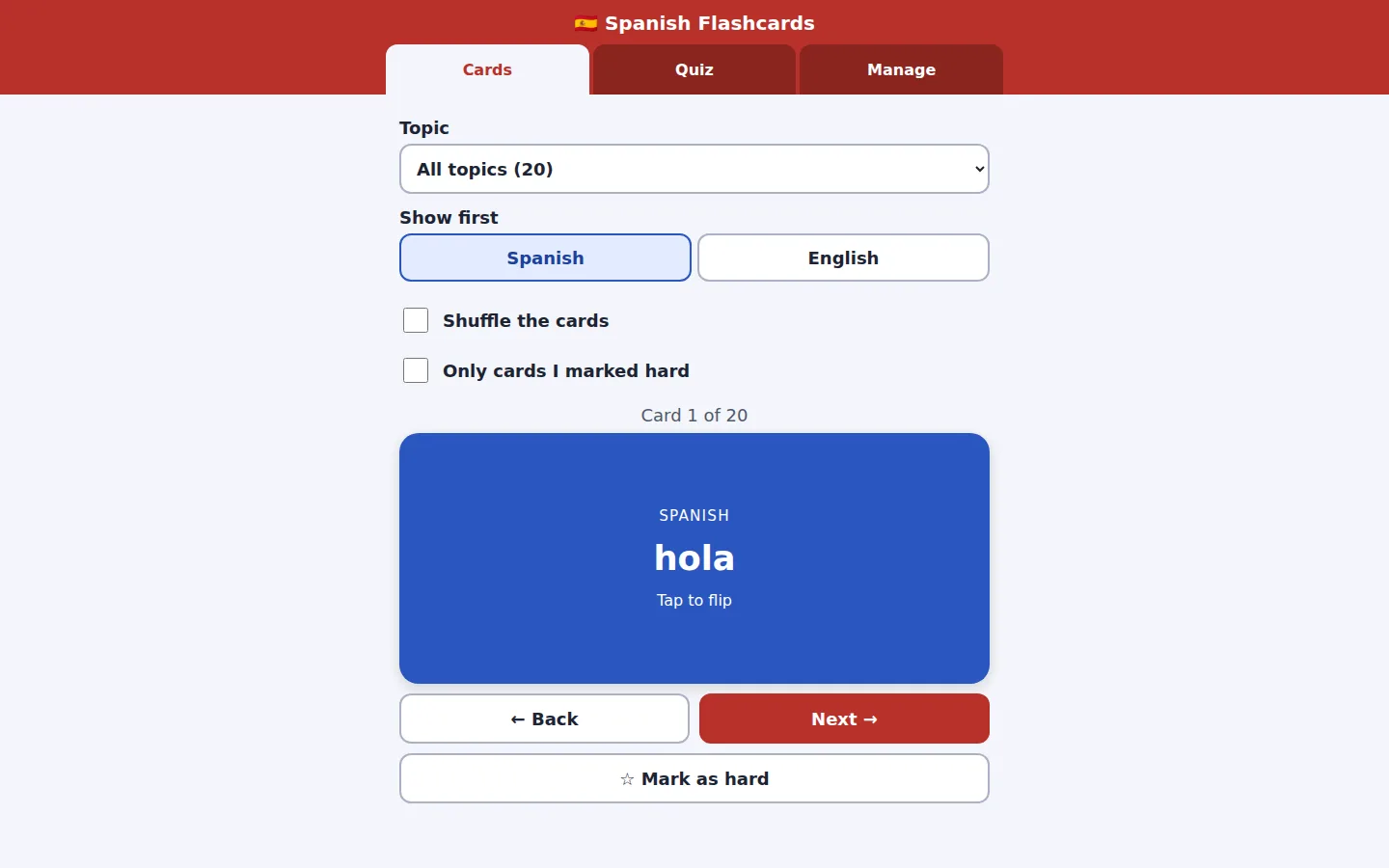
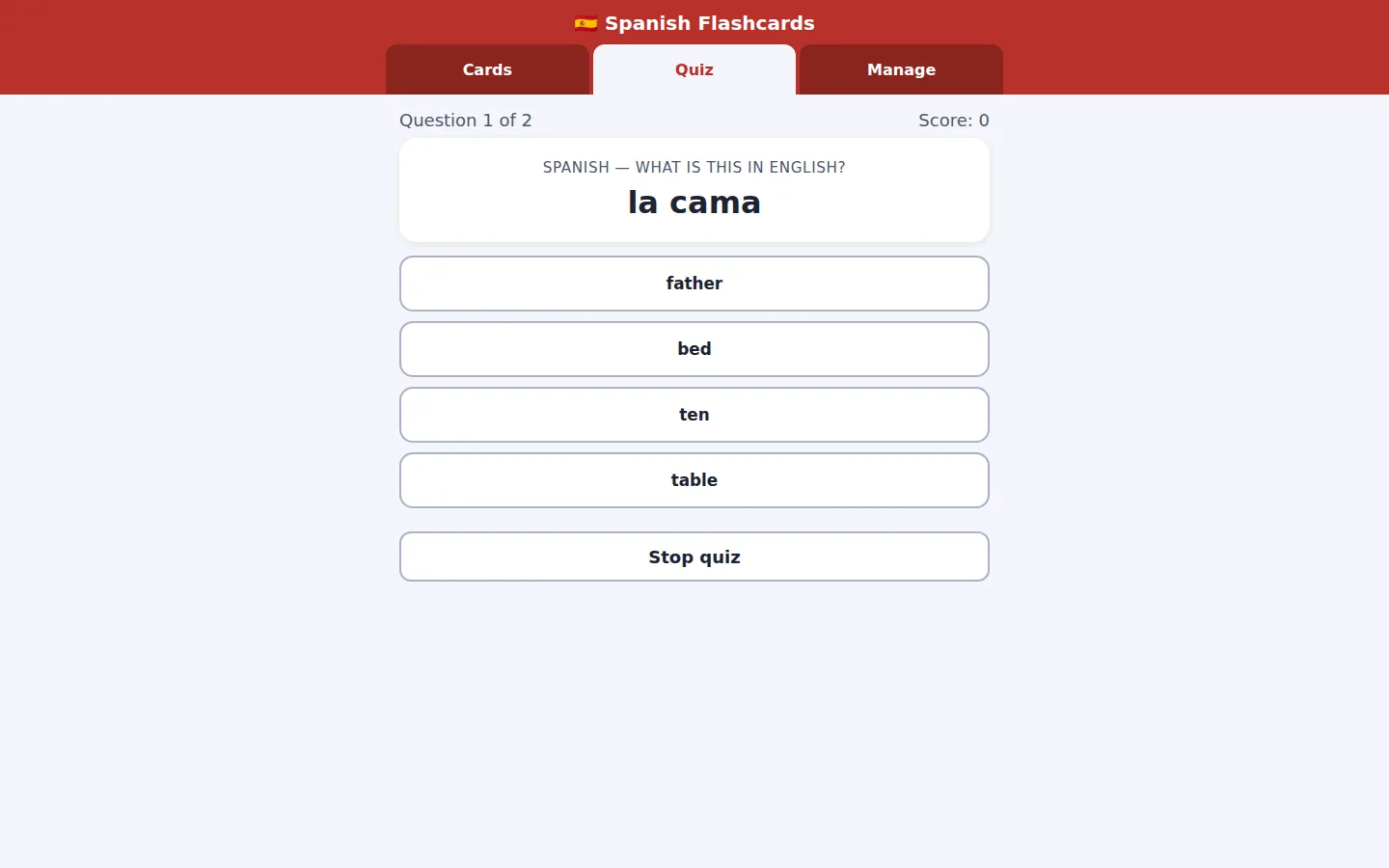
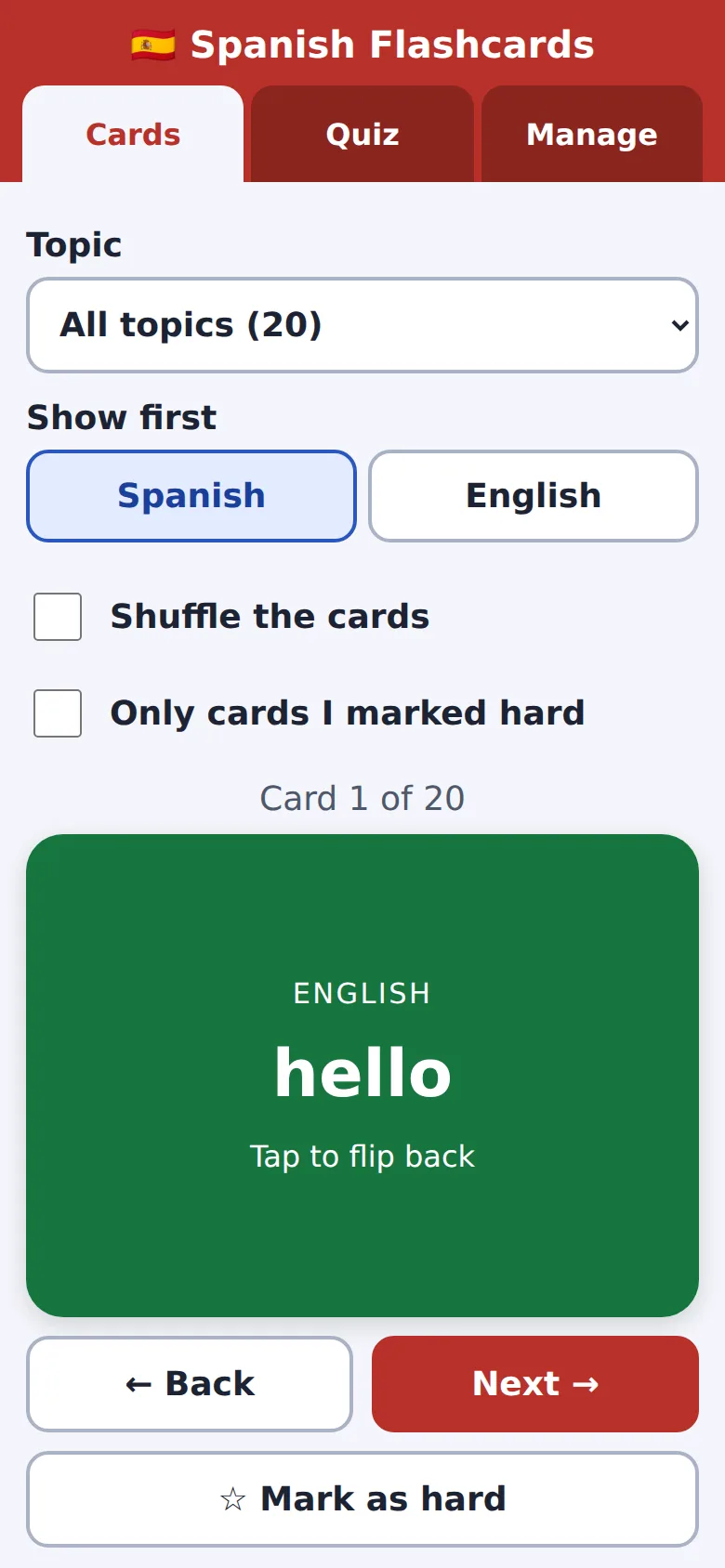
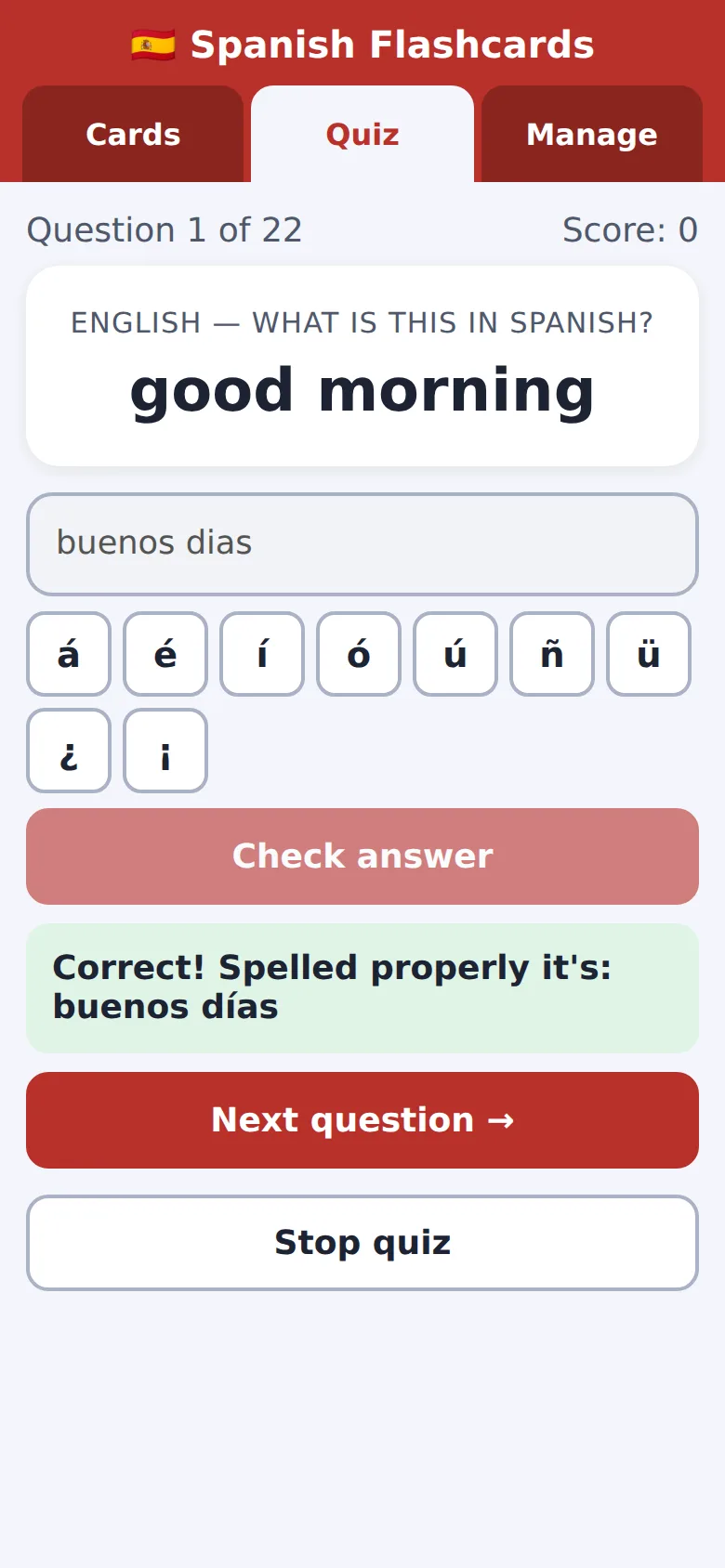
Screenshots of exactly what Claude produced, running on our machine on 2 October 2026. Nothing retouched.
We typed five plain-English prompts into one conversation with claude-sonnet-5-5 on 2 October 2026. We ran them through Anthropic’s command-line tool with only its file tools switched on, much like file creation on claude.ai, so your screen will look different. The replies are published as they came back and we edited nothing by hand. Claude spent 527.6 seconds writing them.
The first prompt made nothing. We described the app (flip cards, a quiz with a score, adding our own cards, remembering them, no account) and Claude answered with a plan and seven questions. It also warned early that with no account, cards saved on the laptop won’t appear on the phone, and offered Export and Import buttons as the fix.
In prompt 2 we answered: about 20 made-up starter words, both multiple-choice and typed quizzes, either direction, accent buttons, shuffling and a way to mark cards as hard. Claude saved one file, index.html, and said it hadn’t opened it in a browser.
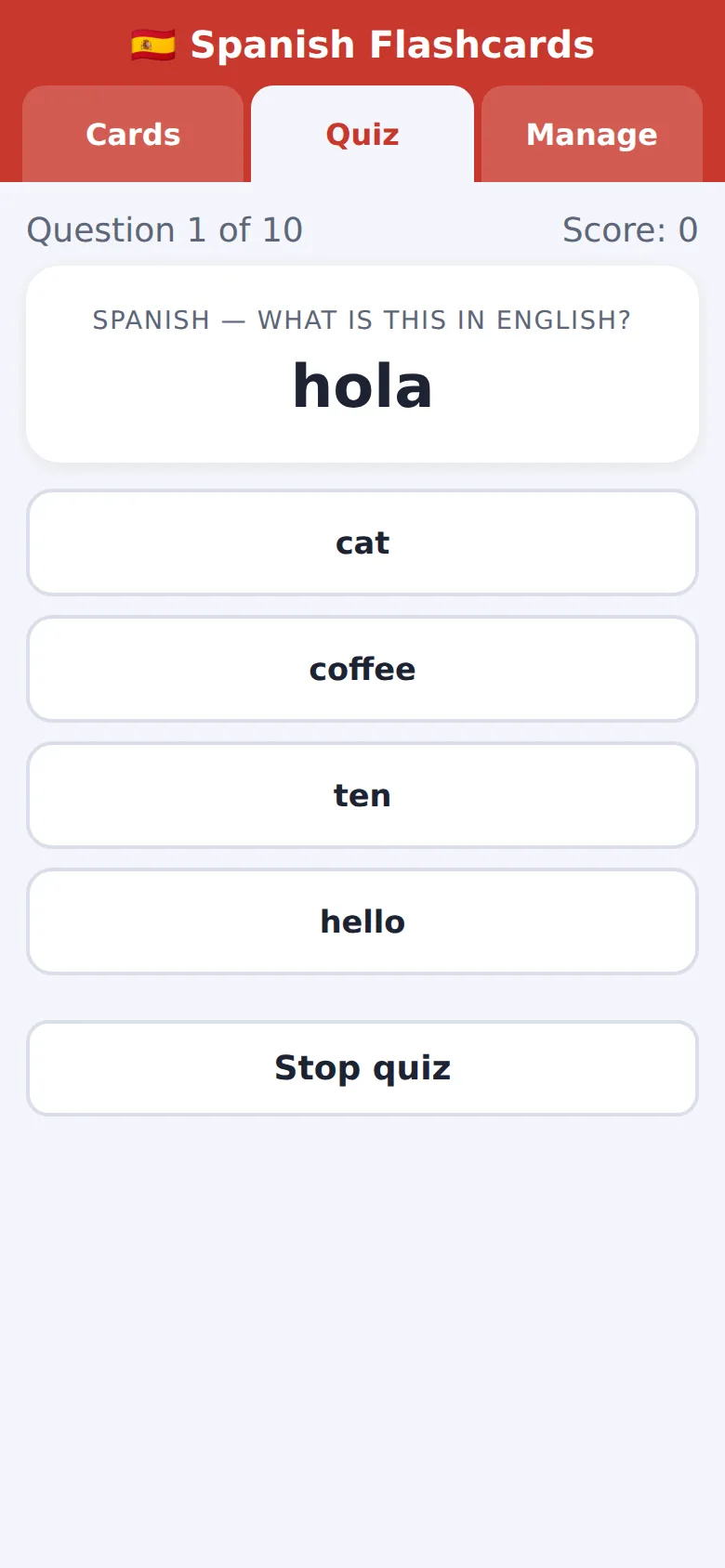
So we tested it, in a browser at laptop and phone size, with real clicks, taps and typing. The first build passed 77 of 106 checks. The biggest failure: on the quiz set-up screen, only the defaults worked. Tapping “Type it”, “English → Spanish”, “Hard only”, “20” or “All” did nothing, so every quiz was 10 multiple-choice questions, Spanish to English, whatever you picked. There were smaller faults too: faint tab labels, a pale gold star, small text, a file chooser that spilled off a phone screen, and nothing telling a screen reader which tab was selected.
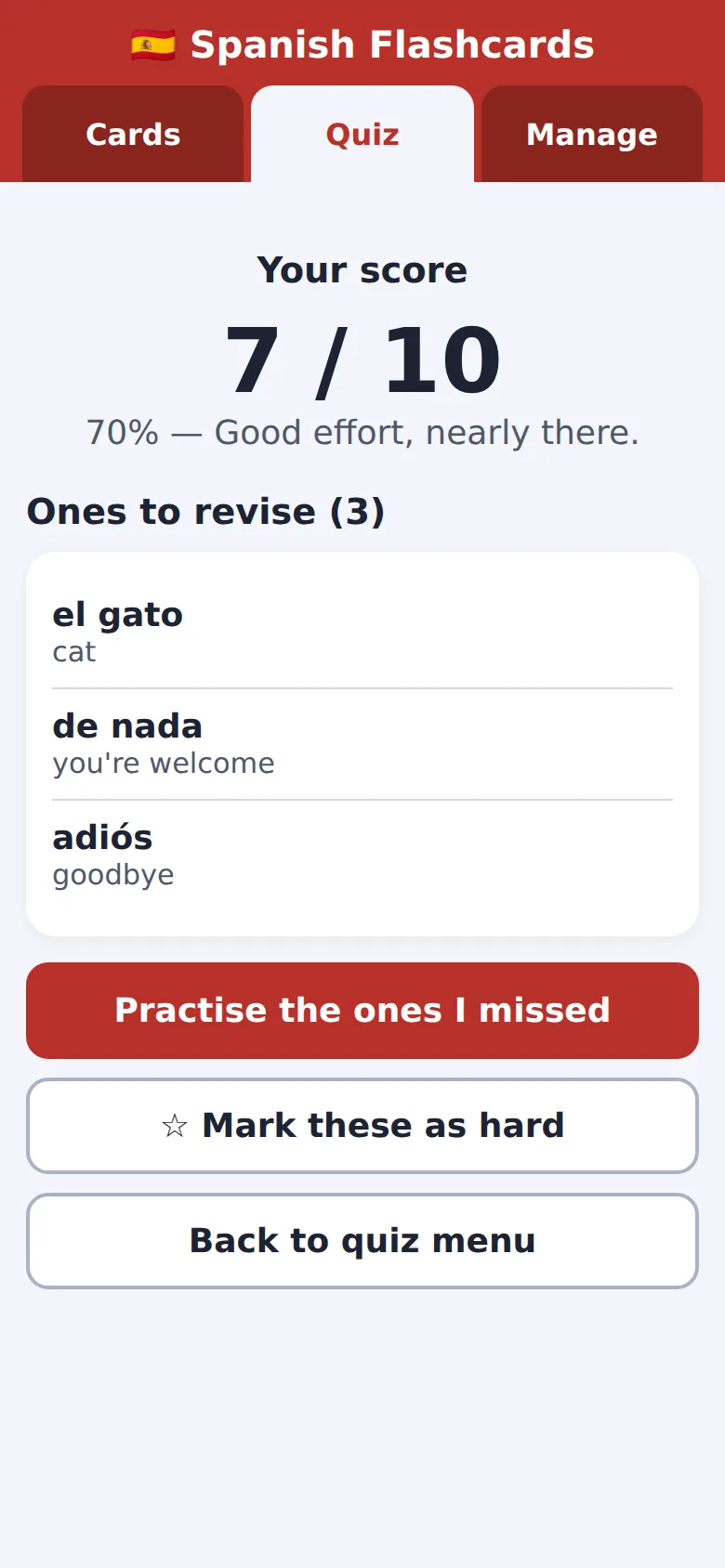
Plenty worked from the start. Cards flip by click, tap or the Space key. Shuffle, Next, Back and hard marks all behaved. Cards added in Manage were still there after a reload, and duplicates were refused. We got three answers wrong on purpose in a ten-question quiz, and it scored 7 / 10 and listed the three to revise.
Prompt 3 asked Claude to check as a learner on a small phone, hunting for mistakes. It listed and fixed a lot, and said it had only read the code, not run it. It never named the quiz bug, but the fixed file no longer has it. After that, 112 of 114 checks passed. The typed quiz accepted answers without accents and showed the proper spelling: “buenos dias” got “Correct! Spelled properly it’s: buenos días”.
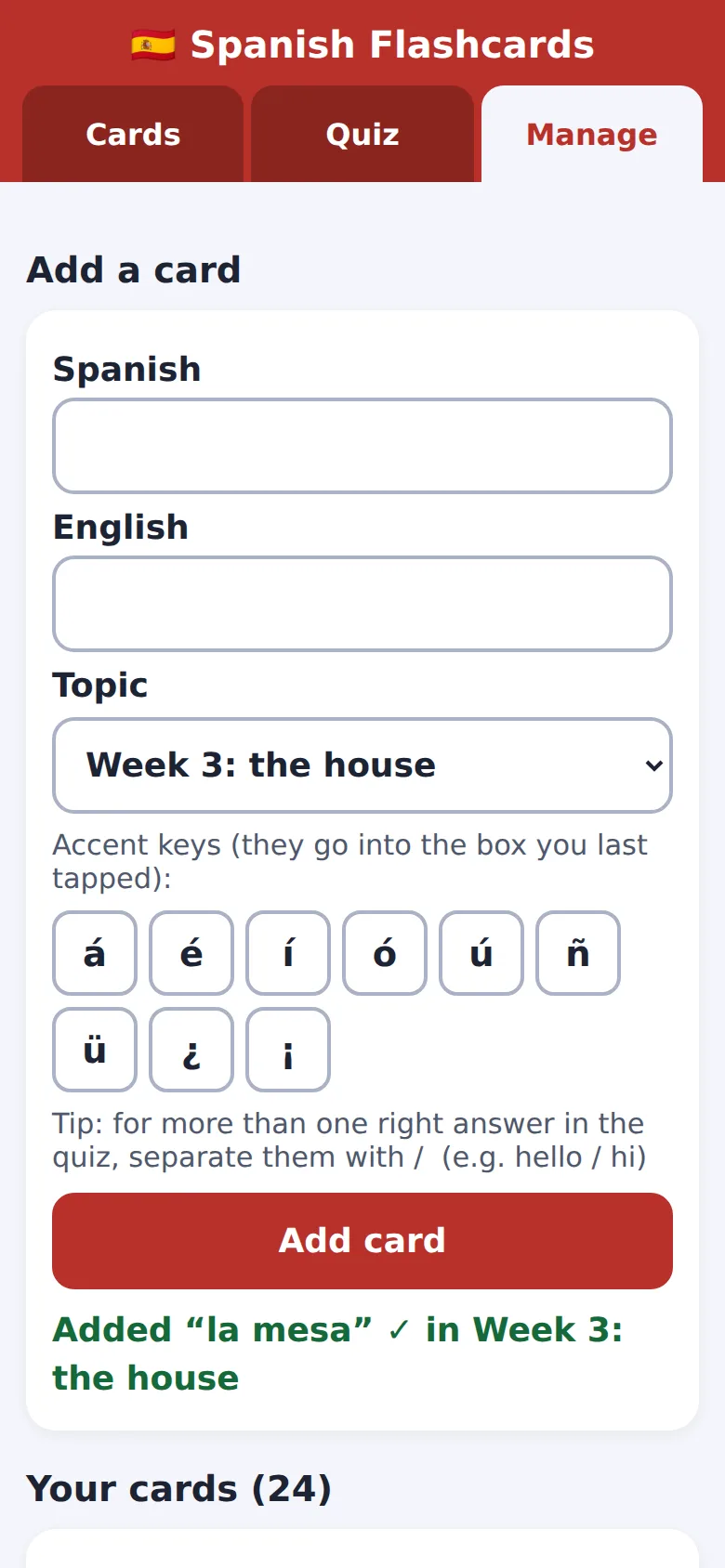
Prompt 4 added topics, and said our own words mustn’t disappear. Claude kept the same storage name so saved cards are found, and filed the starter words into four topics. We added two cards to a new topic and a quiz on it scored 2 / 2. Cards we’d added, deleted or marked hard in the previous version all came through. That build passed 133 of 135.
The two failures are the same thing at two screen sizes. Moving cards to a fresh browser with Download file and Import brought all 22 cards, but not the “hard” mark on a starter word: the new copy already has the starter words and Import skips cards it already has. Claude had said the mark would come across.
demo.iwantaito.com/make-me-a-flashcard-app/: Claude's unedited files, a made-up example.
index.html
05 · What we tested
We tried to break it. 4 of 6 held.
Run on our own machine against the unedited files. Nothing deployed while testing.
| What we tried | What happened | Result |
|---|---|---|
| Final file (prompt 4), opened by double-click, used with real clicks, taps and typing at laptop (1440x900) and phone (390x844) size in headless Chrome | 133 of 135 checks passed: no errors, nothing loaded from other websites, no sideways scrolling, text contrast and size fine, every button at least 44 pixels on a phone, cards flip by click, tap or the Space key | Pass |
| Your own cards survive | Cards added in Manage, and a card marked hard, were still there after a reload; adding the same card twice was refused | Pass |
| Quiz scoring | We got 3 of 10 multiple-choice answers wrong on purpose: it scored 7 / 10 and listed the 3 to revise. A typed quiz of all 22 cards, every answer typed without accents and one wrong on purpose, scored 21 / 22 and showed the proper spellings | Pass |
| Topics, and upgrading | Two cards added to a new topic; the Cards screen showed both and a quiz on it scored 2 / 2. Cards added, deleted or marked hard in the prompt 3 version all came through into the prompt 4 version | Pass |
| Moving cards to a new browser (Download file, then Import) | The same 22 cards arrived, but the 'hard' mark on a starter word didn't (the 2 failed checks, once per screen size) | Fail |
| Prompt 2 first build, same checks | 77 of 106: on the quiz set-up screen only the defaults worked, so every quiz was 10 multiple-choice questions, Spanish to English. Faint tab labels (3.92:1), text as small as 13.6px, the file chooser spilling off a phone. Prompt 3 fixed all of these | Fail |
06 · Ship it
Put it live from GitHub, no terminal.
Your files go into your GitHub repository and Cloudflare publishes them by itself. The steps start from Claude's own answer and are checked by us against GitHub's and Cloudflare's documentation, which the sources below link to.
These clicks follow GitHub’s and Cloudflare’s documentation and Claude’s answer to prompt 5. Claude’s unedited file is live at demo.iwantaito.com/make-me-a-flashcard-app/ (we host it ourselves, with a thin bar on top saying it’s a made-up example).
- Download the file Claude made, index.html. Keep the name exactly as it is.
- On GitHub, open your repository and select Add file, then Upload files. Drag index.html in, or select “choose your files”. Select Commit changes. The repository now lists README.md and index.html.
- If you left Cloudflare’s setup screen open, check the production branch is main, the framework preset is None and the build command is blank, then select Save and Deploy. If you’d already finished it, your upload starts a new deployment by itself.
- In Cloudflare, open Workers & Pages, then your project. Under Deployments, wait for the newest one to say Success. The address ends .pages.dev, such as spanish-flashcards.pages.dev. Open it on your phone: you should see the 20 starter cards.
- Bring your own cards across. This is Claude’s most useful warning: the live copy starts with only the starter words, because your cards are stored in the copy you’ve been using. In that copy, open Manage and select Copy as text (or Download file) and send it to yourself. At the live address, open Manage, paste it into Import and select Import. You should see how many cards were added. Do this before you stop using the old copy.
- To put a change live, such as the topics, ask Claude in the same chat, download the new index.html and upload it the same way. A file with the same name replaces the old one, and Cloudflare publishes it by itself within a minute or two. Your cards stay because the address hasn’t changed, but select Download file first as a backup.
Keep using the same address. Cards belong to the address and the device, so a new address means starting again from a backup.
Free plan: Claude makes the files, you upload them
FreeTo change something: ask Claude, download the files it changed, and upload just those the same way. Files with the same name are replaced; the rest stay as they are.
£0: Claude Free, GitHub Free and Cloudflare's free plan.
Pro: you chat, Claude saves the change, Cloudflare publishes it
Claude Pro, $20 a monthClaude edits the files and saves them to GitHub on a separate branch, a draft copy. Cloudflare gives that branch its own preview address, so you can look before anything changes. Happy with it? Select Create PR, then on GitHub select Merge pull request, then Confirm merge. Cloudflare puts it live by itself.
07 · What it costs
What it costs.
£0 a month on Claude's Free plan, GitHub Free and Cloudflare's free plan. No account for the app itself, and no domain needed.
£0. Claude’s Free plan covered all five prompts, GitHub’s Free plan holds the file, and Cloudflare says “Requests to static assets are free and unlimited”. The whole app is one file of 43,442 bytes, and you don’t need a domain.
The catches aren’t about money. Each device and each address keeps its own cards, so you move them by hand with Export and Import. Saved cards survive closing the browser, but not private browsing or clearing your browsing data, and Safari deletes them after seven days of Safari use in which you never use the page. Download a backup now and then.
08 · What it got wrong
5 things Claude got wrong, or left to you.
If Claude gets something wrong, we say so here. We never fix its files by hand; a fix is a follow-up prompt you can see above.
Quiz options that did nothing
In the first build, tapping 'Type it', 'English → Spanish', 'Hard only', '20' or 'All' changed nothing: every quiz was 10 multiple-choice questions, Spanish to English. Claude didn't name this when we asked it to check, but the fixed file no longer has the problem.
Hard marks lost on import
Claude said Export and Import carry the 'hard' mark. A new copy already has the 20 starter words, and Import skips cards you already have, so a hard mark on a starter word doesn't come across. Marks on your own words do.
Build output directory
Claude said to leave the build output directory 'empty (or /)'. Cloudflare's documentation only says to leave the build command blank when there's no build step. Empty is what we'd try first.
Small things left to you
There's no page description for search results, and the page language is set to 'en' rather than 'en-GB'. Neither matters for using it.
Not checked on an iPhone
Claude said a Home Screen icon on an iPhone can keep its cards separately from Safari, so pick one way of opening it. We didn't test on an iPhone; following its advice costs nothing.
Ours, disclosed
Built it? Where we can help next.
Ours: made by the same studio that runs this site. None of them changes anything above.
Ours
How to get AI to
Its 'turn my notes into flashcards' guide gets AI to write the cards from your notes, ready to add here.
Ours
Adapt Progress Evolve
We build these properly, if you'd rather not do it yourself.
Questions
Questions people ask.
Can Claude make me a Quizlet?
Not Quizlet itself, but your own flashcard and quiz app, yes. Five prompts gave us one file with flip cards, a multiple-choice and typed quiz with a score, cards you add yourself, and topics. It's yours, there's no account, and it costs nothing to host.
Can AI make me flashcards and a quiz for free?
Yes, in our run. Claude's Free plan made the app, and Cloudflare hosts plain files like this one for free. Claude wrote 20 starter words itself; your own cards you type in, or ask AI to write them from your notes first.
Will my cards be saved without an account?
Yes, in the browser on that device. In our tests the cards were still there after a reload. They're lost in private browsing, if you clear your browsing data, and Safari can delete them if you don't open the page for seven days of Safari use. Use Download file now and then as a backup.
How do I get my cards from my laptop to my phone?
The app has Export and Import. On the laptop copy, use Manage, then Copy as text or Download file; at the live address on your phone, use Import. Each address and each device keeps its own cards, so the live copy starts with just the starter words.
Does the quiz mark answers properly?
In the final version, yes: it scored 7 / 10 when we got three wrong on purpose, and accepted 'buenos dias' for 'buenos días' while showing the proper spelling. The first version ignored the quiz options, which is why you should test it yourself before relying on it.
Do I need to use a terminal or install anything?
No. You type in a Claude chat, download the one file it makes, and upload it to your repository on the GitHub website. Cloudflare publishes it from there.
Sources for this page
6- Claude help: create and edit files with Claude (all plans; Settings > Capabilities)
- GitHub Docs: adding a file to a repository (Add file > Upload files; 100 files at once, 25 MiB each)
- Cloudflare Pages: Git integration (Connect to Git; leave the build command blank; deploys on every push)
- Cloudflare Workers pricing ('Requests to static assets are free and unlimited')
- MDN: localStorage (kept after the browser closes, cleared after private browsing; one store per address)
- WebKit: Safari deletes script-written storage after seven days of use without visiting the site; Home Screen web apps count their own days