Real buildClaude's output, unedited
Open the live demo (Claude's unedited files, a made-up example)
I want AI to build me a blog
Five plain-English prompts in a Claude chat made a small blog: a list of posts, a page per post, an About page. Adding a post later means uploading two or three files to GitHub. Free, no terminal.
- Prompts
- 5
- Claude's time
- 2 min 46 s
- Got wrong
- 6 things
- Tests passed
- 4 of 6
- Model
- claude-sonnet-5-5
- Run on
- 2 October 2026
For: Someone who wants a simple blog (a home page listing posts, a page for each post, a few lines about them), has never built a website, has never opened a terminal, and wants it free to run.
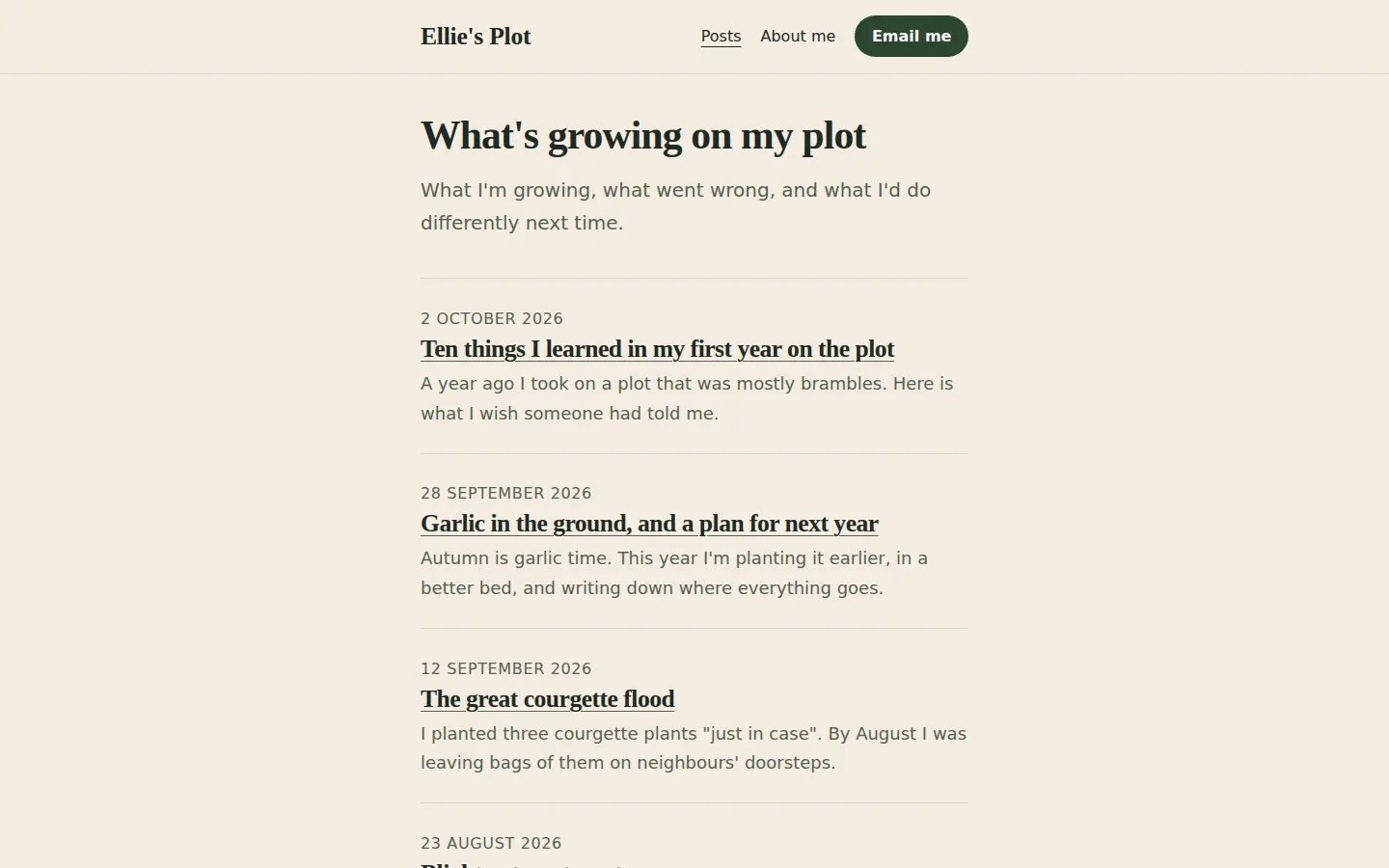
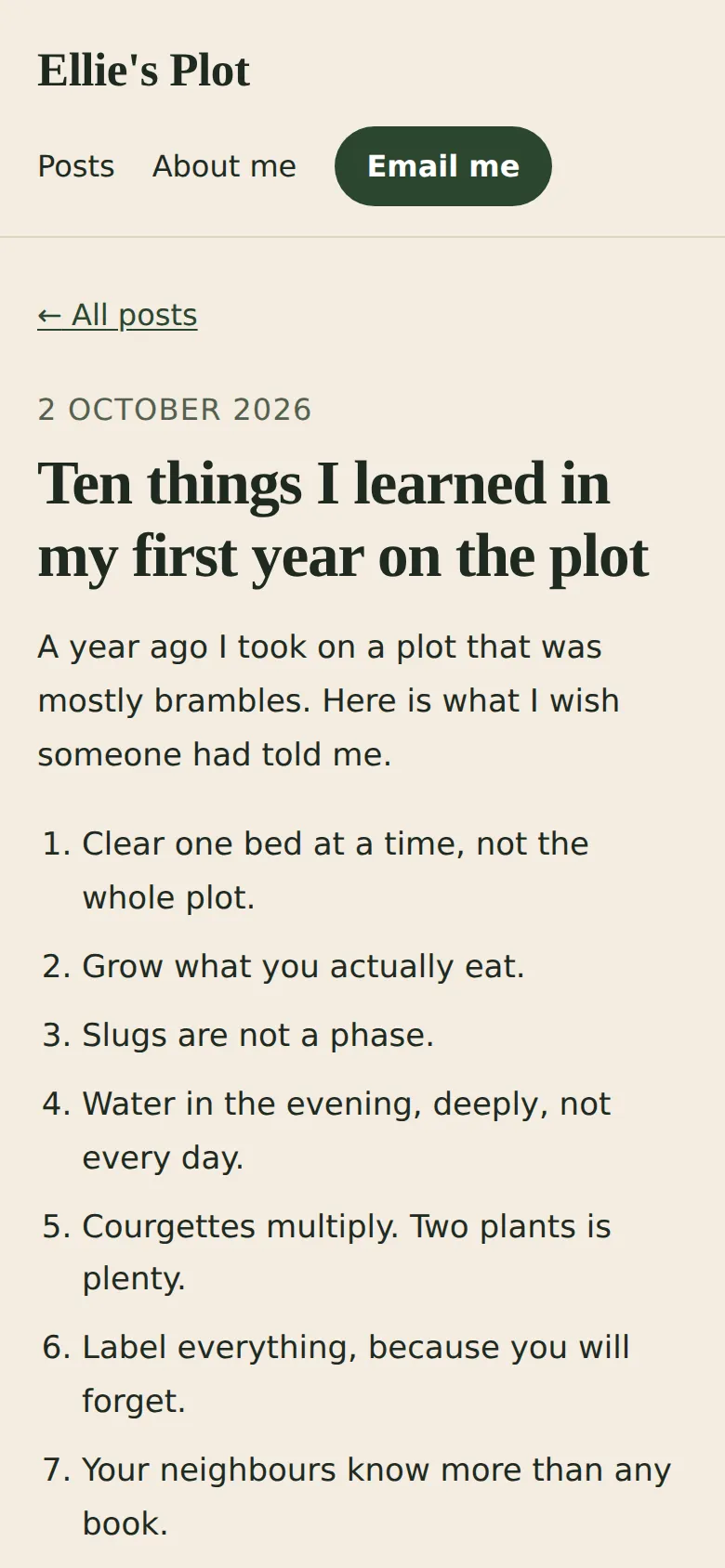
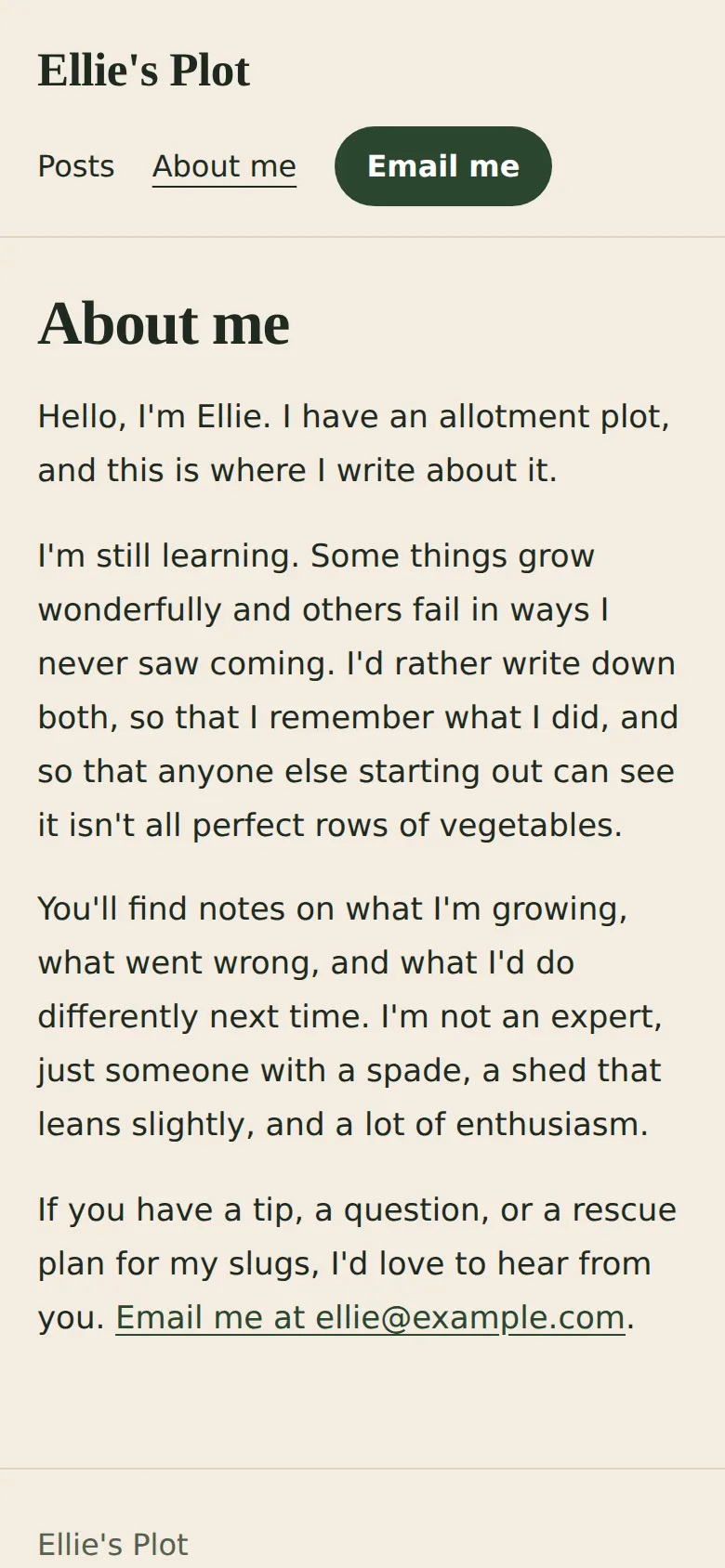
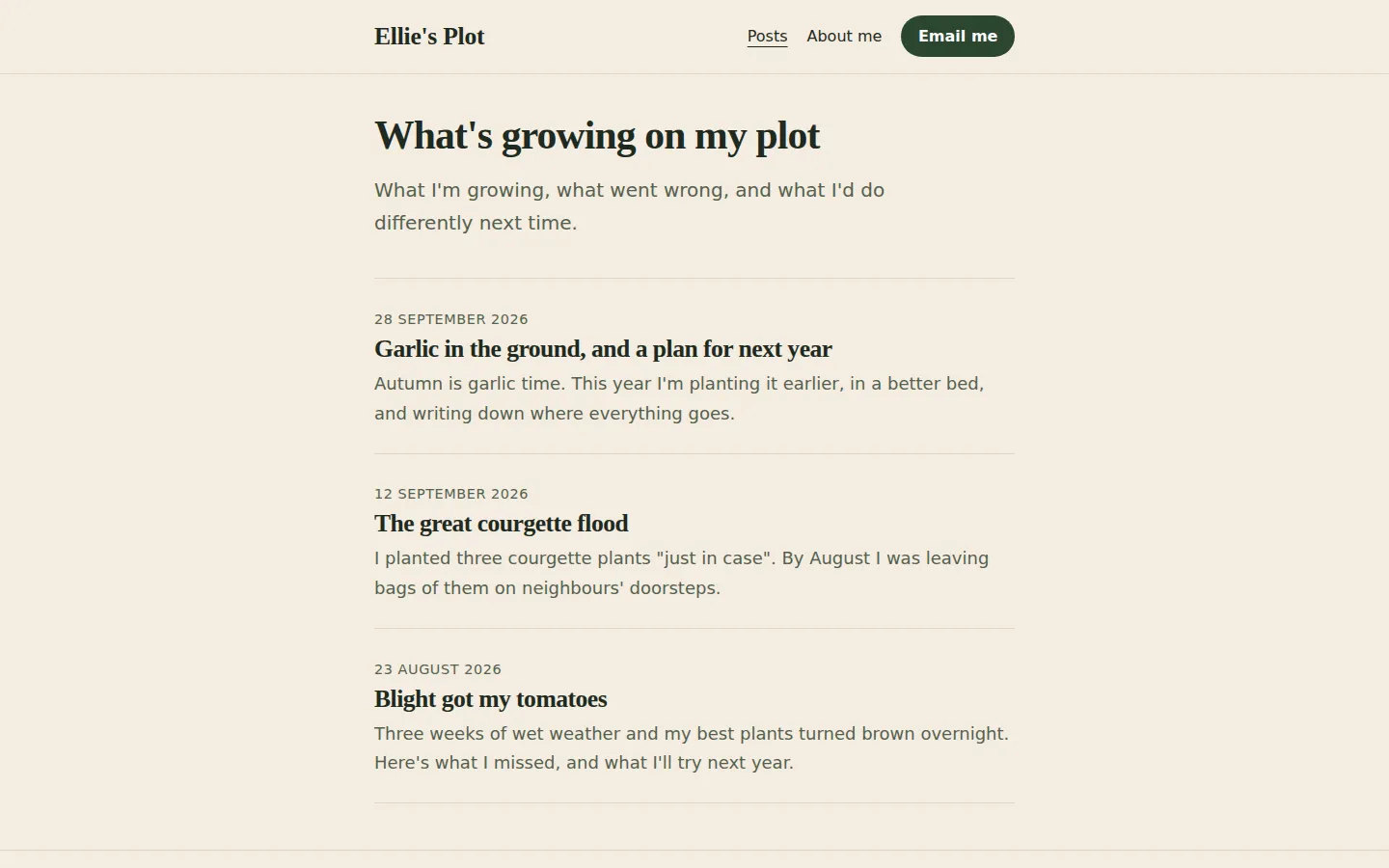
What the five prompts made Home page, newest first

01 · Before you start
Before you start.
You need three free accounts and nothing else. A Claude account with “Code execution and file creation” switched on (Settings, then Capabilities; it’s on every plan, including Free), so Claude can hand you files to download. A GitHub account with an empty repository, which is where your blog’s files will live. And a Cloudflare account connected to that repository, which puts whatever is in it on the internet. The set-up page walks through all three, once, in about 15 minutes.
Nothing to install, and no terminal. Everything below happens in a chat and a web browser.
Our example is Ellie’s Plot. Ellie is made up. She has an allotment, wants to write about what she grows and what goes wrong, and wants a blog that costs nothing to run. One thing to be clear about: Claude builds the blog, which is the website. It wrote three sample posts so we could see the layout, but the posts are meant to be yours.
02 · Set up once
Set up once, then just talk to Claude.
Free accounts you make one time and reuse for every build. Each links to the step-by-step on the set-up page, with what each screen looks like.
- 1. Get a free Claude account. It's where you describe what you want and Claude makes it. The Free plan covers every guide on this site; for websites, Pro adds the shortcut where Claude saves changes to GitHub itself.
- 2. Let Claude hand you files. Everything on this site is a handful of files: a website, an app, an extension. With this switched on, Claude can make them and give them to you to download.
- 3. Get a free GitHub account and an empty repository. A repository is a folder on GitHub that keeps every version of your files. It's the one place your site lives: you (or Claude) change the files there, and Cloudflare publishes whatever is in it.
- 4. Get a free Cloudflare account and connect it to your repository. Cloudflare is where your site is live on the internet. Once it is connected to your repository, every change to the files on GitHub goes live by itself, in a minute or two. A site made of plain files costs nothing to host: Cloudflare says requests to static files are "free and unlimited".
- 5. Connect Claude to GitHub. So Claude can read the files that are live now before it changes them, even in a brand new chat. On Pro, the same connection is what lets Claude Code on the web save its changes to your repository.
03 · The prompts
Paste these five, in order.
Plain English, typed into an ordinary Claude chat. On the left, exactly what we sent, word for word; change the details to yours. On the right, what came back. One conversation with claude-sonnet-5-5, run on 2 October 2026. Read the full transcript.
Prompt 1 of 5
Describe your blog, and say how often you'll add to it.
You say: I'd like to start a blog and I've never made a website. I'm Ellie. I have an allotment plot and I want to write about it: what I'm growing, what went wrong, what I'd do differently. I'd like the blog to be called "Ellie's Plot". On it I'd like: - a home page that lists my posts, newest first, with the title, the date and a line or two from each one - a page of its own for each post - a short "About me" page - a way to email me (ellie@example.com). I don't want a form. I'll write the posts myself, but I want to be able to add a new one every week or two without it being a big job. I'm not technical, and I want it to be free to run. Before you make anything, ask me anything you need to know, and tell me in plain English what you're going to make.
1,260 output tokens back · read the full reply
Prompt 2 of 5
Answer its questions, and show it a website you like.
Attach: a screenshot of a website you like the look of · the one we attached
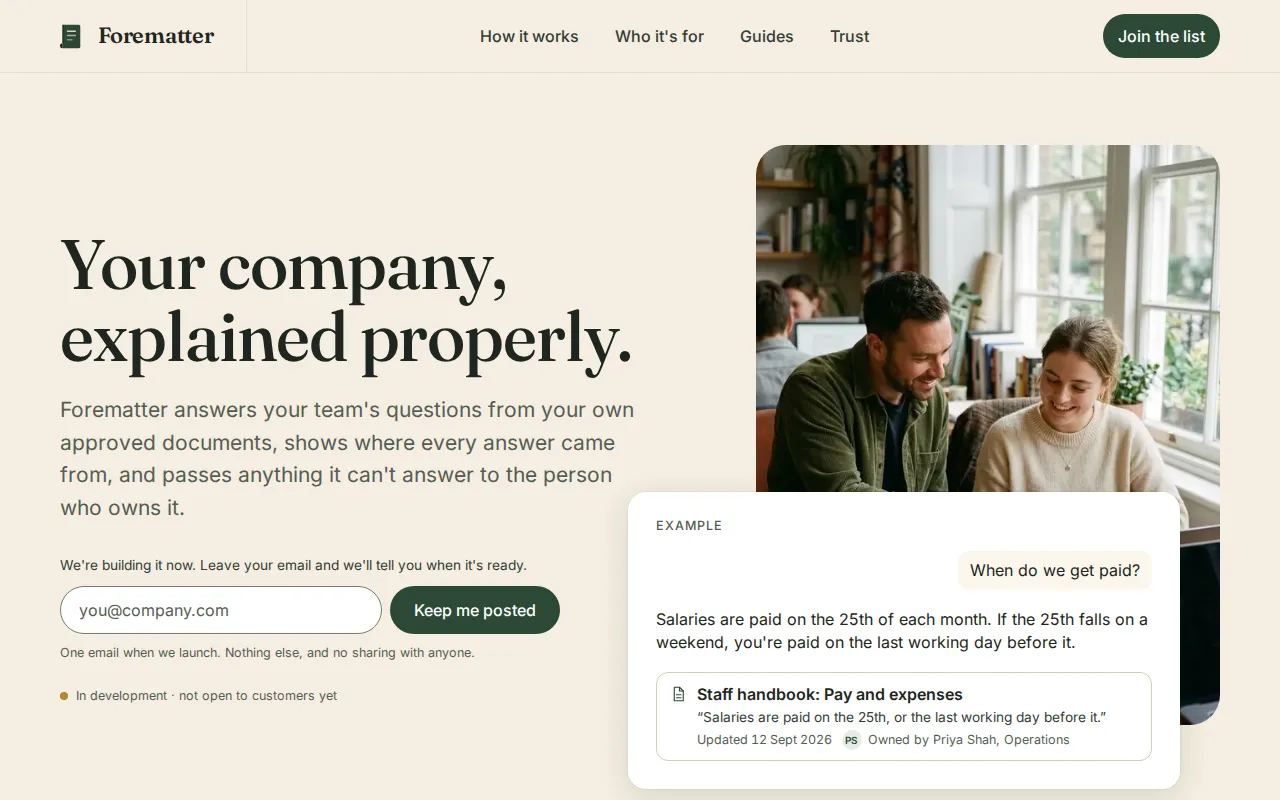
You say: Thanks, that sounds right. My answers: 1. Please write three short made-up sample posts for now, so I can see how it looks. I'll replace them with my own writing. 2. Make up a few friendly lines for the About page too. I'll change them. 3. No photos yet. 4. I've attached a screenshot of a website I like the look of. I like the warm cream background, the big serif headings and how calm it feels. Don't copy its words, just the feel. 5. The free address is fine for now. 6. When I've written a new post, I'll paste it to you and ask you to add it. Please make the blog now. Keep it as simple as possible: just the files I'll need to upload, nothing I have to install. It must be easy to read on a phone.
8,734 output tokens back · read the full reply
Prompt 3 of 5
Ask it to check its work like a reader on a phone.
You say: I opened it by double-clicking index.html and it looks lovely. Before I put it online, please check every page carefully, as if you were someone reading on a small phone and as if you were trying to find mistakes: links that go nowhere, posts that don't link back to the home page, writing that's too small or too faint, lines that are too long to read comfortably, anything that spills off the side of the screen, and anything that would trouble someone who uses a screen reader or only a keyboard. Tell me in plain English what you found, then fix it in the files.
7,716 output tokens back · read the full reply
Prompt 4 of 5
Add a new post, the way you will every week or two.
You say: I've written my first real post. Please add it as my newest one: Title: Ten things I learned in my first year on the plot Date: today "A year ago I took on a plot that was mostly brambles. Here is what I wish someone had told me. 1. Clear one bed at a time, not the whole plot. 2. Grow what you actually eat. 3. Slugs are not a phase. 4. Water in the evening, deeply, not every day. 5. Courgettes multiply. Two plants is plenty. 6. Label everything, because you will forget. 7. Your neighbours know more than any book. 8. Leave a wild corner for the frogs. 9. Write down what you sowed and when. 10. Some years the beans just fail, and that's fine." Then tell me exactly which files you changed or made, so I know which ones to upload again.
1,959 output tokens back · read the full reply
Prompt 5 of 5
Ask how to put it live from GitHub, and how to add a post later, by clicking.
You say: I've made free GitHub and Cloudflare accounts. On GitHub I made a new repository called ellies-plot (I switched on "Add README"), and in Cloudflare I went to Workers & Pages, Create application, Pages, Connect to Git, and picked that repository, so it should go live by itself whenever the files on GitHub change. I don't want to use the terminal or install anything. Please tell me, step by step, how to get the blog into my repository using the GitHub website, what I should see at each step, how I find the address where it's live, and how I put a new post live later (like the one I just added).
3,444 output tokens back · read the full reply
After prompt 1 of 5
Reply to prompt 1 · 13 s · 1,260 output tokens
Describe your blog, and say how often you'll add to it.
A plan and some questions, and nothing made yet. Ours described the home page, a page per post, About and an email link, asked seven questions (the email address, photos, hosting, the address, About text, the look, a first post) and warned that an email address on a page attracts spam. It also promised a home page that would build its own list, which it dropped in the next reply.
Reply to prompt 5 · 30.8 s · 3,444 output tokens
Ask how to put it live from GitHub, and how to add a post later, by clicking.
Click-by-click steps. Ours: Add file, Upload files, drag in what's inside the blog folder (index.html, about.html, style.css and the posts folder), not the folder itself; check the posts are listed under posts/; Commit changes; then find the .pages.dev address in Cloudflare. For a new post, upload the files Claude lists, dragging the posts folder so the new page lands inside it. It rewrote HOW-TO-PUBLISH.txt for GitHub and said not to upload that one.
04 · The result
The real thing, on the stage.
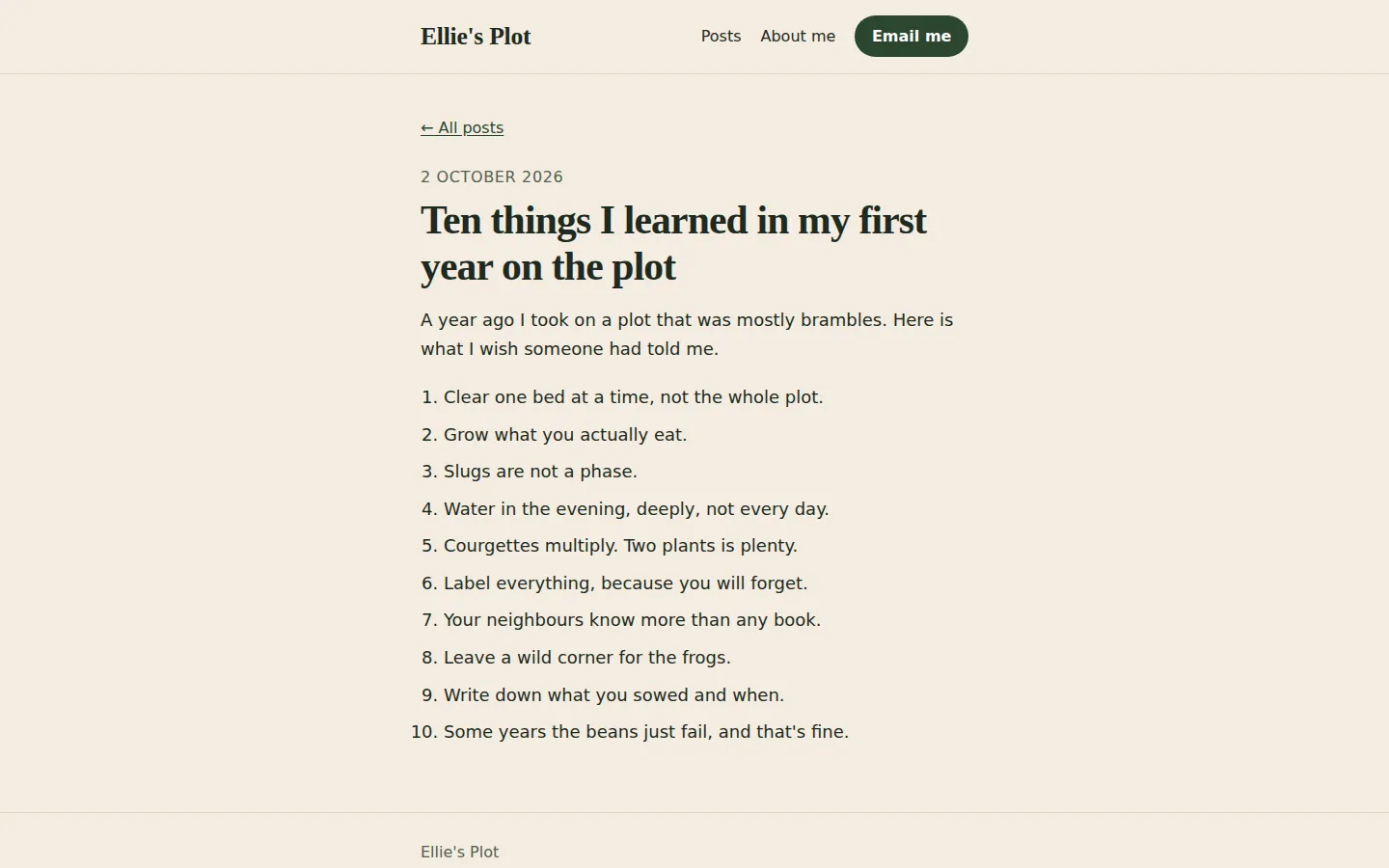
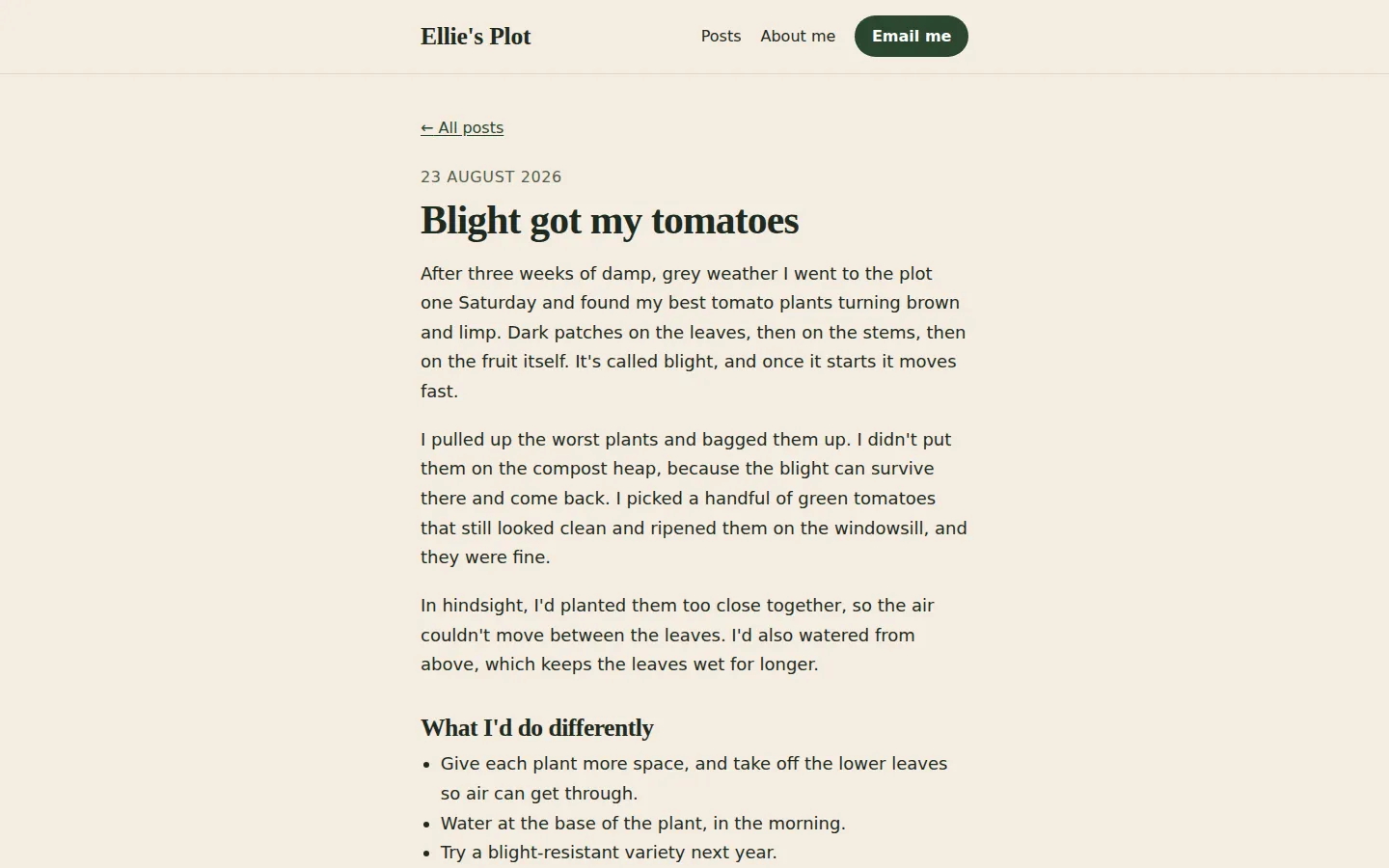
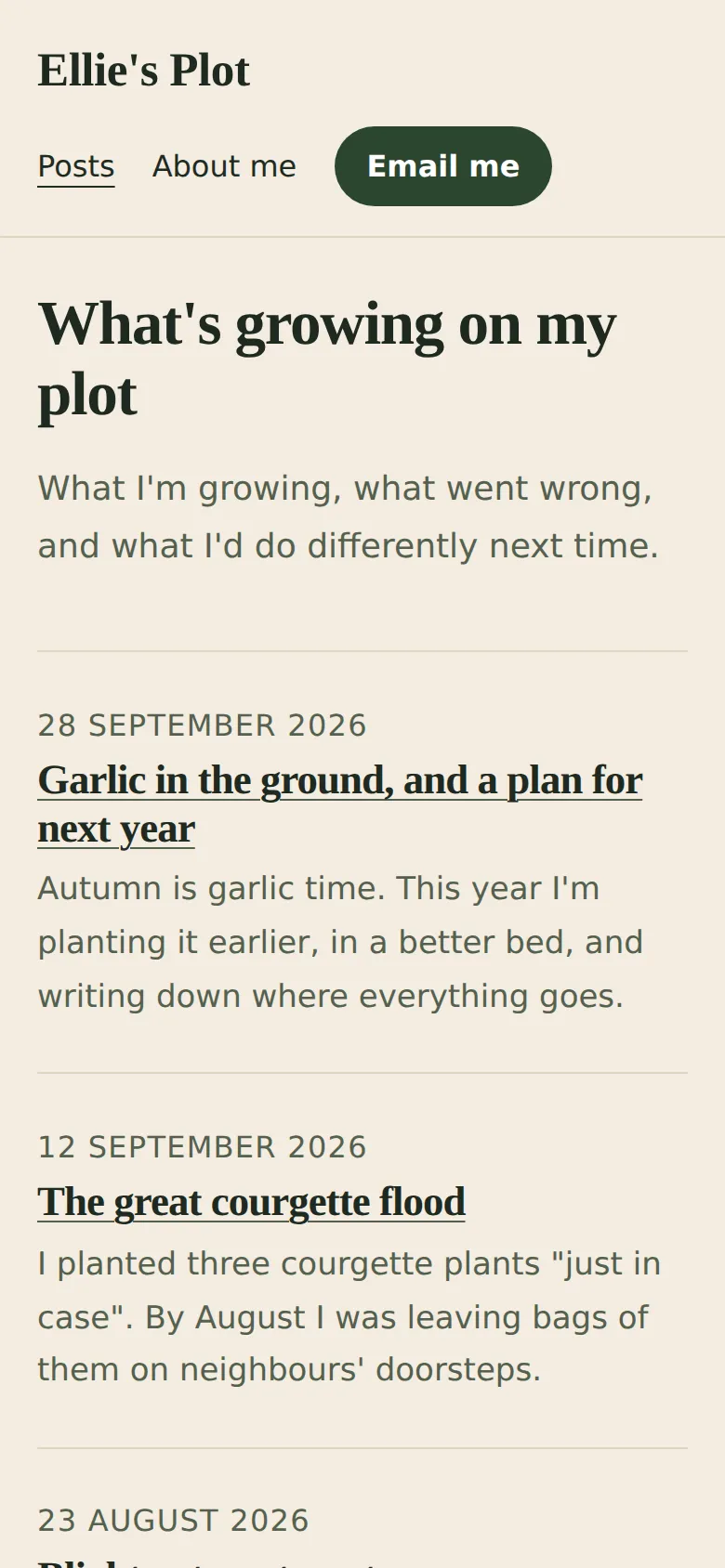
Screenshots of exactly what Claude produced, running on our machine on 2 October 2026. Nothing retouched.
We typed five plain-English prompts into one conversation with claude-sonnet-5-5 on 2 October 2026. One caveat: we ran them through Anthropic’s command-line tool with only its file tools switched on, so Claude could save files into an empty folder, much like file creation on claude.ai. We didn’t use the claude.ai website itself, so your screen will look different. The replies are published as they came back and we edited nothing by hand. Claude spent 165.7 seconds writing them.
The first prompt described the blog and asked Claude to ask questions before making anything. It made nothing and asked seven. It warned that an email address on a page attracts spam, suggested Netlify (we hadn’t mentioned Cloudflare yet), and said the home page would build its own list of posts.
That last part didn’t survive. In the second prompt we answered its questions, asked for three made-up sample posts, and attached a screenshot of one of our own sites for the cream background and big serif headings. Claude saved a home page, an About page, a style sheet, three post pages in a posts folder and a note on publishing. It said it hadn’t opened them in a browser, and it said plainly that it had changed its plan: to keep the blog as plain files with nothing to install, the list doesn’t build itself. When you send a new post, Claude sends back the post’s page and an updated home page. That’s the catch, and it’s worth knowing early.
We tested every page at laptop and phone size, opened from disk like a double-click. After prompt 2, 150 of 160 checks passed. The ten fails were one thing: no “skip to main content” link on any of the five pages.
Prompt 3 asked Claude to check it like a reader on a small phone, and like someone hunting for mistakes. It narrowed the lines (it said from about 85 characters to about 65 to 70), underlined the post titles on the home page, made the dates bigger, added the skip link and stopped long words spilling sideways. It also corrected one of its own sample posts. It said it had checked by reading the code, not on a phone or with a screen reader. After that, 170 of 170 checks passed.
Prompt 4 is the step you’ll repeat. We pasted a post, ten things learned in a first year on the plot, dated “today”. Claude made its page, put it at the top of the home page dated 2 October 2026, used our words exactly, and listed three files to upload again: the new post page, index.html and style.css. It also noticed our post says two courgette plants is plenty while its own sample post says one. Fair catch.
We then tested the list properly. All four posts appear once, newest first, and every title and date on the home page matches the post’s own page. Clicking the newest title opens it, and “All posts” comes back. We also tried the upload the way you’d do it: the prompt 3 blog plus only the three files Claude named gave a folder identical to Claude’s own. Leave out style.css and it still works; only the spacing of the numbered list differs. Upload the new post page without index.html, though, and the post is online but missing from the home page.
demo.iwantaito.com/build-me-a-blog/: Claude's unedited files, a made-up example.
HOW-TO-PUBLISH.txt
about.html
index.html
posts/blight-and-the-tomatoes.html
posts/garlic-for-next-year.html
posts/ten-things-first-year.html
posts/the-courgette-flood.html
style.css
05 · What we tested
We tried to break it. 4 of 6 held.
Run on our own machine against the unedited files. Nothing deployed while testing.
| What we tried | What happened | Result |
|---|---|---|
| Prompt 3 files opened by double-click, every page (home, About, three posts) at laptop (1440x900) and phone (390x844) size in headless Chrome | 170 of 170 checks passed: no errors, nothing loaded from other websites, no sideways scrolling, every link works, one main heading per page, every post links back home, skip link reachable with Tab, smallest text 16px, at most about 60 characters per line on a laptop | Pass |
| Text contrast | Lowest text contrast 5.67:1 on every page at both sizes (the WCAG AA minimum is 4.5:1) | Pass |
| Prompt 4 files: the post list after adding a new post | 205 of 205: the home page lists all 4 posts once each, newest first; every listed title and date matches the post's own page; clicking the newest title opens it and 'All posts' comes back | Pass |
| Uploading only the files Claude named (the new post, index.html, style.css) on top of the prompt 3 blog | Identical to Claude's own prompt 4 folder, 205 of 205. Leaving out style.css still passes; only the spacing of the numbered list differs | Pass |
| Uploading only the new post page, without the updated index.html | The post exists but the home page doesn't list it (200 of 201). Upload both | Fail |
| Prompt 2 first build, same checks | 150 of 160: no skip link on any of the 5 pages at either size. Prompt 3 fixed it | Fail |
06 · Ship it
Put it live from GitHub, no terminal.
Your files go into your GitHub repository and Cloudflare publishes them by itself. The steps start from Claude's own answer and are checked by us against GitHub's and Cloudflare's documentation, which the sources below link to.
These clicks follow GitHub’s and Cloudflare’s documentation and Claude’s own steps; Claude said its button names might differ a little. Claude’s unedited files are live at demo.iwantaito.com/build-me-a-blog/ (we host them ourselves, with a thin bar on top saying it’s a made-up example); the screenshots are from our own machine.
- Download Claude’s files into one folder: index.html, about.html, style.css and the posts folder with the post pages in it. HOW-TO-PUBLISH.txt is a note for you; Claude said not to upload it.
- On GitHub, open your ellies-plot repository and select Add file, then Upload files. You’ll see a box to drag files into.
- Open the blog folder on your computer and drag in what’s inside it, not the folder itself, or the blog ends up one level too deep. Check the post pages are listed under posts/ before you go on.
- Select Commit changes. The repository now lists posts, about.html, index.html, style.css and README.md. README.md doesn’t appear on the blog.
- Wait a minute or two. In Cloudflare, open Workers & Pages, then your project. The newest deployment should say “Success”. The address ends .pages.dev and comes from your project name, such as ellies-plot.pages.dev. Open it and click through a post, “All posts” and About me.
- To add a post later, paste it to Claude in the same chat and ask which files changed. On GitHub, select Add file, then Upload files, drag in those files (drag the posts folder so the new page lands inside it) and select Commit changes. Claude says a file with the same name replaces the old one; the rest stay. Always include index.html, or the new post won’t be on the home page. Cloudflare publishes the change by itself.
On Claude Pro, you can skip the downloading and uploading. Claude Code on the web can save the change to a branch of your repository; you merge it on GitHub and Cloudflare publishes it. The set-up page shows how.
Free plan: Claude makes the files, you upload them
FreeTo change something: ask Claude, download the files it changed, and upload just those the same way. Files with the same name are replaced; the rest stay as they are.
£0: Claude Free, GitHub Free and Cloudflare's free plan.
Pro: you chat, Claude saves the change, Cloudflare publishes it
Claude Pro, $20 a monthClaude edits the files and saves them to GitHub on a separate branch, a draft copy. Cloudflare gives that branch its own preview address, so you can look before anything changes. Happy with it? Select Create PR, then on GitHub select Merge pull request, then Confirm merge. Cloudflare puts it live by itself.
07 · What it costs
What it costs.
£0 a month on Cloudflare's free plan and Claude's Free plan; your own domain is optional and the only cost.
Hosting is £0 a month. Cloudflare says requests to static files are free and unlimited, and a blog like this is nothing but static files. GitHub’s Free plan holds them, and Claude’s Free plan includes the file creation this needs.
A domain of your own is optional. Claude said one would cost roughly £10 to £15 a year, but we haven’t checked prices, so look before you buy. The free .pages.dev address works without one.
08 · What it got wrong
6 things Claude got wrong, or left to you.
If Claude gets something wrong, we say so here. We never fix its files by hand; a fix is a follow-up prompt you can see above.
The list doesn't build itself
In its first reply Claude said the home page would build its own list from your posts. In the second it said that, to stay as plain files with nothing to install, it would update the list itself each time instead. So every new post means two files at least: the post page and index.html. Our test shows what happens if you forget index.html: the post is online but nobody can find it from the home page.
It started with Netlify
Claude's first plan, and its first HOW-TO-PUBLISH.txt, were for Netlify. It switched to GitHub and Cloudflare when we said we had those accounts. We haven't checked the Netlify steps.
A taken project name, and the output directory
Claude said Cloudflare adds a few extra letters or numbers to the address if the project name is taken, and that the build output directory can be 'empty or /'. Cloudflare's Git integration page says the address comes from the project name and to leave the build command blank; it doesn't say either thing. Use the address the project page shows.
Not tried on Cloudflare itself
We tested the files opened from disk, not on a live Cloudflare address. Cloudflare redirects a page like /about.html to /about; Claude's links are all relative, so they should keep working, but we haven't seen it.
No 'page not found' page
There is no 404.html, so Cloudflare Pages shows the home page for any mistyped address. Ask Claude for a '404.html page not found page' if that bothers you.
A domain price we didn't check
Claude said a domain like elliesplot.com costs roughly £10 to £15 a year. We haven't checked domain prices. The free .pages.dev address works without one.
Ours, disclosed
Built it? Where we can help next.
Ours: made by the same studio that runs this site. None of them changes anything above.
Ours
ScriptGrain
Claude built the blog; the posts are yours to write. ScriptGrain learns how you write from your own samples and drafts posts that sound like you.
Ours
What is GEO
Once the blog is live, a free guide to getting your posts read and cited by AI assistants.
Questions
Questions people ask.
Can I build a blog with AI for free?
Yes, in our run. Five prompts in one Claude conversation made a blog with a home page of posts, a page per post and an About page, and Claude's Free plan includes file creation. GitHub's Free plan holds the files and Cloudflare serves files like these for free. A domain name is optional and the only possible cost.
How do I build a blog with AI, step by step?
Describe the blog and ask Claude to ask you questions first. Answer them and ask it to make the files. Ask it to check every page as a reader on a phone and fix what it finds. Then upload the files to a GitHub repository that's connected to Cloudflare, which puts them live. The five prompts we used are above, word for word.
How do I add a new post once the blog is live?
Paste the post into the same Claude chat and ask which files it changed. Ours sent back the new post page, an updated index.html (the list of posts) and style.css. On GitHub select Add file, then Upload files, drag those in and select Commit changes; Cloudflare publishes the change by itself. Always include index.html, or the post won't appear on the home page.
Will Claude write my blog posts too?
It wrote three made-up sample posts so we could see the layout, and it added our own post word for word. The blog is the website; the writing is yours. If you want help drafting posts in your own voice, that's a different tool.
Do I need a terminal or to install anything?
No. You type in a Claude chat, download the files, and upload them on the GitHub website. Cloudflare, connected to your repository once, does the rest. On Claude Pro, Claude Code on the web can save changes to a branch of your repository for you to merge on GitHub instead.
Sources for this page
8- Claude help: create and edit files with Claude (all plans; Settings > Capabilities)
- Claude help: uploading files to Claude (screenshots, 20 files per chat)
- Claude docs: GitHub integration (every plan, reads files only)
- GitHub Docs: adding a file to a repository (Add file > Upload files; a file or folder; 100 files at once, 25 MiB each)
- Cloudflare Pages: Git integration (Connect to Git; leave the build command blank; deploys on every push; address from the project name)
- Cloudflare Pages: serving pages (no 404.html means single-page app behaviour; /page.html redirects to /page)
- Cloudflare Workers pricing ('Requests to static assets are free and unlimited')
- Claude Code on the web: get started (Pro, Max and Team plans; pushes a branch for you to review)