Real buildClaude's output, unedited
Open the live demo (Claude's unedited files, a made-up example)
I want AI to build me a CV or portfolio website
Five plain-English prompts in a Claude chat made a one-page CV and portfolio with email and copy-address buttons. Upload it to GitHub and Cloudflare puts it live: free, no terminal.
- Prompts
- 5
- Claude's time
- 3 min 32 s
- Got wrong
- 5 things
- Tests passed
- 4 of 6
- Model
- claude-sonnet-5-5
- Run on
- 1 October 2026
For: A freelancer or job hunter who wants their CV and portfolio on one web page to send as a link instead of a Word document, has never built a website and has never opened a terminal.
What the five prompts made Top of the page
01 · Before you start
Before you start.
You need three free accounts and nothing else. A Claude account with “Code execution and file creation” switched on (Settings, then Capabilities; it’s on the Free plan), so Claude can hand you a file to download. A GitHub account with an empty repository, which is where your page will live. And a Cloudflare account connected to that repository, which puts whatever is in it on the internet. The set-up page walks through all three, once, in about 15 minutes.
Nothing to install, and no terminal. Everything below happens in a chat and a web browser.
Our example is Nell Ashcombe, a made-up freelance illustrator in Bristol who does children’s books and packaging in watercolour and ink. She wants her CV and portfolio on one page she can send as a link, instead of a Word document. Have your details roughly to hand, but if something’s missing, Claude will put in a marked placeholder. Change the details to yours.
02 · Set up once
Set up once, then just talk to Claude.
Free accounts you make one time and reuse for every build. Each links to the step-by-step on the set-up page, with what each screen looks like.
- 1. Get a free Claude account. It's where you describe what you want and Claude makes it. The Free plan covers every guide on this site; Pro adds the shortcut where Claude saves changes to GitHub itself.
- 2. Let Claude hand you files. A website is a handful of files. With this switched on, Claude can make them and give them to you to download, ready to upload to GitHub.
- 3. Get a free GitHub account and an empty repository. A repository is a folder on GitHub that keeps every version of your files. It's the one place your site lives: you (or Claude) change the files there, and Cloudflare publishes whatever is in it.
- 4. Get a free Cloudflare account and connect it to your repository. Cloudflare is where your site is live on the internet. Once it is connected to your repository, every change to the files on GitHub goes live by itself, in a minute or two. A site made of plain files costs nothing to host: Cloudflare says requests to static files are "free and unlimited".
- 5. Connect Claude to GitHub. So Claude can read the files that are live now before it changes them, even in a brand new chat. On Pro, the same connection is what lets Claude Code on the web save its changes to your repository.
03 · The prompts
Paste these five, in order.
Plain English, typed into an ordinary Claude chat. On the left, exactly what we sent, word for word; change the details to yours. On the right, what came back. One conversation with claude-sonnet-5-5, run on 1 October 2026. Read the full transcript.
Prompt 1 of 5
Describe yourself and what the page needs.
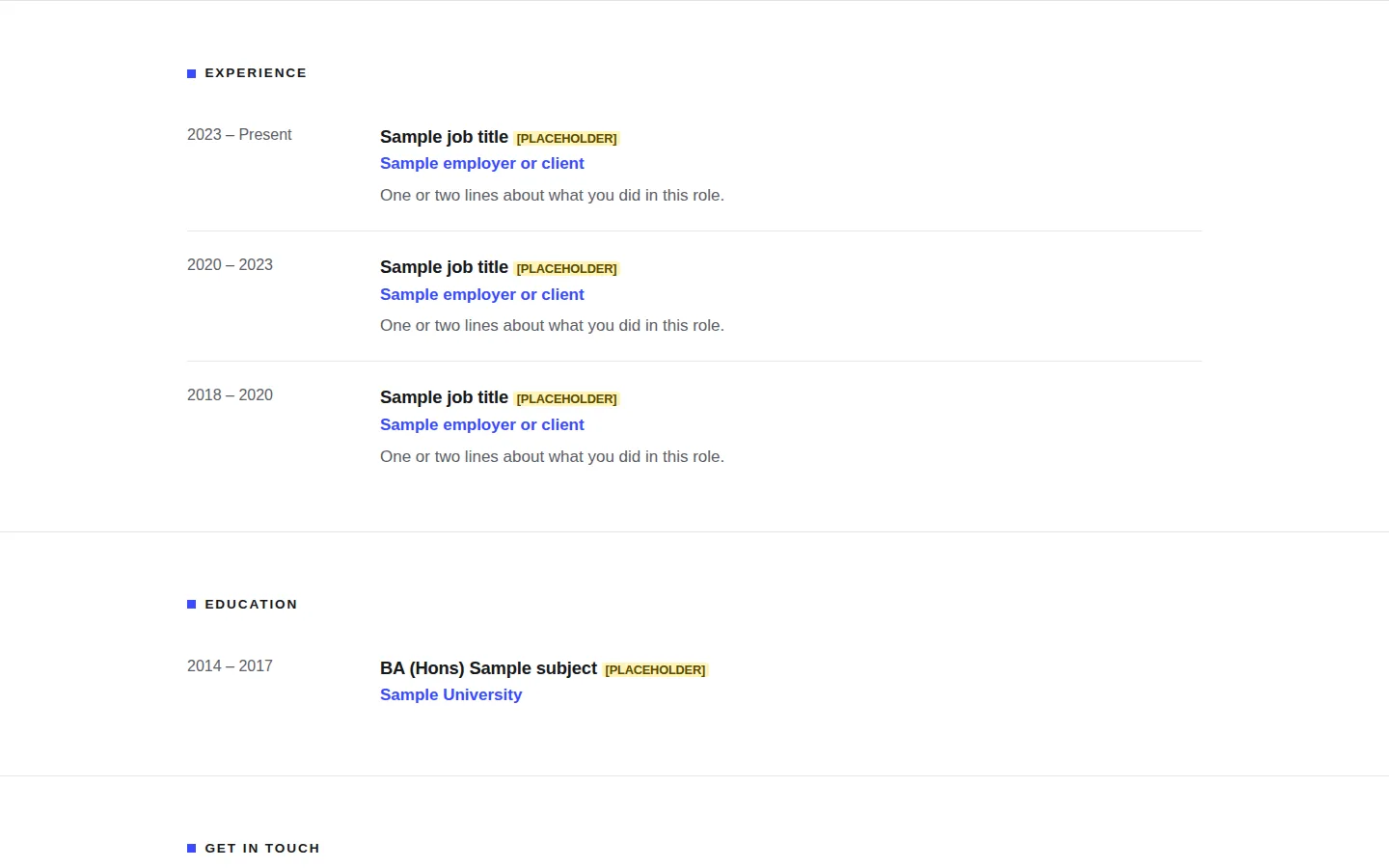
You say: I'm a freelance illustrator called Nell Ashcombe. I'd like a simple website that's my CV and portfolio on one page, so I can send clients and recruiters a link instead of a Word document. I've never made a website. On it I'd like: - my name, what I do ("Freelance illustrator, children's books and packaging") and a few lines about me - six pieces of my work, each with a title, one line about it and the year. I'll add my pictures later - my work history (three jobs) and my education (one degree) - a clear way to get in touch: my email is hello@nellashcombe.co.uk. I don't want a form. It needs to look professional on a phone and a laptop, and print neatly if someone wants a paper copy. I'm not technical, and I want it to be free to run. Before you make anything, ask me anything you need to know, and tell me in plain English what you're going to make.
1,054 output tokens back · read the full reply
Prompt 2 of 5
Answer its questions, and show it a website you like.
Attach: a screenshot of a website you like the look of · the one we attached
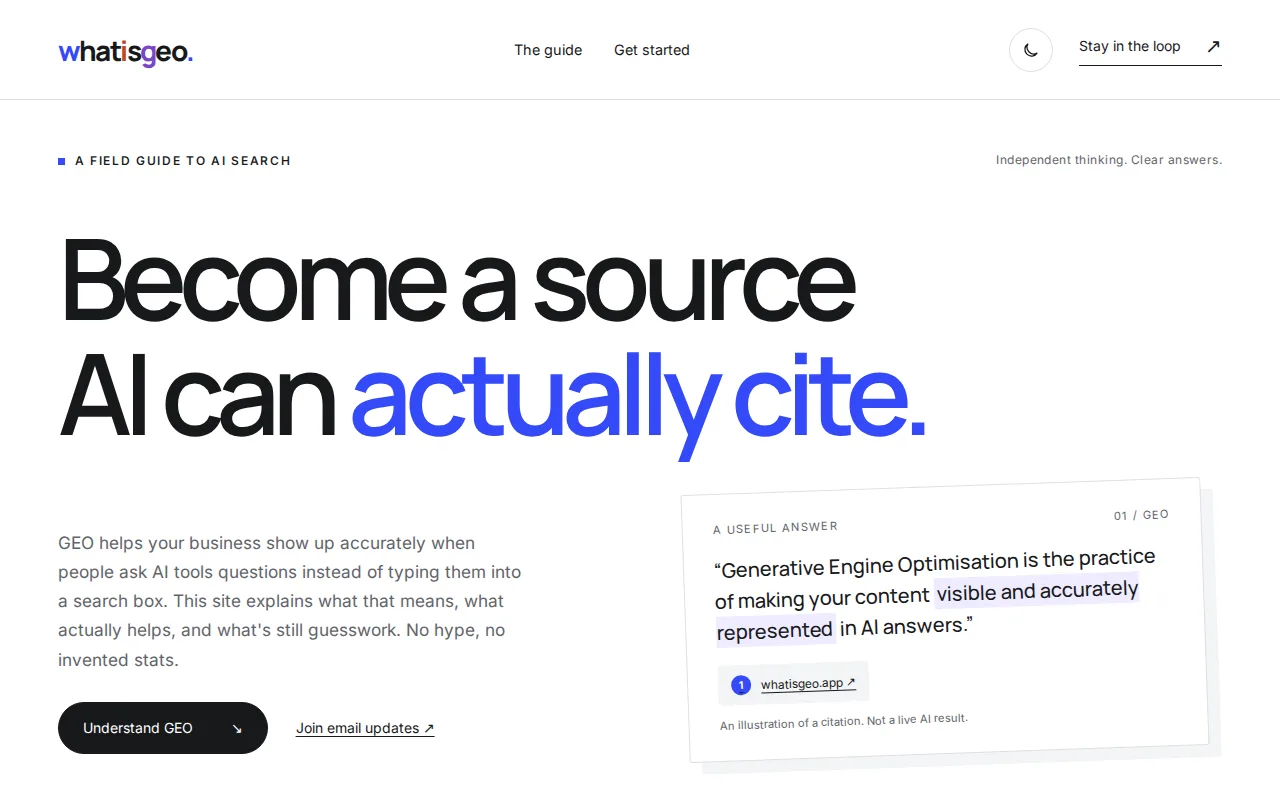
You say: Thanks, that sounds right. My answers: 1. Please draft the "about me" from this and I'll correct it: I'm based in Bristol, I work in watercolour and ink, and I love drawing animals and food. Don't invent anything else. 2. Make up six pieces of work for now and mark them clearly so I know what to replace. 3. Make up three jobs too, clearly marked. 4. Same for my degree. 5. I've attached a screenshot of a website I like the look of. I like the big bold heading, the white background with one strong colour, and how clean and confident it feels. Don't copy its words, just the feel. 6. No social links and no PDF button. Some people don't use an email app, though, so please make it easy to copy my email address too. 7. Yes, I own nellashcombe.co.uk, but a free address is fine to start with. 8. No photo of me. Please make it now. Keep it as simple as possible: just the files I'll need to upload, nothing I have to install.
7,785 output tokens back · read the full reply
Prompt 3 of 5
Ask it to check its work like a recruiter, and try to break it.
You say: I opened it by double-clicking and it looks lovely. Before I send it to anyone, please check it carefully, as a recruiter would on a small phone, and as if you were trying to break it: a very long title for a piece of work, a missing picture, using only the keyboard, a screen reader, the copy button in a browser that blocks copying, printing it, and writing that's too small or too faint. Tell me in plain English what you found, then fix it in the file.
17,336 output tokens back · read the full reply
Prompt 4 of 5
Swap in a real piece of work, the way you will once it's live.
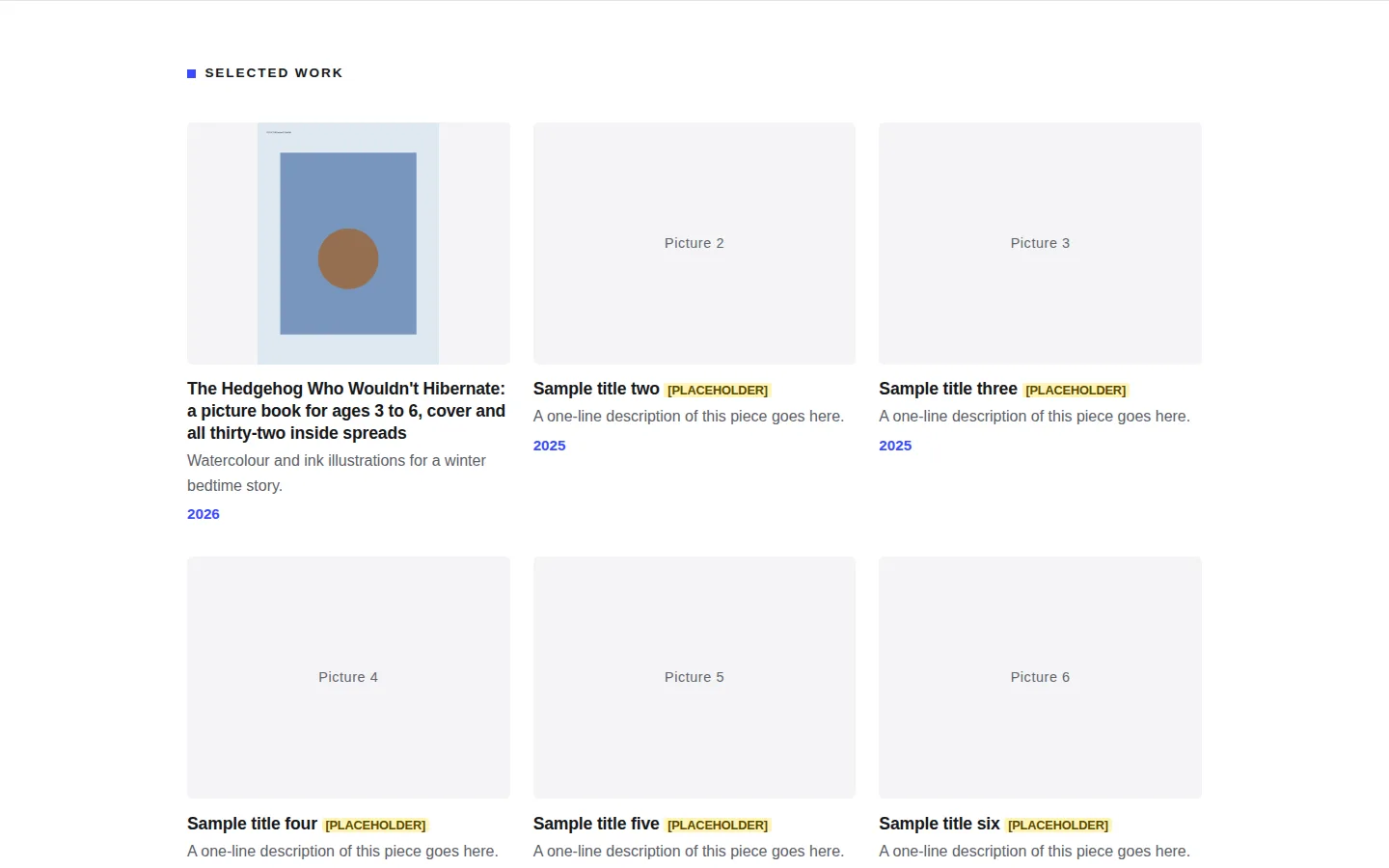
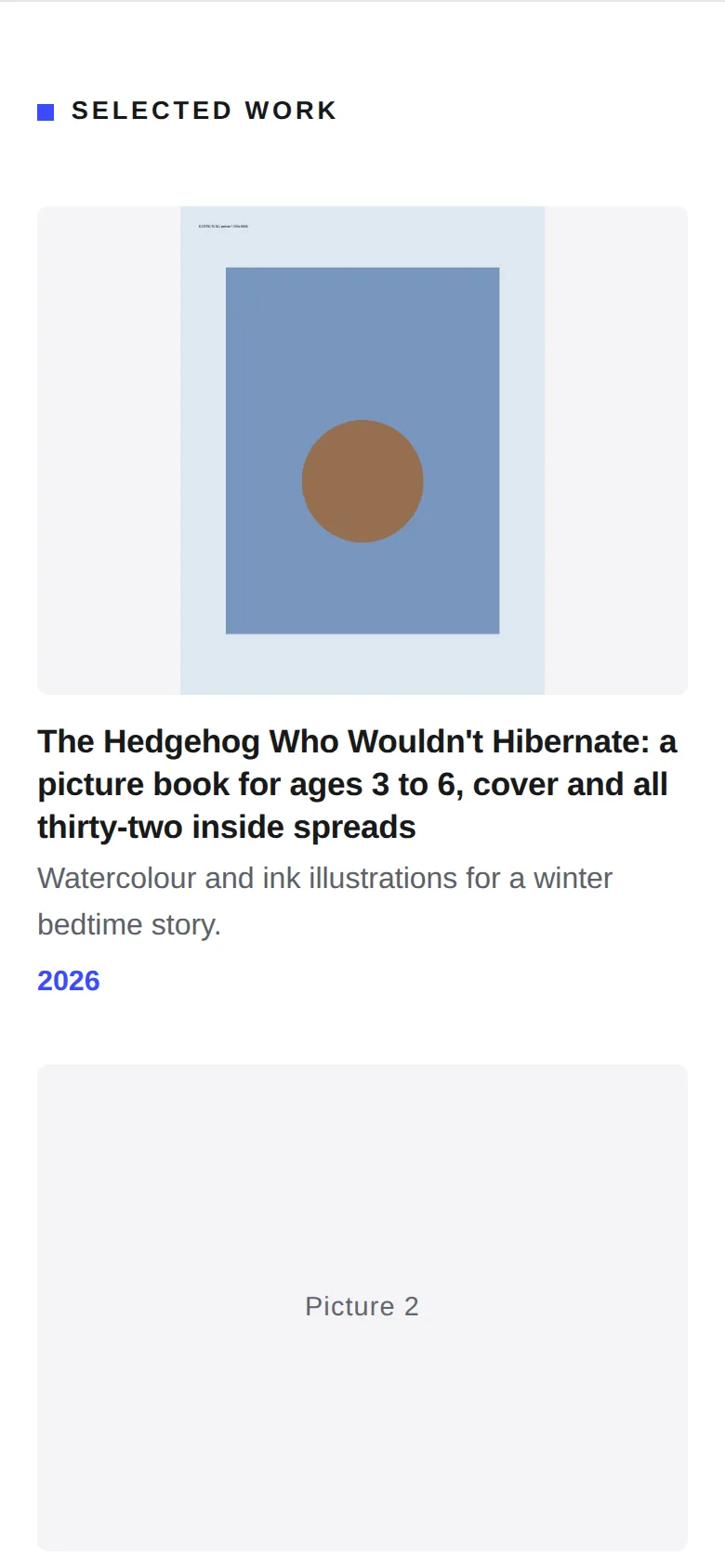
You say: I've finished my first real piece, so please swap it in for the first made-up one: Title: "The Hedgehog Who Wouldn't Hibernate: a picture book for ages 3 to 6, cover and all thirty-two inside spreads". One line: "Watercolour and ink illustrations for a winter bedtime story." Year: 2026. The picture is called hedgehog-cover.jpg. Tell me exactly where to put the picture, and what I need to upload again.
1,516 output tokens back · read the full reply
Prompt 5 of 5
Ask how to put it live from GitHub by clicking, and how to use your domain without breaking email.
You say: I've made free GitHub and Cloudflare accounts. On GitHub I made a new repository called nell-ashcombe (I switched on "Add README"), and in Cloudflare I went to Workers & Pages, Create application, Pages, Connect to Git, and picked that repository, so it should go live by itself whenever the files on GitHub change. I don't want to use the terminal or install anything. Please tell me, step by step, how to get my page into my repository using the GitHub website, what I should see at each step, how I find the address where it's live, and how I put a change live later (like the hedgehog picture). I also own nellashcombe.co.uk, and my email uses it. How would I use it for the page later without breaking my email?
2,738 output tokens back · read the full reply
After prompt 1 of 5
Reply to prompt 1 · 10.4 s · 1,054 output tokens
Describe yourself and what the page needs.
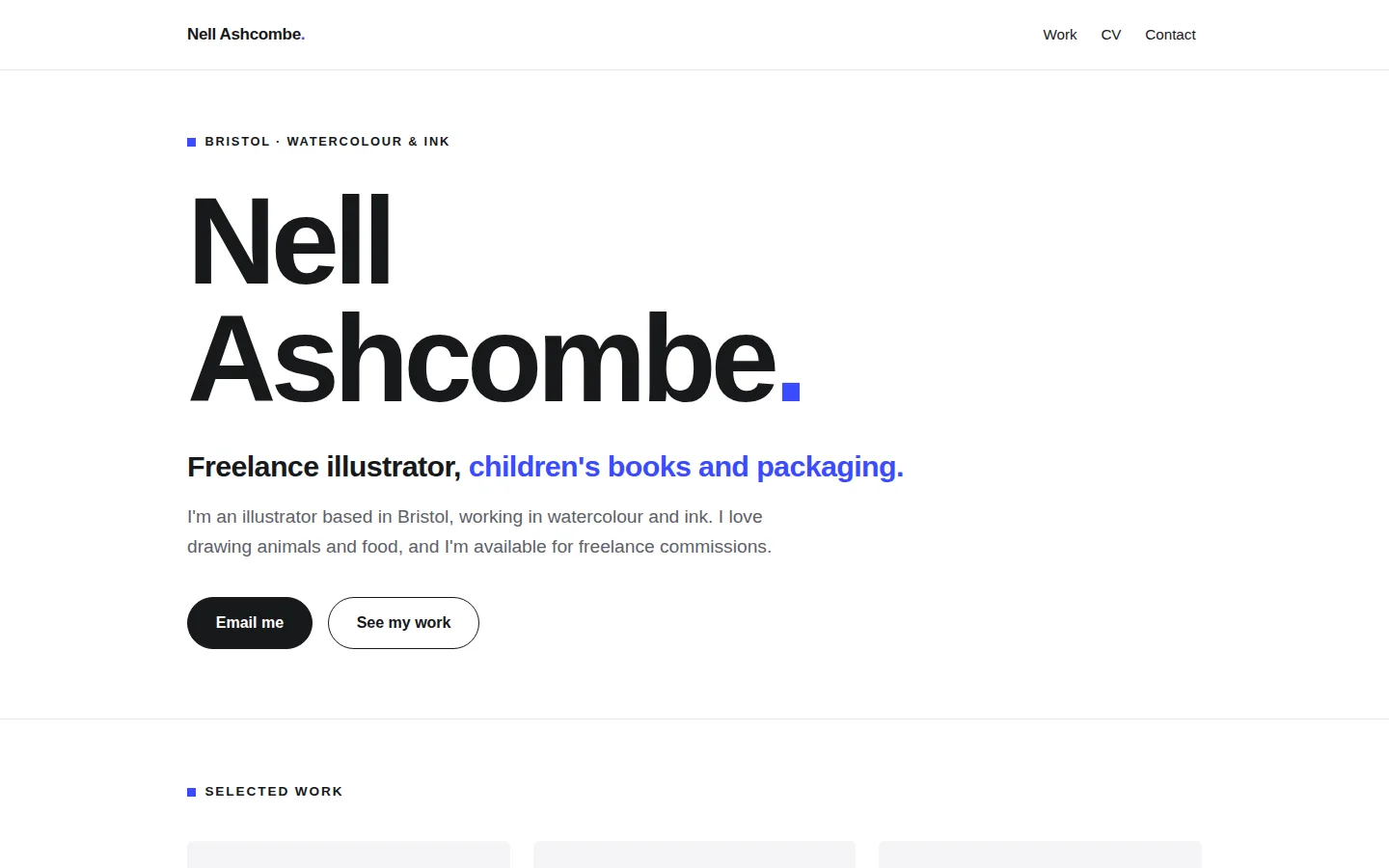
A plan and questions, and nothing made yet. Ours described one file, index.html, in five sections (a header with an Email me button, six work tiles with grey placeholders, experience, education, get in touch), a plain black-on-white layout for printing, and asked eight questions.
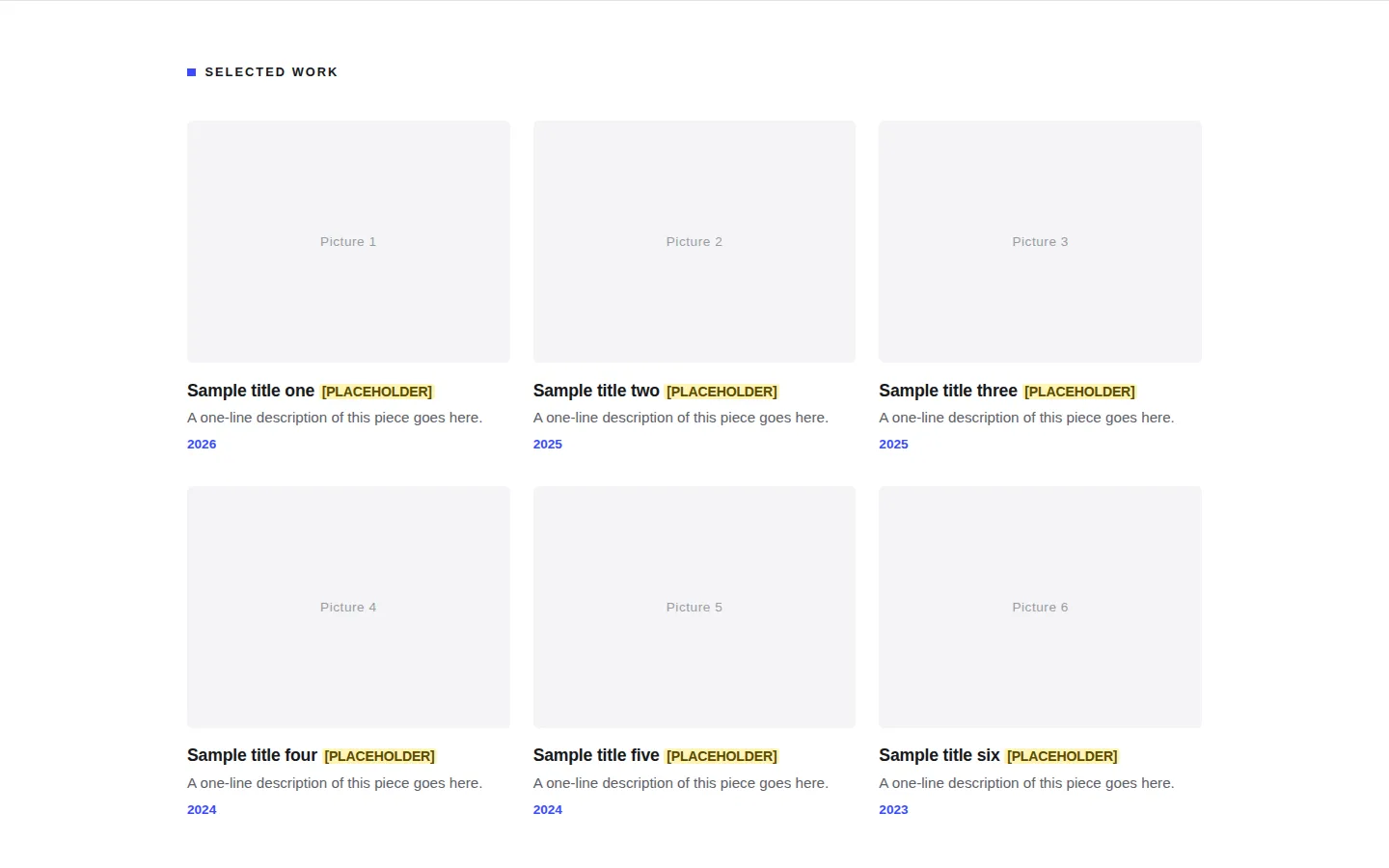
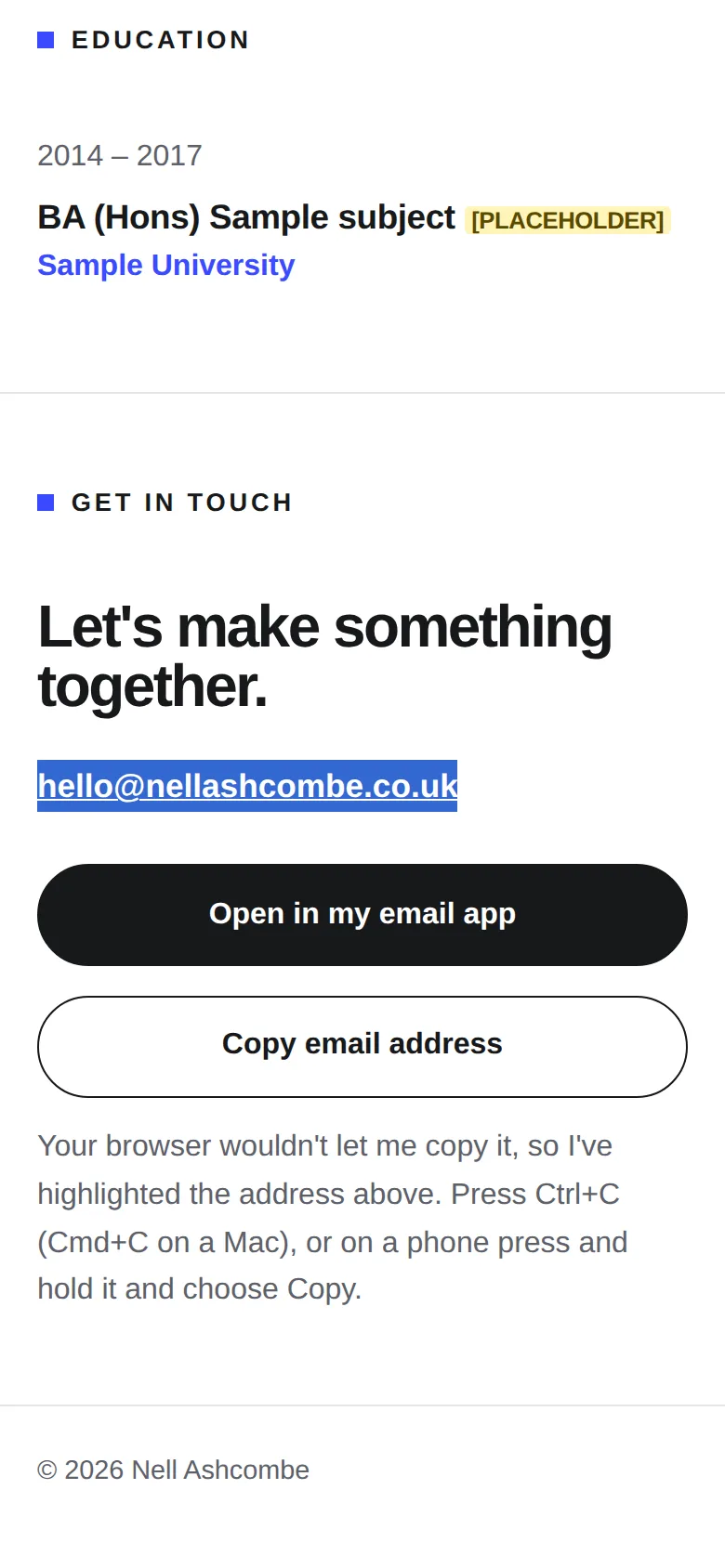
Reply to prompt 5 · 24.2 s · 2,738 output tokens
Ask how to put it live from GitHub by clicking, and how to use your domain without breaking email.
Click-by-click steps on GitHub and Cloudflare. Ours: Add file, Upload files, drag in index.html and the images folder, check the picture is listed as images/hedgehog-cover.jpg, Commit changes; finish Cloudflare's setup with framework preset None; find the .pages.dev address. It said not to send the link while the PLACEHOLDER tags are showing. For the domain: screenshot every record, use www with one new record, and never touch the email records.
04 · The result
The real thing, on the stage.
Screenshots of exactly what Claude produced, running on our machine on 1 October 2026. Nothing retouched.
We typed five plain-English prompts into one conversation with claude-sonnet-5-5 on 1 October 2026. One caveat: we ran them through Anthropic’s command-line tool with only its file tools switched on, so Claude could save files into an empty folder, much like file creation on claude.ai. We didn’t use the claude.ai website itself, so your screen will look different. The replies are published as they came back and we edited nothing by hand. Claude spent 211.7 seconds writing them.
The first prompt described Nell and the page and asked Claude to ask questions first. It made nothing, described one file in five sections, and asked eight questions. We’d said “ask me first”, and it did.
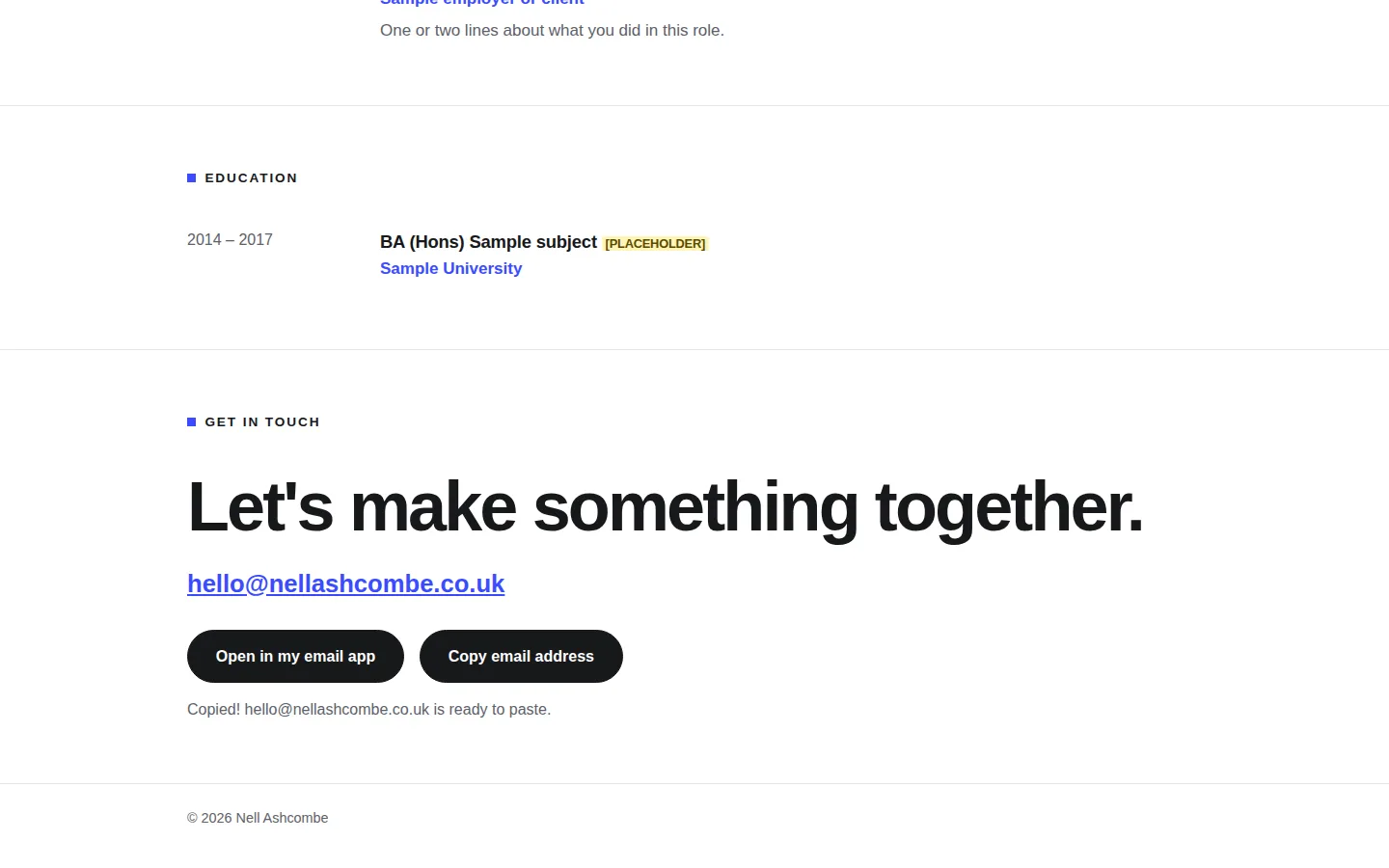
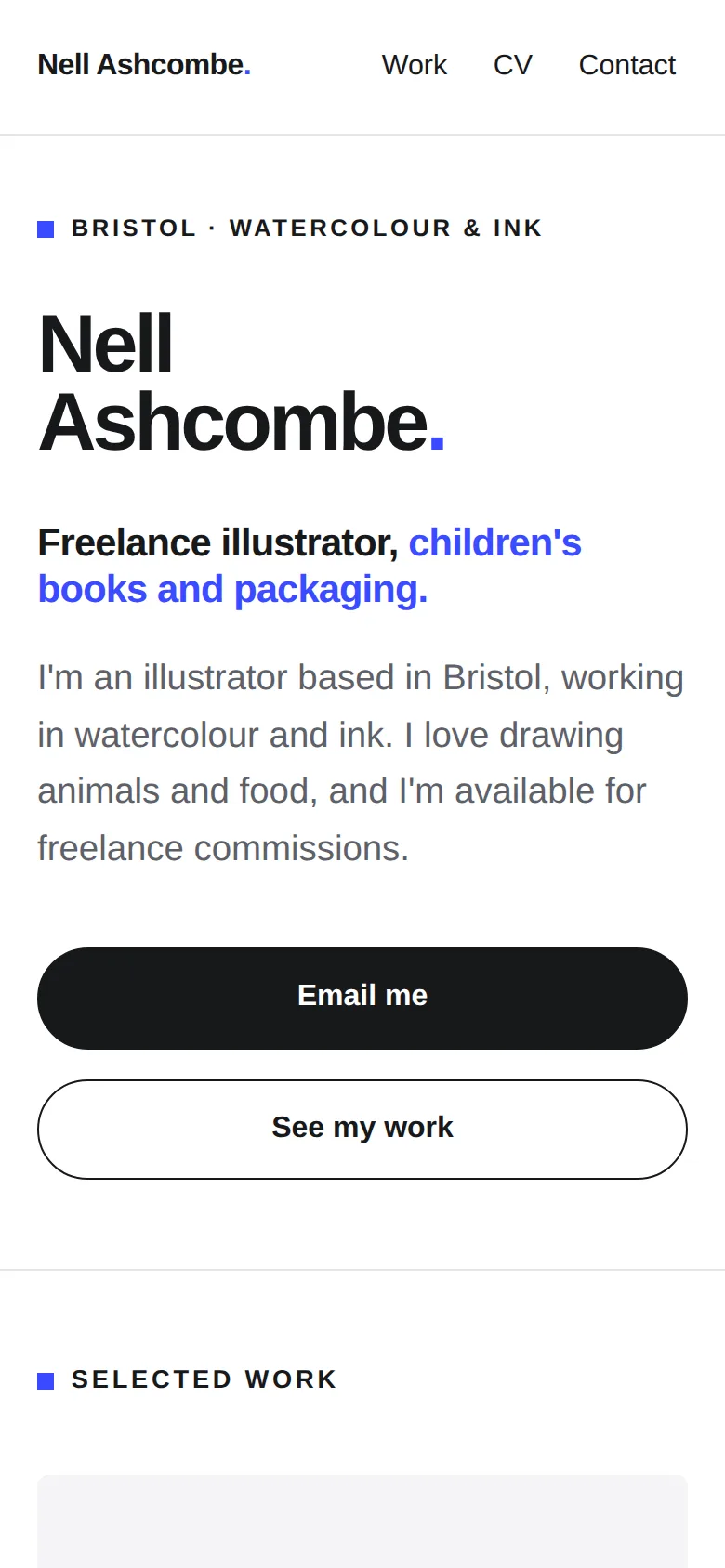
In the second prompt we answered: write the “about me” only from three facts, make up the pieces, jobs and degree and mark them, and make it easy to copy the email address. We attached a screenshot of one of our own sites, saying we liked the big bold heading and the one strong colour, not its words. Claude saved index.html with a huge “Nell Ashcombe.” heading, one blue, and a yellow [PLACEHOLDER] tag on everything it made up, which disappears when you print. It said it hadn’t opened it in a browser or printed it.
We tested it in a browser at laptop, phone and small-phone widths, opened from disk like a double-click. 33 of 40 checks passed. Some text was 12px, the grey “Picture 1” labels in the empty tiles were far too faint, and there was no skip link for keyboard users.
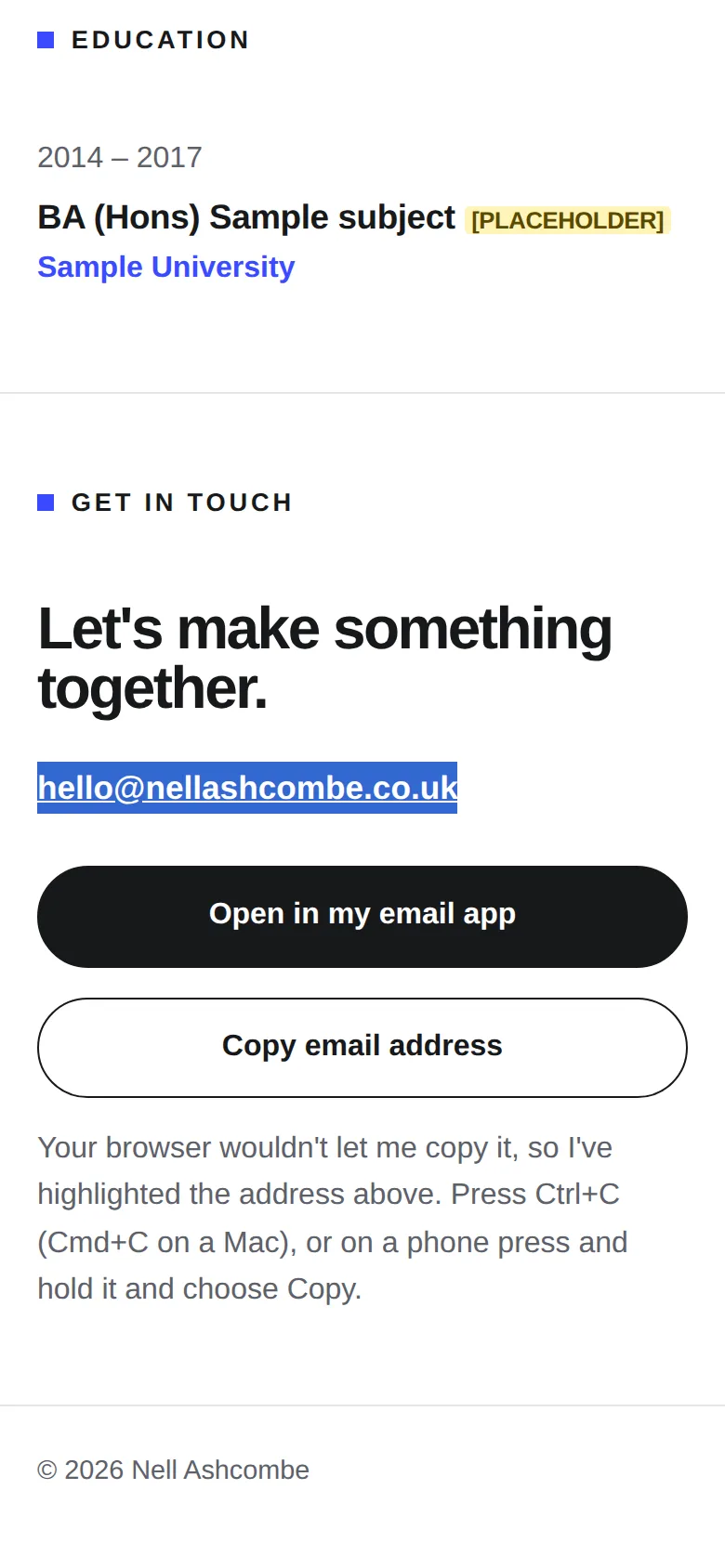
Prompt 3 asked Claude to check it as a recruiter on a small phone and try to break it: a very long title, a missing picture, the keyboard only, a screen reader, a browser that blocks copying, printing. It found real problems. A long title could have pushed a tile off a phone screen. Your pictures would have been cropped, which for an illustrator is no good, so it now shows them whole. It added a skip link, and when copying is blocked the button now highlights the address and says how to copy it. It said it had checked by reading the code only.
After that, 38 of 41 checks passed: nothing spills sideways even at 320px, the copy button works both ways, and it prints on 4 A4 pages with the buttons hidden and the address written out. The 3 fails are one thing at three widths: the small capital labels are 12.8px, and we look for 14px.
Prompt 4 is what keeping it up to date looks like. We swapped in a real piece with a deliberately long title and a picture called hedgehog-cover.jpg. Claude replaced the first tile word for word, explained where the picture goes, and gently suggested a shorter title. We followed its steps on a copy with a test picture: it showed whole, the long title wrapped, and the five empty tiles stayed tidy grey boxes. 12 of 12.
Prompt 5 asked how to get the page onto GitHub and live by clicking, and how to use nellashcombe.co.uk without breaking email. We told Claude we’d already made the repository and connected Cloudflare to it. Its steps matched GitHub’s and Cloudflare’s documentation closely, with one useful check of its own: before you commit, the picture should be listed as images/hedgehog-cover.jpg, or it’s in the wrong place. It also said not to send the link to clients while the yellow PLACEHOLDER tags are still showing. Fair.
demo.iwantaito.com/build-me-a-cv-website/: Claude's unedited files, a made-up example.
index.html
05 · What we tested
We tried to break it. 4 of 6 held.
Run on our own machine against the unedited files. Nothing deployed while testing.
| What we tried | What happened | Result |
|---|---|---|
| Prompt 3 file opened by double-click, at 1440, 390 and 320 pixels wide in headless Chrome | 38 of 41 checks passed: no sideways scrolling at any width, nothing loaded from other websites, six pieces, every email link right, one main heading, lowest text contrast 5.31:1, no script errors | Pass |
| Keyboard and copy button | First Tab lands on 'Skip to main content'; Tab alone reaches the email link and the copy button, each with a visible outline. Copy puts the address on the clipboard; with copying blocked, it highlights the address and says how to copy it | Pass |
| Printing (A4 PDF) | Buttons hidden, email address written out, 4 pages | Pass |
| Smallest text | The small capital labels (such as 'BRISTOL · WATERCOLOUR & INK') are 12.8px at every width, below the 14px we look for (the 3 failed checks above) | Fail |
| Prompt 4 file, and Claude's picture steps on a copy with our 1200x1600 test picture saved as images/hedgehog-cover.jpg | Same 38 of 41. The picture shows whole, the other five stay grey boxes with no broken-image icons, the long title wraps, nothing spills sideways at 320px: 12 of 12 | Pass |
| Prompt 2 first build, same checks | 33 of 40: text as small as 12px, the 'Picture 1' labels at 2.49:1 contrast, no skip link. Prompt 3 fixed the last two | Fail |
06 · Ship it
Put it live from GitHub, no terminal.
Your files go into your GitHub repository and Cloudflare publishes them by itself. The steps start from Claude's own answer and are checked by us against GitHub's and Cloudflare's documentation, which the sources below link to.
These clicks follow GitHub’s and Cloudflare’s documentation. Claude’s unedited files are live at demo.iwantaito.com/build-me-a-cv-website/ (we host them ourselves, with a thin bar on top saying it’s a made-up example); the screenshots are from our own machine.
- Make a folder on your computer and download index.html into it. Make a folder called images inside it for your pictures, named exactly as the page expects (ours: hedgehog-cover.jpg).
- On GitHub, open your nell-ashcombe repository and select Add file, then Upload files. Drag in index.html and the images folder. Before going on, check the list under the box: the picture should show as images/hedgehog-cover.jpg. If it shows without images/ in front, remove it and drag the folder in again. Select Commit changes.
- If you left Cloudflare’s “Set up builds and deployments” screen open, check the production branch is main, the framework preset is None and the build command is blank, then select Save and Deploy. If you’d already finished it, there’s nothing to do: your commit starts a new deployment by itself.
- In Cloudflare, open Workers & Pages, then your project. Its address ends .pages.dev, such as nell-ashcombe.pages.dev. Open it on your phone before you send the link to anyone.
- To put a change live, ask Claude in the same chat and download the new index.html. On GitHub, select Add file, then Upload files, drag in the changed file (for a new picture, the images folder again) and select Commit changes. A file with the same name and place replaces the old one; the rest stay. Cloudflare publishes it by itself in a minute or two; you can watch it under the project’s Deployments.
- To use your own domain, the safe route is www. First screenshot every DNS record where you bought the domain, especially MX and TXT, which run your email. Then open the project, Custom domains, “Set up a domain”, and enter www.nellashcombe.co.uk. Only then add one CNAME record, named www, pointing to nell-ashcombe.pages.dev, wherever your domain is managed. Leave every other record alone. Cloudflare says that adding the CNAME before setting up the domain in Pages gives a 522 error.
The plain domain without www needs the whole domain moved to Cloudflare first. Claude’s advice was to compare every email record before switching, or to ask your domain company to forward the plain address to www. Whether it can depends on the company; we haven’t checked.
On Claude Pro, you can skip the downloading and uploading. Ask Claude Code on the web for the change and it saves it to a branch of your repository; you merge it on GitHub and Cloudflare publishes it. The set-up page shows how.
No GitHub? Cloudflare’s “Drag and drop your files” works too, but you drag the whole folder in again for every change, and that project can’t be switched to GitHub later.
A one-page CV is also the kind of thing Claude can share by itself. Its help centre says artifacts made in claude.ai can be shared with anyone who has the link, on the Free plan too. We made a downloadable file rather than an artifact, so we didn’t test that, and the link would be a claude.ai address, not yours.
Free plan: Claude makes the files, you upload them
FreeTo change something: ask Claude, download the files it changed, and upload just those the same way. Files with the same name are replaced; the rest stay as they are.
£0: Claude Free, GitHub Free and Cloudflare's free plan.
Pro: you chat, Claude saves the change, Cloudflare publishes it
Claude Pro, $20 a monthClaude edits the files and saves them to GitHub on a separate branch, a draft copy. Cloudflare gives that branch its own preview address, so you can look before anything changes. Happy with it? Select Create PR, then on GitHub select Merge pull request, then Confirm merge. Cloudflare puts it live by itself.
07 · What it costs
What it costs.
£0 a month on Cloudflare's free plan and Claude's Free plan; your own domain is optional and the only cost.
Hosting is £0 a month. Cloudflare says requests to static files are free and unlimited, and GitHub’s Free plan is enough to hold the page and its pictures.
Claude’s Free plan covered everything here. A domain is the only possible cost, and it’s optional; the free pages.dev address works without one.
08 · What it got wrong
5 things Claude got wrong, or left to you.
If Claude gets something wrong, we say so here. We never fix its files by hand; a fix is a follow-up prompt you can see above.
Tiny labels
Even after Claude's check, the small capital labels are 12.8px. Easy to read on a laptop, small on a phone. Ask for them bigger if that bothers you.
Browsers and folders
Claude said Chrome, Edge and Firefox accept a dragged folder on GitHub's upload page and Safari often doesn't. GitHub's documentation just says you can drag a file or a folder; we haven't tested browsers. The check that matters is Claude's own: the picture must be listed as images/hedgehog-cover.jpg before you commit.
The build output directory
Claude said to leave Cloudflare's build output directory empty 'or put / if it insists on something'. Cloudflare's documentation says to leave the build command blank for a site with no build step, and doesn't say what goes in the output directory. Empty is what we'd try first.
It started with Netlify
Before we said we had a Cloudflare account, Claude's going-live steps were for Netlify Drop. We haven't checked those; this page covers GitHub and Cloudflare.
The placeholders are still yours to replace
Five pieces, three jobs and the degree are made-up samples with yellow PLACEHOLDER tags, and the pictures still need descriptions for screen readers. Claude marked every one; it didn't pass any off as real.
Ours, disclosed
Built it? Where we can help next.
Ours: made by the same studio that runs this site. None of them changes anything above.
Ours
What is GEO
So AI assistants can find and describe you when someone asks for an illustrator.
Ours
Adapt Progress Evolve
We build these properly, if you'd rather not.
Questions
Questions people ask.
Can Claude build me a CV or portfolio website?
Yes, a one-page one. Five prompts in one conversation gave us a single file that works on a phone and a laptop, prints on 4 A4 pages and passed 38 of our 41 checks. You replace the marked placeholders and add your pictures.
Do I need to use a terminal or install anything?
No. You type in a Claude chat, download the file, and upload it with an images folder for your pictures on the GitHub website (Add file, then Upload files). Cloudflare, connected to your repository once, does the rest.
Can Claude put it online for me?
Not from a chat on the Free plan, as of October 2026: Claude's GitHub connection there only reads your files. But once GitHub is connected to Cloudflare, uploading the files to GitHub is putting the page live. On Claude Pro, Claude Code on the web can save a change to a branch of your repository; you merge it on GitHub and Cloudflare publishes it.
Can't I just share it straight from Claude?
Possibly. Claude's help centre says artifacts made in claude.ai can be shared with anyone who has the link, on the Free plan too. We made a downloadable file rather than an artifact, so we didn't test it, and you'd get a claude.ai link rather than your own address. GitHub and Cloudflare is the route we checked.
How do people contact me without a form?
Ours has an 'Open in my email app' button and a 'Copy email address' button for people who don't use an email app. If the browser blocks copying, it highlights the address and says how to copy it. No server needed.
Will my own domain break my email?
Not on the route Claude suggested, which we checked against Cloudflare's documentation but didn't run: add www in your Pages project first, then one CNAME record where your domain is managed, and leave the email (MX and TXT) records alone. Screenshot every record before you start.
Sources for this page
10- Claude help: create and edit files with Claude (all plans; Settings > Capabilities)
- Claude help: uploading files to Claude (screenshots, 20 files per chat)
- Claude help: share artifacts (Free plan can share with anyone who has the link; older artifacts show Publish)
- Claude docs: GitHub integration (every plan, reads files only)
- GitHub Docs: adding a file to a repository (Add file > Upload files; a file or folder; 100 files at once, 25 MiB each)
- Cloudflare Pages: Git integration (Connect to Git; leave the build command blank; deploys on every push)
- Claude Code on the web: get started (Pro, Max and Team plans)
- Cloudflare Pages: Direct Upload, drag and drop (the no-GitHub alternative; can't switch to Git later)
- Cloudflare Pages custom domains (subdomain by CNAME; apex domains must be a Cloudflare zone; 522 if the CNAME comes first)
- Cloudflare Workers pricing ('Requests to static assets are free and unlimited')
For developers
For developers.
Skip this if you've never used a terminal. You don't need it.
The command-line route
If you’re happy in a terminal, skip the upload page. With the repository connected to Cloudflare Pages, every push to main deploys, and pushes to other branches get their own preview address:
git clone https://github.com/<you>/nell-ashcombe.gitcp -r index.html images nell-ashcombe/cd nell-ashcombegit add .git commit -m "Add the page"git push origin mainThe first, command-line version of this page (claude-sonnet-5-5, 1 October 2026) deployed without GitHub instead, to a Direct Upload project, with index.html in a site folder; the flags were checked against Wrangler’s own help, but nothing was deployed:
npx serve sitenpx wrangler loginnpx wrangler pages project create nell-ashcombe --production-branch mainnpx wrangler pages deploy site --project-name nell-ashcombe --branch mainnpx serve site served it at http://localhost:3000, and npx wrangler pages dev site (Cloudflare’s local Pages runtime) passed the same checks. To check your email records survive a DNS change, run nslookup -type=MX nellashcombe.co.uk and nslookup -type=TXT nellashcombe.co.uk before and after: the results should match.