Answered with a real runClaude's output, unedited
Open the live demo (Claude's unedited files, a made-up example)
Do I need Wix or Squarespace, or can Claude and GitHub do it?
Claude picked GitHub and Cloudflare over Wix or Squarespace for our choir, on one condition: someone must be around to make changes. Its site passed 31 of 33 checks.
- Prompts
- 5
- Claude's time
- 2 min 41 s
- Got wrong
- 6 things
- Tests passed
- 3 of 5
- Model
- claude-sonnet-5-5
- Run on
- 1 October 2026
For: A non-technical person deciding whether to pay for a website builder or have Claude make the site, keep it on GitHub and let Cloudflare publish it for free.
What the five prompts made Home

01 · Before you start
Before you start.
The question: you’re not technical and you need a website. Do you pay a website builder every year, or ask Claude to make it, keep the files on GitHub and let Cloudflare publish it for free? We compared just those two: Wix or Squarespace on one side, Claude, GitHub and Cloudflare on the other.
Our made-up example is the Hollybrook Community Choir: about 30 singers, rehearsals on Tuesday evenings in a church hall, and an organiser who has never made a website.
To try the second route you need three free accounts: Claude, with “Code execution and file creation” switched on (Settings, then Capabilities; it’s on the Free plan), GitHub, with an empty repository, and Cloudflare, connected to that repository. The set-up page walks through all three once. No installing, no terminal.
02 · Set up once
Set up once, then just talk to Claude.
Free accounts you make one time and reuse for every build. Each links to the step-by-step on the set-up page, with what each screen looks like.
- 1. Get a free Claude account. It's where you describe what you want and Claude makes it. The Free plan covers every guide on this site; Pro adds the shortcut where Claude saves changes to GitHub itself.
- 2. Let Claude hand you files. A website is a handful of files. With this switched on, Claude can make them and give them to you to download, ready to upload to GitHub.
- 3. Get a free GitHub account and an empty repository. A repository is a folder on GitHub that keeps every version of your files. It's the one place your site lives: you (or Claude) change the files there, and Cloudflare publishes whatever is in it.
- 4. Get a free Cloudflare account and connect it to your repository. Cloudflare is where your site is live on the internet. Once it is connected to your repository, every change to the files on GitHub goes live by itself, in a minute or two. A site made of plain files costs nothing to host: Cloudflare says requests to static files are "free and unlimited".
- 5. Connect Claude to GitHub. So Claude can read the files that are live now before it changes them, even in a brand new chat. On Pro, the same connection is what lets Claude Code on the web save its changes to your repository.
03 · The prompts
Paste these five, in order.
Plain English, typed into an ordinary Claude chat. On the left, exactly what we sent, word for word; change the details to yours. On the right, what came back. One conversation with claude-sonnet-5-5, run on 1 October 2026. Read the full transcript.
Prompt 1 of 5
Ask for an honest comparison, and for a pick.
You say: I run a small community choir called Hollybrook Community Choir. There are about 30 of us and we rehearse on Tuesday evenings in a church hall. I'd like a simple website: what we are, when and where we rehearse, upcoming concerts, how to join, and a way to get in touch. I've never made a website and I'm not technical. Everyone tells me something different. Should I pay for Wix or Squarespace? Or should I get you to make the website, keep it on GitHub, and have Cloudflare put it online automatically whenever it changes? A friend says that last way is free. I have already ruled out everything else, so please stick to these two. Please compare them honestly for someone like me: roughly what each costs a year, how much effort it is to set up and to keep up to date myself, whether I need to know any code, what happens if I stop paying or want to move later, and how you can help with each one. If you're not sure of today's prices, say so and tell me where to look rather than guessing. Then tell me which you'd pick for us, and why.
2,482 output tokens back · read the full reply
Prompt 2 of 5
Give it the details, and show it a website you like.
Attach: a screenshot of a website you like the look of · the one we attached
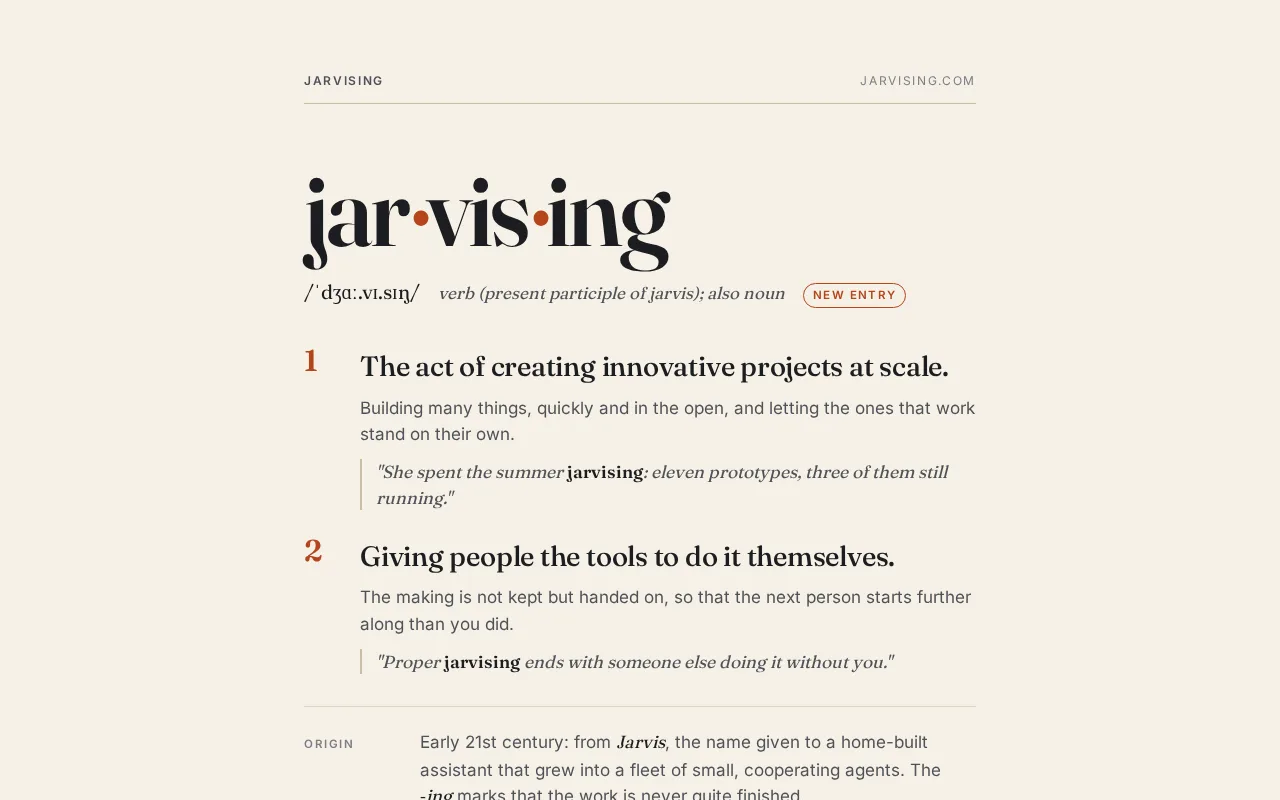
You say: Thank you, that's really clear. Let's try your way: please make it, so I can see it before I make any accounts. The details: - We rehearse on Tuesdays, 7:30pm to 9:30pm, at St Anne's Church Hall. - Please make up two upcoming concerts so I can see how it looks. I'll swap in the real ones. - No auditions. Your first two rehearsals are free, then it's £5 a week. - For getting in touch, just an email link to hello@example.com. No form. - No photos or logo yet. I've attached a screenshot of a website I like the look of. I like the cream background, the elegant old-fashioned headings and the touch of rusty orange. It feels a bit like a concert programme. Don't copy its words, just the feel. Keep it as simple as possible: just the files I'll need to upload, nothing I have to install. It must look good on a phone.
5,100 output tokens back · read the full reply
Prompt 3 of 5
Ask it to check its work like a choir member on a phone.
You say: I opened it by double-clicking index.html and it looks lovely. Before I show the committee, please check it carefully, as if you were a choir member on a small phone and as if you were trying to find mistakes: links that go nowhere, writing that's too small or too faint, anything that spills off the side of the screen, and anything that would trouble someone who uses a screen reader or only a keyboard. Tell me in plain English what you found, then fix it in the files.
8,197 output tokens back · read the full reply
Prompt 4 of 5
Change something, the way you will once it's live.
You say: The committee has just booked a summer concert, so please add it: Summer Serenade. Saturday 27 June 2027 at 7pm, in St Anne's Church. Tickets £8 on the door, under-16s free. Songs for a summer evening, with strawberries and Pimm's in the interval. Also, St Anne's Church Hall is on Mill Lane, Hollybrook, HB1 2AB. Please add that to the rehearsals part. Then tell me which files you changed, so I know what to upload again.
1,846 output tokens back · read the full reply
Prompt 5 of 5
Ask how to put it live from GitHub, by clicking, and for the honest downside.
You say: I've made free GitHub and Cloudflare accounts. On GitHub I made a new repository called hollybrook-choir (I switched on "Add README"), and in Cloudflare I went to Workers & Pages, Create application, Pages, Connect to Git, and picked that repository, so it should go live by itself whenever the files on GitHub change. I don't want to use the terminal or install anything. Please tell me, step by step, how to get the website into my repository using the GitHub website, what I should see at each step, how I find the address where it's live, and how I put a change live later (like the concert I just added). We also bought hollybrookchoir.org.uk from another company. How would I use that instead of the free address? And be honest: compared with Wix or Squarespace, what will be harder for us doing it this way?
3,699 output tokens back · read the full reply
After prompt 1 of 5
Reply to prompt 1 · 24.2 s · 2,482 output tokens
Ask for an honest comparison, and for a pick.
A side-by-side table and a pick. Ours said its prices were rough and from memory and pointed to the two pricing pages. It picked GitHub and Cloudflare on one condition: someone has to be available to make changes, Claude when asked or a willing choir member. If you'd be stuck every time a date changes, it said, pick Squarespace.
Reply to prompt 5 · 31.5 s · 3,699 output tokens
Ask how to put it live from GitHub, by clicking, and for the honest downside.
Clicks on GitHub and Cloudflare, two ways to use the domain, and a list of what's harder. Ours: Add file, Upload files, drag the two files (not a folder), Commit changes; find the .pages.dev address; edit later with GitHub's pencil or upload a new index.html. Harder: no visual editor, relying on someone for changes, jargon, three logins, no built-in forms or payments, no helpdesk.
04 · The result
The real thing, on the stage.
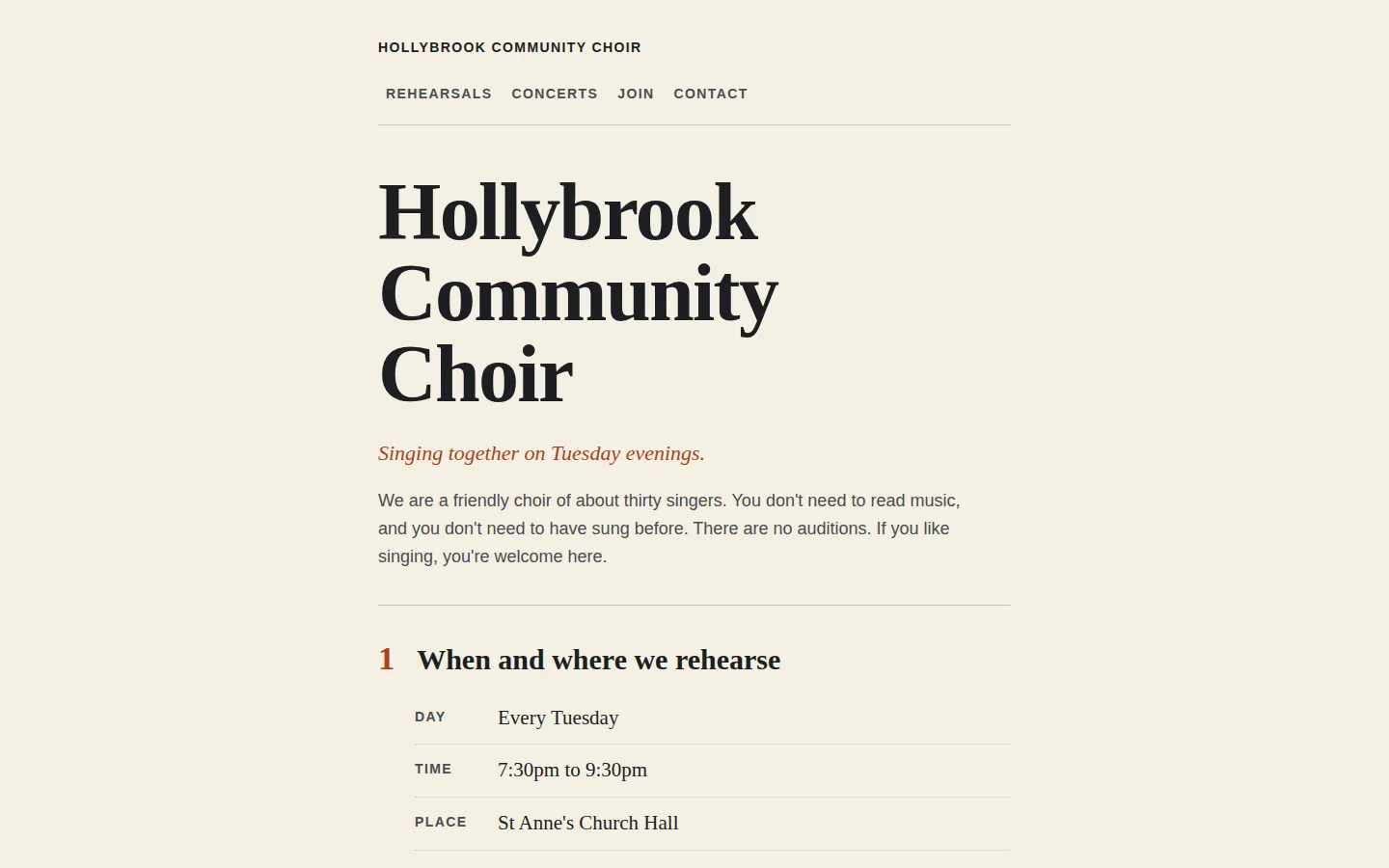
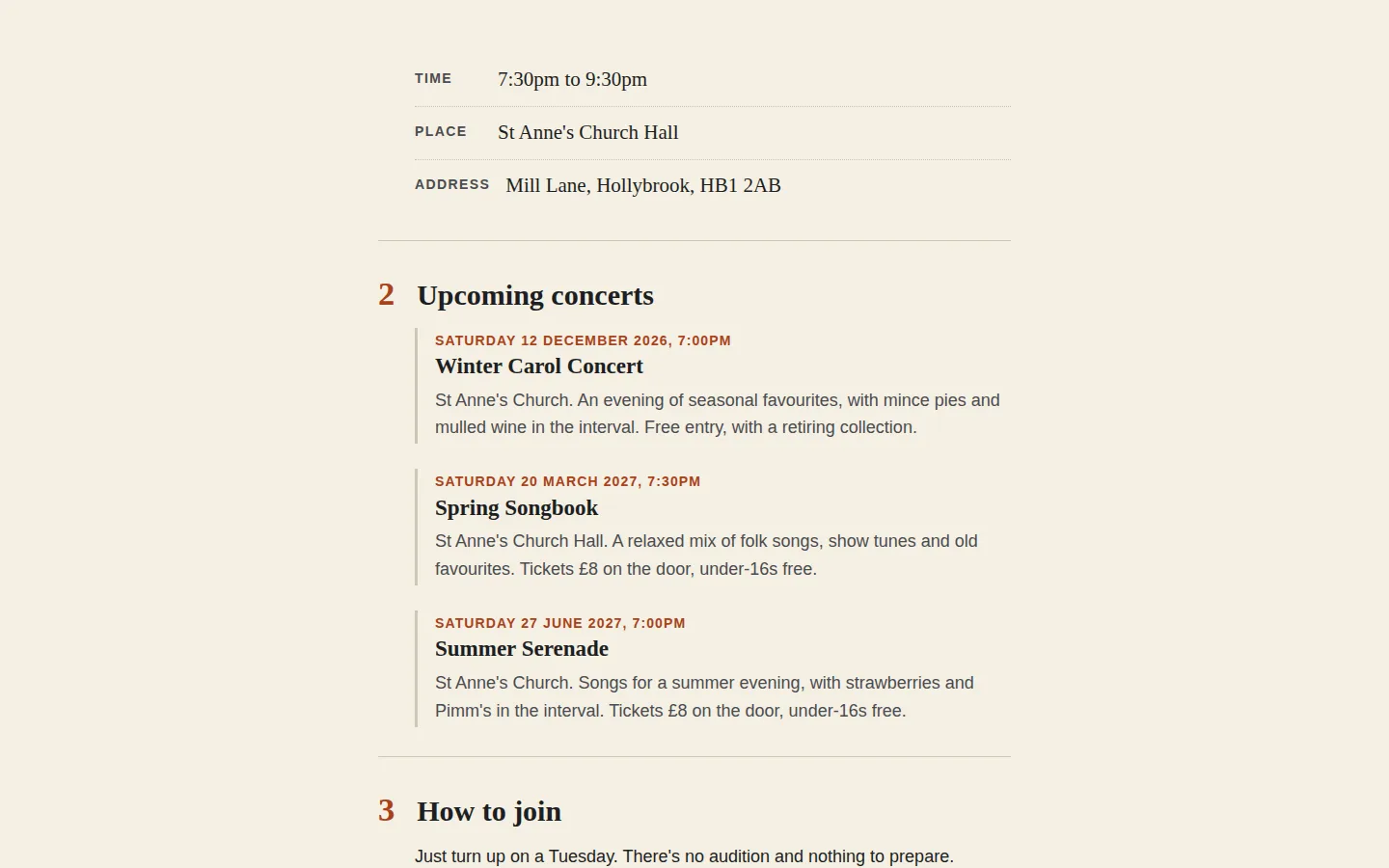
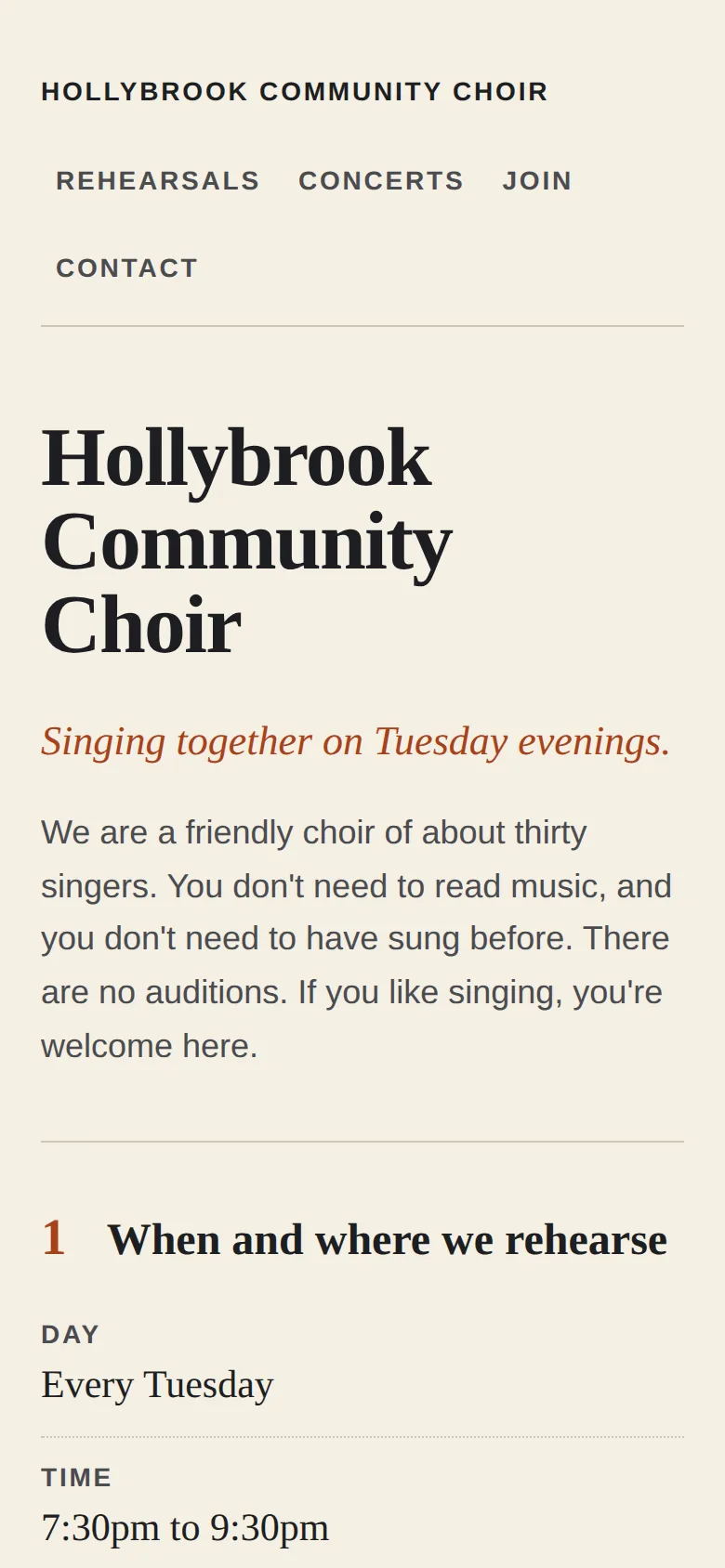
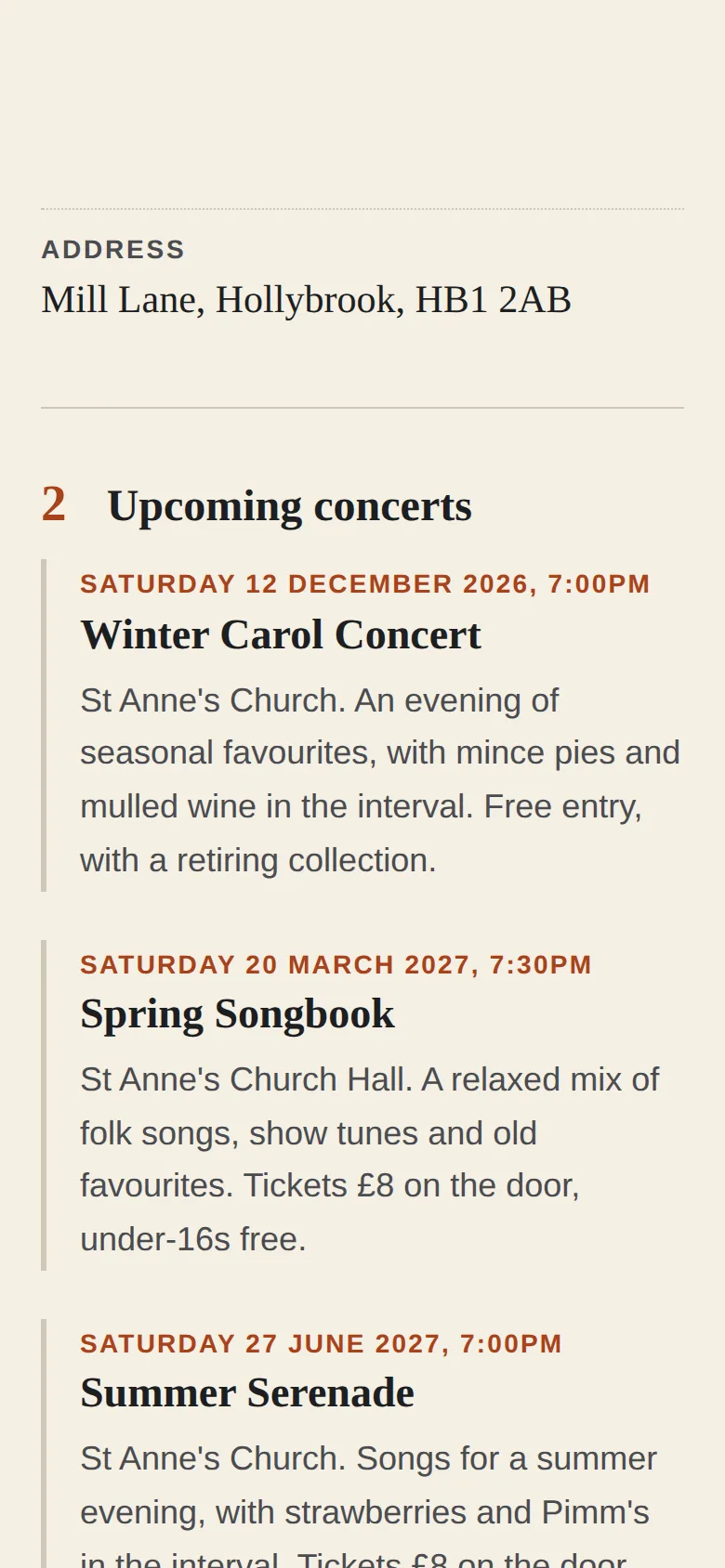
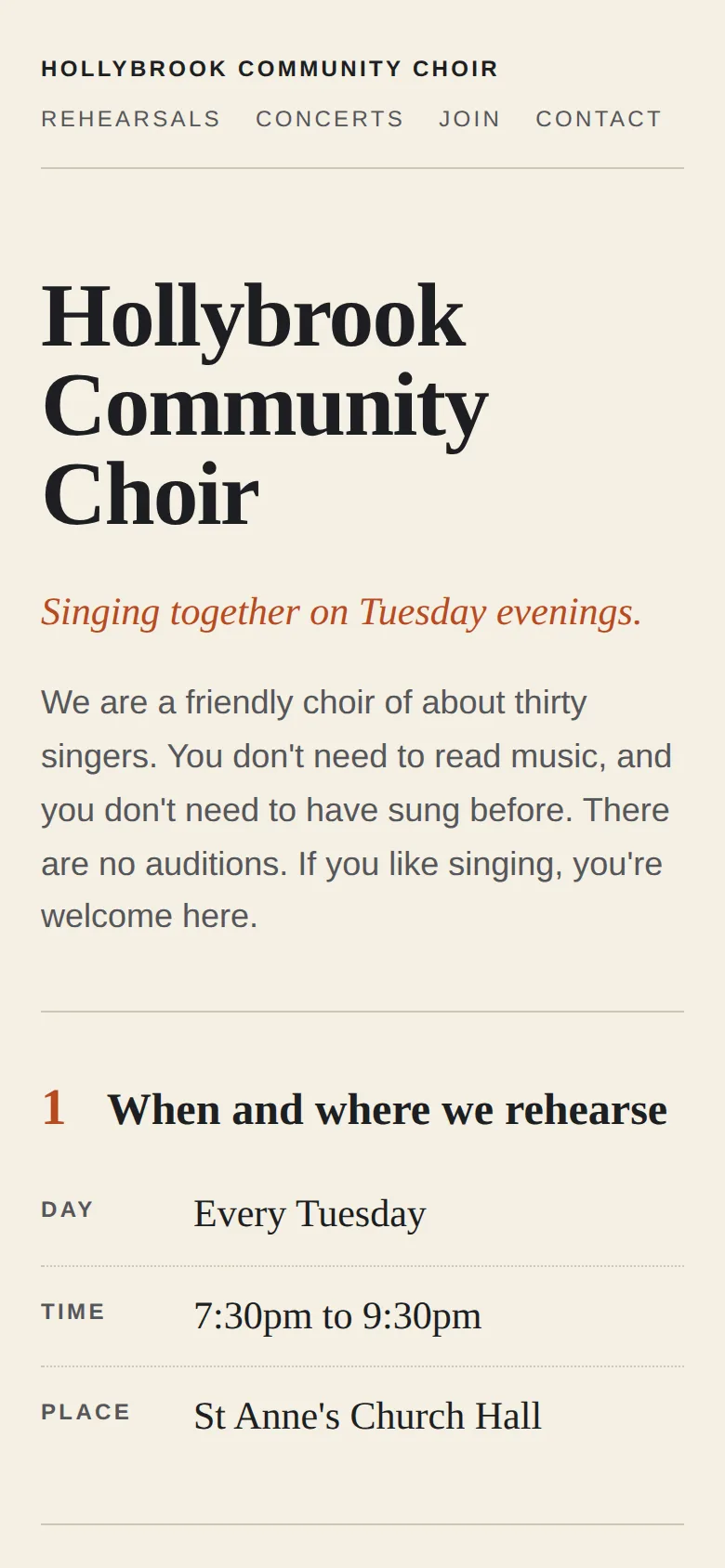
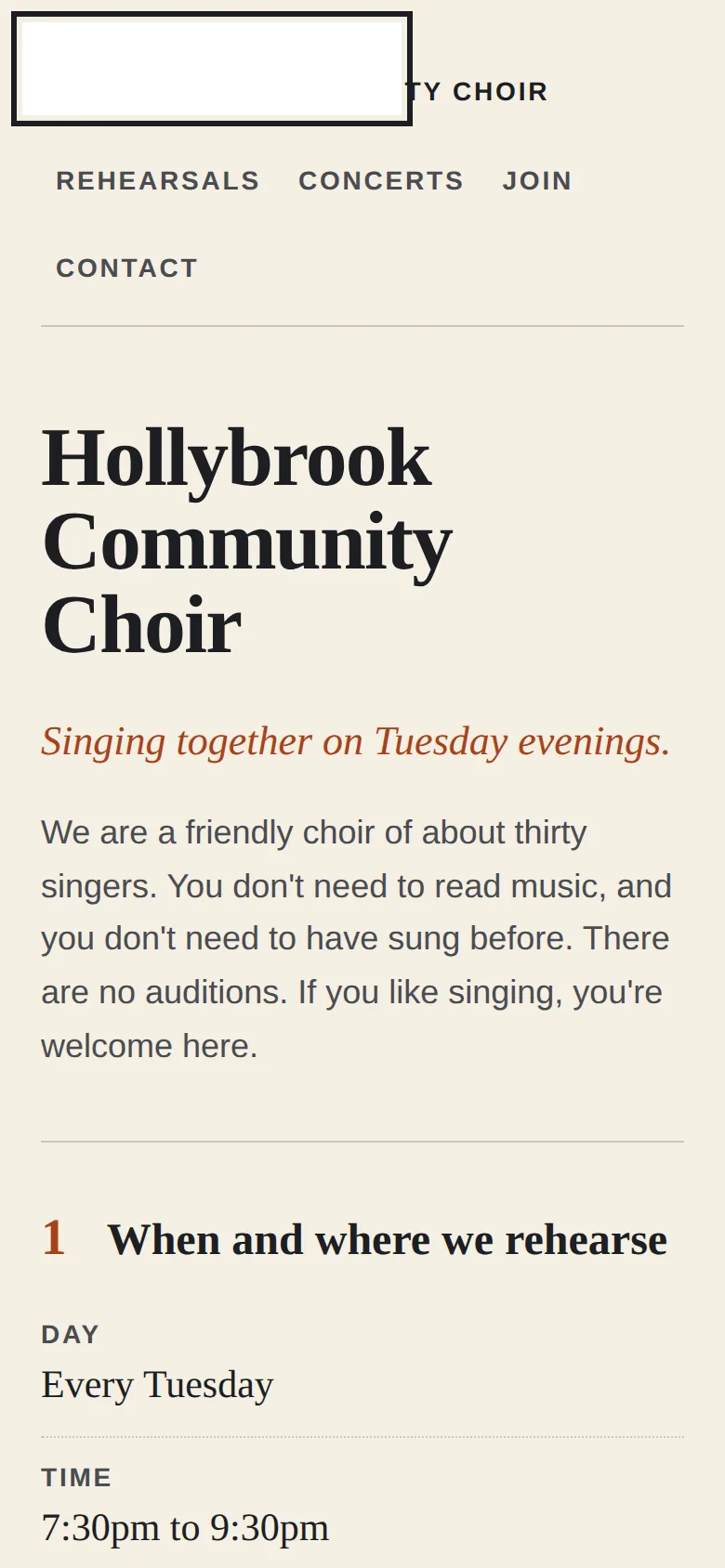
Screenshots of exactly what Claude produced, running on our machine on 1 October 2026. Nothing retouched.
We typed five plain-English prompts into one conversation with claude-sonnet-5-5 on 1 October 2026. We ran them through Anthropic’s own tool with only its file tools on, so Claude could save files into an empty folder, much like file creation on claude.ai. It had no web search and no connectors, and we didn’t use the claude.ai website itself. The replies are published as they came; we edited nothing by hand. Claude spent 161.1 seconds on them.
The first prompt asked for an honest comparison and a pick. Claude said its prices were rough and from memory, and pointed us to Wix’s and Squarespace’s pricing pages, adding that the renewal price matters more than the first-year deal. It put the builders at roughly $150 to $400 a year: easy to set up in an afternoon, easy to edit, hard to leave. The GitHub route came out at a domain’s cost a year, about an hour of harder setup once, and edits that are “fiddly alone, easy via me”. It picked GitHub and Cloudflare, with one condition: someone has to be around to make changes, Claude when you ask or a willing choir member. If you’d be stuck every time a date changes, it said, pick Squarespace for its visual editor. That condition is the honest part of the answer.
The second prompt gave the choir’s details and a screenshot of one of our own sites, for the feel: cream, elegant headings, a touch of rusty orange. Claude saved two files, index.html and style.css: a one-page site in four numbered sections. It said it hadn’t opened it in a browser.
So we opened it in one, at laptop and phone size. It passed 31 of 33 checks; the menu and labels were 12px, below the 14px we look for, and there was no skip link for keyboard users.
The third prompt asked Claude to check it as a choir member on a small phone, hunting for mistakes. It read the code (it said it couldn’t try a real phone), enlarged the small text, darkened the orange and grey, made links easier to tap, fitted the title on the narrowest phones and added a skip link. Still 31 of 33, but for a new reason: the skip link is white text on a white box when you tab to it, because another rule it added makes every focused link’s background white.
The fourth prompt added a summer concert we’d described as “Saturday 27 June 2027”. Claude pointed out that 27 June 2027 is a Sunday, which it is, and asked which was right. It said only index.html had changed, which was true.
The fifth asked how to get it live from GitHub, how to use the choir’s own domain, and what’s harder than a builder. Its list: no visual editor, depending on someone for changes (and Claude doesn’t remember past chats, so keep your latest files), jargon, three logins to look after (use a shared choir email, and give a second committee member access), no built-in forms, payments or galleries, no helpdesk, and photos to shrink first.
demo.iwantaito.com/website-on-wix-squarespace-wordpress-or-cloudflare/: Claude's unedited files, a made-up example.
index.html
style.css
05 · What we tested
We tried to break it. 3 of 5 held.
Run on our own machine against the unedited files. Nothing deployed while testing.
| What we tried | What happened | Result |
|---|---|---|
| Prompt 4 files (the final ones) opened by double-click at laptop (1440x900) and phone (390x844) size in headless Chrome, plus a 320px-wide phone | 31 of 33 checks passed: no errors, nothing loaded from other websites, no sideways scrolling even at 320px, one main heading, a main-content marker, every menu link has a target, the email link works, 14px smallest text, a visible keyboard outline | Pass |
| Text contrast | Lowest 5.34:1 after prompt 3 (the WCAG AA minimum for normal text is 4.5:1). The first build's lowest was 4.57:1, only just over | Pass |
| Keyboard: the skip link | Fails at both sizes (the 2 failed checks): when focused, 'Skip to the main content' is white text on a white box, because the focus style Claude added in prompt 3 turns every focused link's background white | Fail |
| Prompt 2 first build, same checks | 31 of 33: the menu and labels were 12px, below the 14px we look for; no skip link. Prompt 3 fixed the size and added the link | Fail |
| Prompt 4 content | Summer Serenade, £8 on the door, under-16s free and Mill Lane, Hollybrook, HB1 2AB all present; style.css unchanged, as Claude said | Pass |
06 · Ship it
Put it live from GitHub, no terminal.
Your files go into your GitHub repository and Cloudflare publishes them by itself. The steps start from Claude's own answer and are checked by us against GitHub's and Cloudflare's documentation, which the sources below link to.
These clicks follow GitHub’s and Cloudflare’s documentation, so the button names are theirs. Claude’s unedited files are live at demo.iwantaito.com/website-on-wix-squarespace-wordpress-or-cloudflare/ (we host them ourselves, with a thin bar on top saying it’s a made-up example); the screenshots are from our own machine.
- Download index.html and style.css. Change hello@example.com to your real address first (ask Claude to do it).
- On GitHub, open your hollybrook-choir repository and select Add file, then Upload files. Drag in the two files themselves, not a folder they’re in, or the site won’t show. Select Commit changes. The repository now lists README.md, index.html and style.css.
- If Cloudflare’s “Set up builds and deployments” screen is still open, check the production branch is main, the framework preset is None and the build command is blank, then select Save and Deploy. If you’d already finished it, your commit starts a new deployment by itself.
- In Cloudflare, open Workers & Pages, then your project. The address ends .pages.dev, such as hollybrook-choir.pages.dev. Open it on a phone. If it isn’t there, open Deployments and look at the newest entry; there’s a Retry deployment option.
- To put a change live, such as a new concert, ask Claude in the same chat and download the files it changed. On GitHub, select Add file, then Upload files, drag them in and select Commit changes. A file with the same name replaces the old one. Cloudflare publishes the change by itself. To check a change first, choose to save it to a new branch instead of main: Cloudflare gives that branch its own preview address.
- For hollybrookchoir.org.uk, in Cloudflare select Onboard a domain, check the records it finds (if you have email at that domain, make sure its email records are there), then change the nameservers at the company you bought it from. Then open the project, Custom domains, and “Set up a domain”. For www only, set up the domain in the project first, then add the CNAME record where you bought it.
On Claude Pro, you can skip the downloading and uploading. Ask Claude Code on the web for the change and it saves it to a branch of your repository; you merge it on GitHub and Cloudflare publishes it. The set-up page shows how.
No GitHub? Cloudflare’s “Drag and drop your files” works too, but you drag the whole folder in for every change.
Free plan: Claude makes the files, you upload them
FreeTo change something: ask Claude, download the files it changed, and upload just those the same way. Files with the same name are replaced; the rest stay as they are.
£0: Claude Free, GitHub Free and Cloudflare's free plan.
Pro: you chat, Claude saves the change, Cloudflare publishes it
Claude Pro, $20 a monthClaude edits the files and saves them to GitHub on a separate branch, a draft copy. Cloudflare gives that branch its own preview address, so you can look before anything changes. Happy with it? Select Create PR, then on GitHub select Merge pull request, then Confirm merge. Cloudflare puts it live by itself.
07 · What it costs
What it costs.
£0 a month to host on GitHub and Cloudflare's free plans; a domain is the only cost. Squarespace's cheapest plan was £10 a month paid yearly when we looked; Wix showed us only US dollars.
Prices change and vary by country. We read each page on 1 October 2026.
Squarespace. No free plan; a 14-day trial with no card needed. In pounds, Basic was £10 a month paid yearly (£15 paying monthly) and Core £16 (£21). Yearly plans include a domain free for the first year. Cancel and visitors see “Website expired”. You can export some pages and blocks as a file, but not your style settings or custom code.
Wix. It showed us US dollars and we couldn’t get pounds, so check it yourself: Light was $17 a month and Core $29, on yearly plans paid in full, before tax. There’s a free plan with Wix branding. Its free domain voucher only covers a new domain bought from Wix, so it doesn’t help if you already own one. Cancel and the site goes back to a free wixsite.com address with Wix ads. A Wix site has to stay on Wix.
GitHub and Cloudflare. Hosting is £0 a month. Cloudflare says requests to static files are free and unlimited, its free plan allows 500 builds a month, and this site is two files. A domain is the only cost. The price you pay instead is effort: every change means asking Claude and uploading, or editing on GitHub, with no click-and-type editor and no helpdesk.
So: nobody to make changes? Claude itself said pay for the builder. Someone who’ll ask, and a tight budget? GitHub and Cloudflare.
08 · What it got wrong
6 things Claude got wrong, or left to you.
If Claude gets something wrong, we say so here. We never fix its files by hand; a fix is a follow-up prompt you can see above.
The skip link it added can't be read
In prompt 3 Claude added a 'Skip to the main content' link and a white background for any link with keyboard focus. The second rule beats the first, so the skip link shows as an empty white box. Ask Claude to make the skip link dark with light text when it's focused.
'No preview' isn't quite right
Claude said there's no way to look before you publish. GitHub's file editor has a Preview tab, and it lets you save a change to a new branch instead of main; Cloudflare gives every other branch its own preview address and leaves the live site alone.
The www order is the wrong way round
For the www-only route Claude said to add the CNAME record first, then the domain in Cloudflare. Cloudflare's docs say to set up the domain in the project first: a CNAME added before that fails with a 522 error.
Button names
Claude said 'Add a domain' and 'Set up a custom domain'. Cloudflare's docs call them 'Onboard a domain' and 'Set up a domain'. It warned that wording changes; the steps below use Cloudflare's names.
Prices left to you
Step 1's prices were rough ranges in dollars from memory. Claude said so and pointed to the pricing pages, which is right; what we read there is under What it costs.
No 'page not found' page
There is no 404.html, so Cloudflare Pages treats the site as a single-page app and shows the home page for any mistyped address.
Ours, disclosed
Built it? Where we can help next.
Ours: made by the same studio that runs this site. None of them changes anything above.
Ours
Adapt Progress Evolve
We build these properly, if you'd rather not do it yourself.
Ours
Can You Use AI
Short verdict pages on what AI can and can't do, including building a website.
Questions
Questions people ask.
Do I need Wix or Squarespace for a small club website?
Not necessarily. For our choir Claude picked a site it makes, kept on GitHub and published by Cloudflare, because it costs only a domain and you own the files. Its condition: someone must be around to make changes. If nobody is, it said a builder with a click-and-type editor, such as Squarespace, is the better choice.
Can Claude put the website online for me?
Not from a chat on the Free plan, as of October 2026: Claude's GitHub connection there only reads your files. But once GitHub is connected to Cloudflare, uploading the files to GitHub is putting the site live. On Claude Pro, Claude Code on the web can save a change to a branch of your repository; you merge it on GitHub and Cloudflare publishes it.
What happens if I stop paying?
Squarespace says a cancelled site shows 'Website expired'. Wix says it goes back to a free wixsite.com address with Wix ads, and a Wix site can't be moved to another host. On GitHub and Cloudflare there's nothing to stop paying except the domain, and the files are yours to take anywhere.
Is the GitHub and Cloudflare route really free?
The hosting is, for plain files like these: Cloudflare says requests to static files are free and unlimited, and its free plan allows 500 builds a month, as of October 2026. A domain is the only cost, and the free .pages.dev address works without one.
Do I need to use a terminal?
No. Claude makes the files in the chat, you upload them on the GitHub website (Add file, then Upload files) and Cloudflare publishes them. Every change still means asking Claude and uploading again, or editing on GitHub, which Claude listed as the main thing that's harder than a builder.
Sources for this page
19- Squarespace pricing (no free plan, 14-day trial; Basic £10 a month paid annually, £15 monthly, read in GBP)
- Squarespace: cancel your website subscription ('Website expired')
- Squarespace: exporting your site (some pages and blocks as an .xml file; not style settings or custom CSS)
- Wix plans (free plan; Light $17 a month on a yearly plan paid in full, excluding tax, shown in US dollars)
- Wix: canceling a Premium plan (back to the free Wix address with Wix ads)
- Wix: exporting or embedding your Wix site elsewhere (must run on Wix's servers)
- Claude help: create and edit files with Claude (all plans; Settings > Capabilities)
- GitHub Docs: quickstart for repositories
- GitHub Docs: adding a file to a repository (Add file > Upload files)
- GitHub Docs: editing files (the pencil, Preview, commit to a new branch)
- Cloudflare Pages: Git integration (Connect to Git; build command blank; deploys on every commit)
- Cloudflare Pages: preview deployments (other branches get their own address)
- Cloudflare Pages: custom domains (Set up a domain; add it before any CNAME, or 522)
- Cloudflare: onboard a domain (nameservers)
- Cloudflare Pages limits (500 builds a month on the free plan)
- Cloudflare Workers pricing ('Requests to static assets are free and unlimited')
- Cloudflare Pages: serving pages (no 404.html means single-page app behaviour)
- Cloudflare Pages: Direct Upload, drag and drop (the no-GitHub alternative)
- Claude Code on the web: get started (Pro, Max and Team plans)
For developers
For developers.
Skip this if you've never used a terminal. You don't need it.
The command-line route
With the repository connected to Cloudflare Pages, every push to main deploys and other branches get their own preview address:
git clone https://github.com/<you>/hollybrook-choir.gitcp index.html style.css hollybrook-choir/cd hollybrook-choirgit add .git commit -m "Add the choir site"git push origin mainWithout GitHub, the same files deploy with Wrangler to a separate Direct Upload project. From the first, command-line version of this page (claude-sonnet-5-5, 1 October 2026; Wrangler 4.145.0, which needs Node.js 22 or newer), run from the folder that contains the site folder:
npx wrangler pages dev hollybrook-choirnpx wrangler loginnpx wrangler pages project create hollybrook-choir --production-branch mainnpx wrangler pages deploy hollybrook-choir --project-name hollybrook-choir --branch mainRun the deploy again after every change.