Real buildClaude's output, unedited
Open the live demo (Claude's unedited files, a made-up example)
I want AI to make me a game
Five plain-English prompts made a hedgehog apple-catching game in one file, played with arrow keys or a thumb. It passed all 33 of our checks. Upload it to GitHub and Cloudflare shares it free.
- Prompts
- 5
- Claude's time
- 5 min 39 s
- Got wrong
- 7 things
- Tests passed
- 7 of 8
- Model
- claude-sonnet-5-5
- Run on
- 1 October 2026
For: A parent, a child or anyone who has never made anything like this, has never opened a terminal, and wants a simple browser game to share by link.
What the five prompts made Start

01 · Before you start
Before you start.
You need three free accounts: Claude, GitHub and Cloudflare. Claude makes the game, GitHub keeps the file, and Cloudflare puts whatever is on GitHub on the internet. The set-up page walks through all three once, including the one-off connection between GitHub and Cloudflare, and switching on “Code execution and file creation” in Claude so it can hand you the game as a file. Nothing to install and no terminal.
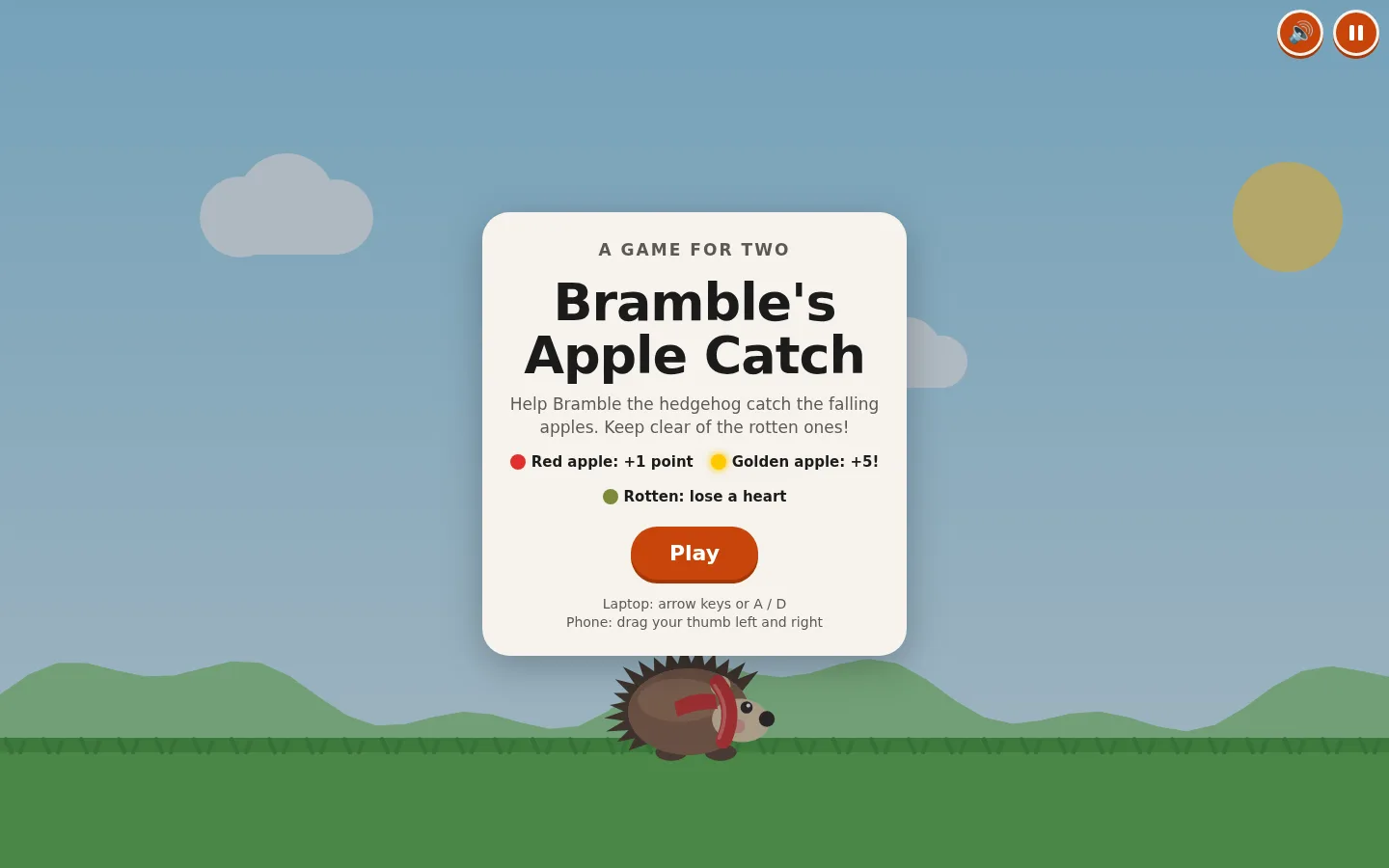
Our example is made up. A parent and a 9-year-old who have never made anything like this want a game they can send to the grandparents as a link. Bramble the hedgehog runs left and right catching falling apples: a red apple scores a point, a rotten one costs a life, you get 3 lives, it speeds up, and it remembers your best score. The domain, bramblesapples.co.uk, is invented too.
02 · Set up once
Set up once, then just talk to Claude.
Free accounts you make one time and reuse for every build. Each links to the step-by-step on the set-up page, with what each screen looks like.
- 1. Get a free Claude account. It's where you describe what you want and Claude makes it. The Free plan covers every guide on this site; Pro adds the shortcut where Claude saves changes to GitHub itself.
- 2. Let Claude hand you files. A website is a handful of files. With this switched on, Claude can make them and give them to you to download, ready to upload to GitHub.
- 3. Get a free GitHub account and an empty repository. A repository is a folder on GitHub that keeps every version of your files. It's the one place your site lives: you (or Claude) change the files there, and Cloudflare publishes whatever is in it.
- 4. Get a free Cloudflare account and connect it to your repository. Cloudflare is where your site is live on the internet. Once it is connected to your repository, every change to the files on GitHub goes live by itself, in a minute or two. A site made of plain files costs nothing to host: Cloudflare says requests to static files are "free and unlimited".
- 5. Connect Claude to GitHub. So Claude can read the files that are live now before it changes them, even in a brand new chat. On Pro, the same connection is what lets Claude Code on the web save its changes to your repository.
03 · The prompts
Paste these five, in order.
Plain English, typed into an ordinary Claude chat. On the left, exactly what we sent, word for word; change the details to yours. On the right, what came back. One conversation with claude-sonnet-5-5, run on 1 October 2026. Read the full transcript.
Prompt 1 of 5
Describe the game, and ask Claude to ask questions first.
You say: My daughter is 9 and we'd like to make a simple game together that we can play in a web browser, on the laptop and on my phone. Neither of us has ever made anything like this and I'm not technical. Her idea: a hedgehog called Bramble runs left and right along the bottom of the screen catching falling apples. Apples give you points. Every so often a rotten apple falls, and if Bramble catches it you lose a life. You start with 3 lives. It should get a bit faster the longer you play, and remember your best score. Before you make anything, ask us anything you need to know, and tell us in plain English what you're going to make: what the screen will look like, how you play it on a laptop and on a phone, and what happens when the game ends.
1,094 output tokens back · read the full reply
Prompt 2 of 5
Answer its questions, and show it a look you like.
Attach: a screenshot of a website she likes the look of · the one we attached
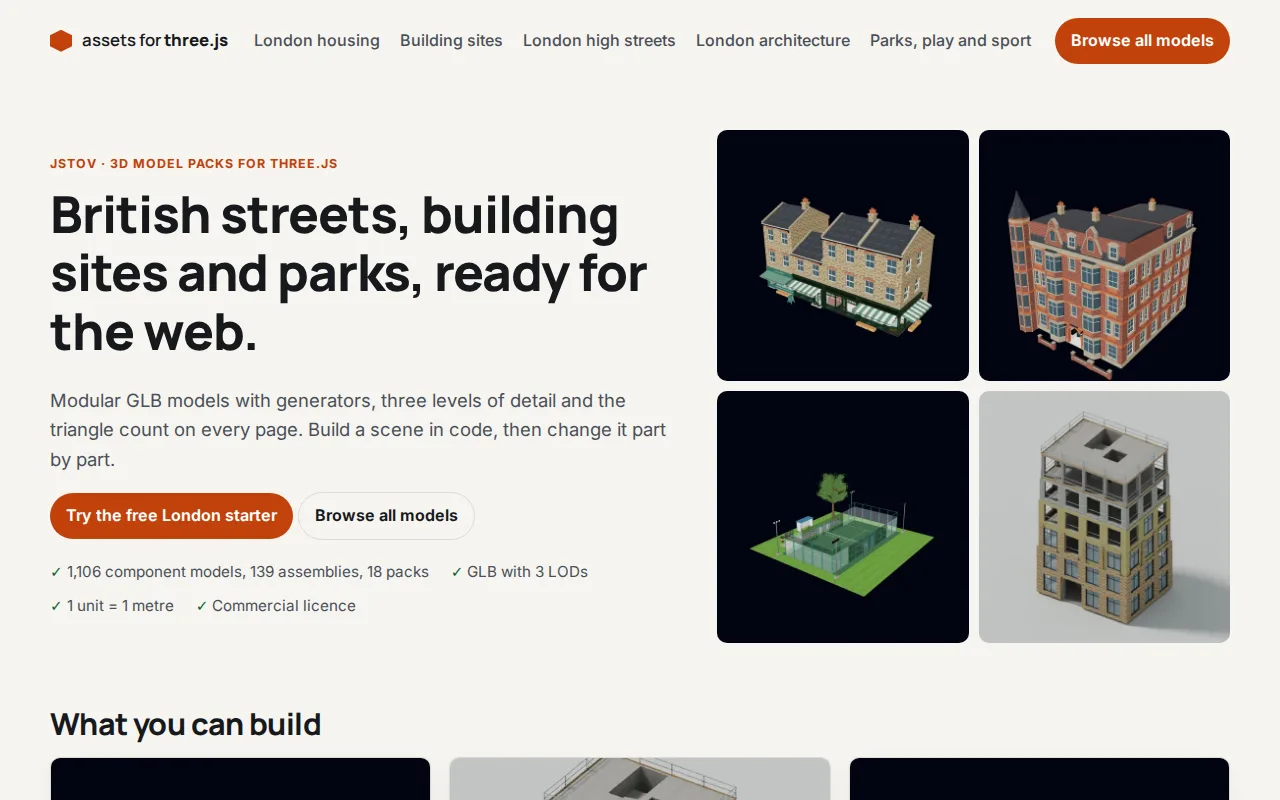
You say: Thanks, that sounds perfect. Our answers: 1. Sounds yes, with a mute button. 2. No extras yet. She's already asking for a golden apple, so maybe later. 3. Brown Bramble is fine, but she'd love him to wear a little red scarf. 4. It's an iPhone. 5. We'd like her grandparents to play it from a link, so it will need to go online. 6. Saving it where you are is fine. I've also attached a screenshot of a website she likes the look of. She likes the bright orange rounded buttons, the big chunky writing and the warm cream background. Please use that feel for the buttons and the writing on the start and game over screens. Don't copy its words. Please make the game now. Keep it as simple as possible: something we can open by double-clicking and later put online, nothing we have to install. It must work with the arrow keys on the laptop and with her thumb on my phone, and it needs a pause button.
18,607 output tokens back · read the full reply
Prompt 3 of 5
Ask it to check the game the way a child would break it.
You say: We played it and she loves the scarf! Before we send it to anyone, please check it carefully as if you were a 9-year-old playing on a small phone, and as if you were trying to break it: holding both arrow keys at once, pressing keys before the game starts or straight after it ends, switching to another app mid-game, turning the phone sideways, pressing pause and play again quickly, tapping with two fingers, and playing for a long time until it gets really fast. Tell me in plain English what you found, then fix it in the file.
19,157 output tokens back · read the full reply
Prompt 4 of 5
Change something, the way you will once it's live.
You say: Everything you fixed works on my phone. She's been asking all week, so please add the golden apple: now and then a golden apple falls, a bit faster than the others, and catching it is worth 5 points. It should look special so you can't miss it. Then tell me what you changed, so I know what to put online again.
6,253 output tokens back · read the full reply
Prompt 5 of 5
Ask how to put it live from GitHub, by clicking, not typing commands.
You say: Now we'd like her grandparents to play it from a link. I've made free GitHub and Cloudflare accounts. On GitHub I made a new repository called bramblesapples (I switched on "Add README"), and in Cloudflare I went to Workers & Pages, Create application, Pages, Connect to Git, and picked that repository, so it should go live by itself whenever the files on GitHub change. I don't want to use the terminal or install anything. Please tell me, step by step, how to get the game into my repository using the GitHub website, what I should see at each step, how I find the address where it's live, and how I put a change live later (like the golden apple). We also bought bramblesapples.co.uk from another company. How would we use that instead of the free address?
2,450 output tokens back · read the full reply
After prompt 1 of 5
Reply to prompt 1 · 10.1 s · 1,094 output tokens
Describe the game, and ask Claude to ask questions first.
A plan and some questions, and nothing made yet. Ours promised one file, bramble.html, to open by double-clicking; arrow keys or A and D on a laptop, drag a finger on a phone; and asked six questions (sounds, extras such as a golden apple, Bramble's look, iPhone or Android, sharing, where to save).
Reply to prompt 5 · 21.2 s · 2,450 output tokens
Ask how to put it live from GitHub, by clicking, not typing commands.
Click-by-click steps and no new files. Ours: rename bramble.html to index.html, then Add file, Upload files, drag it in and Commit changes; find the green Success under Deployments and the bramblesapples.pages.dev address; for a change, upload the new index.html the same way and Cloudflare rebuilds by itself. For the domain: Custom domains and Cloudflare's nameservers at the company you bought it from.
04 · The result
The real thing, on the stage.
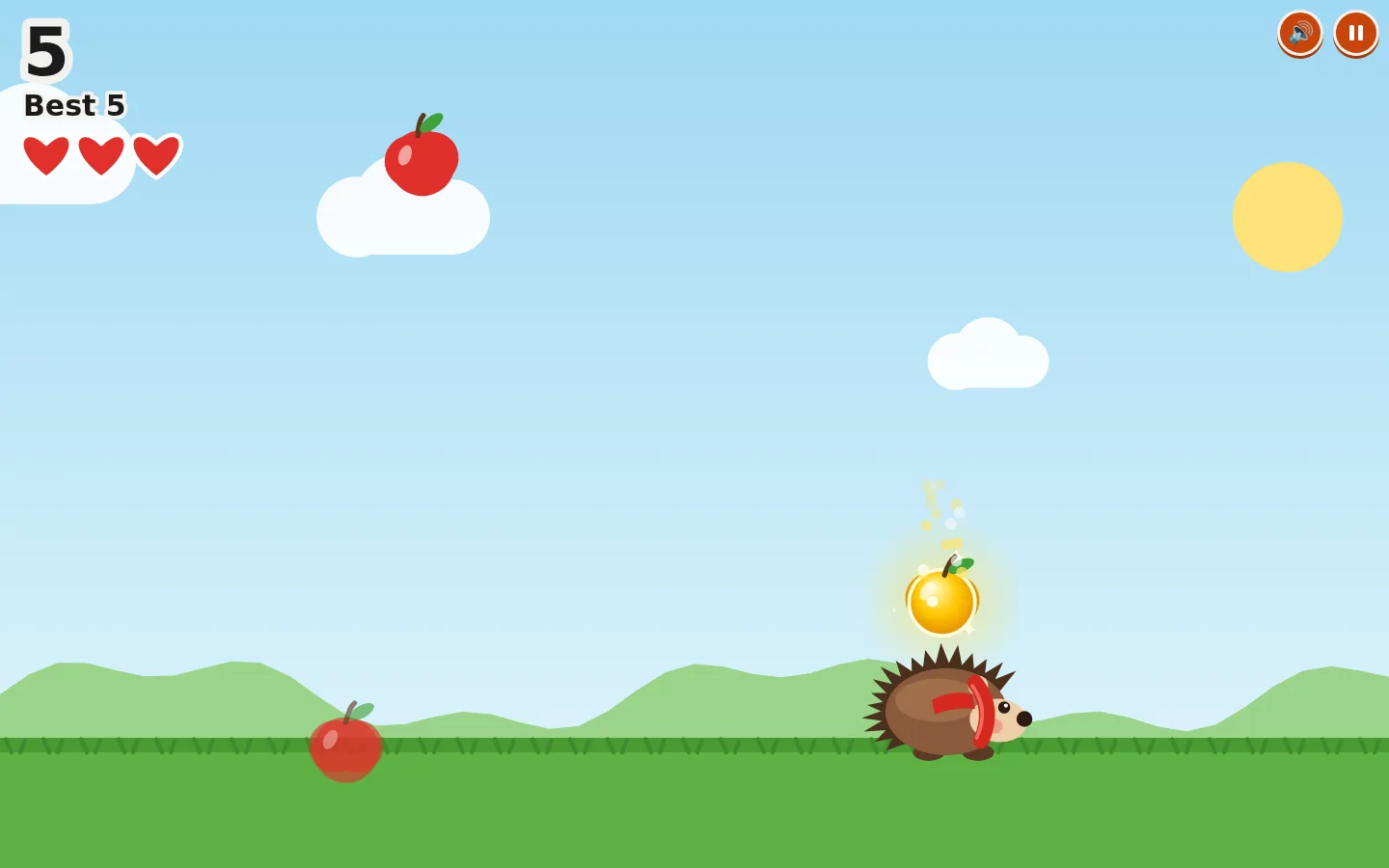
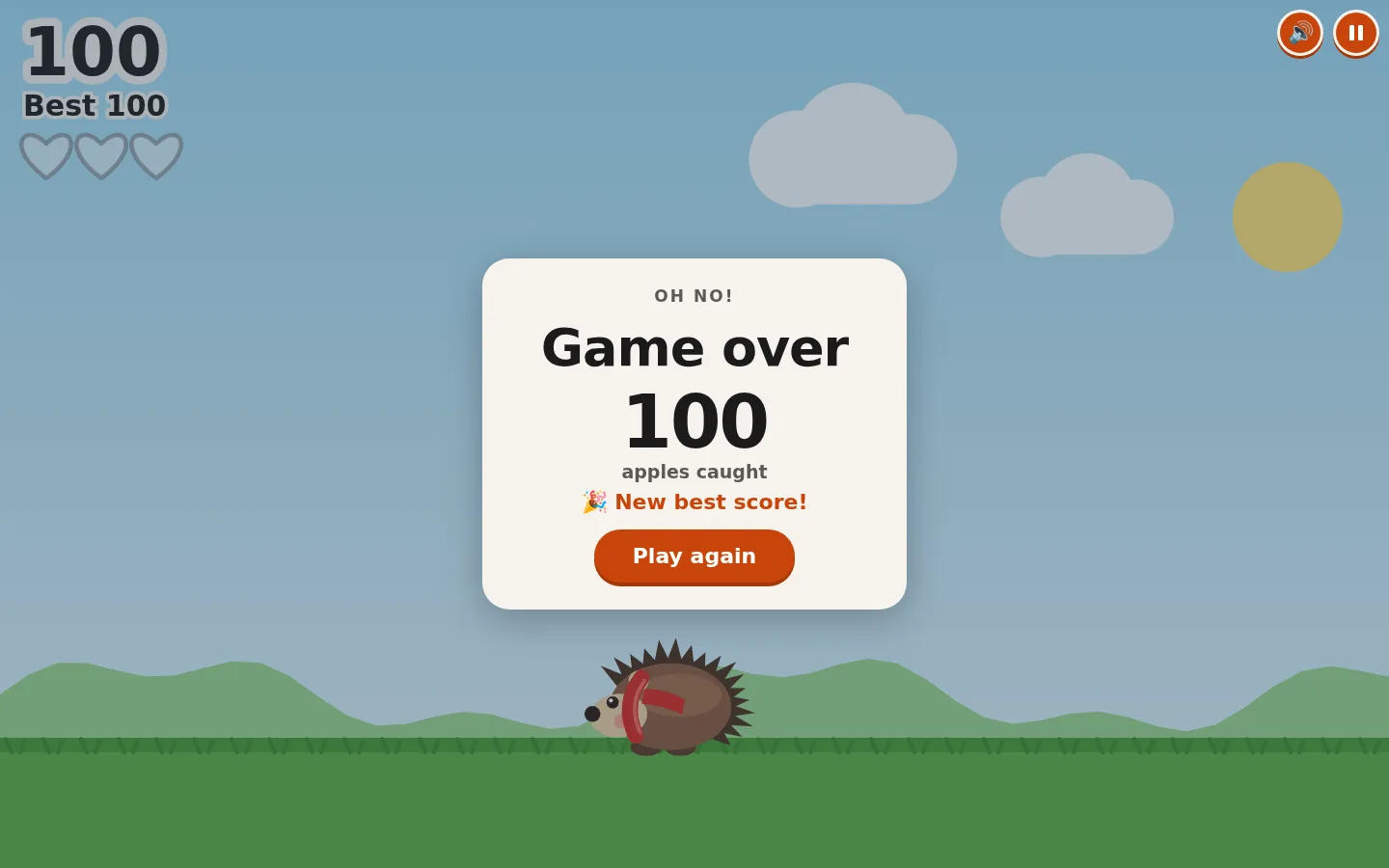
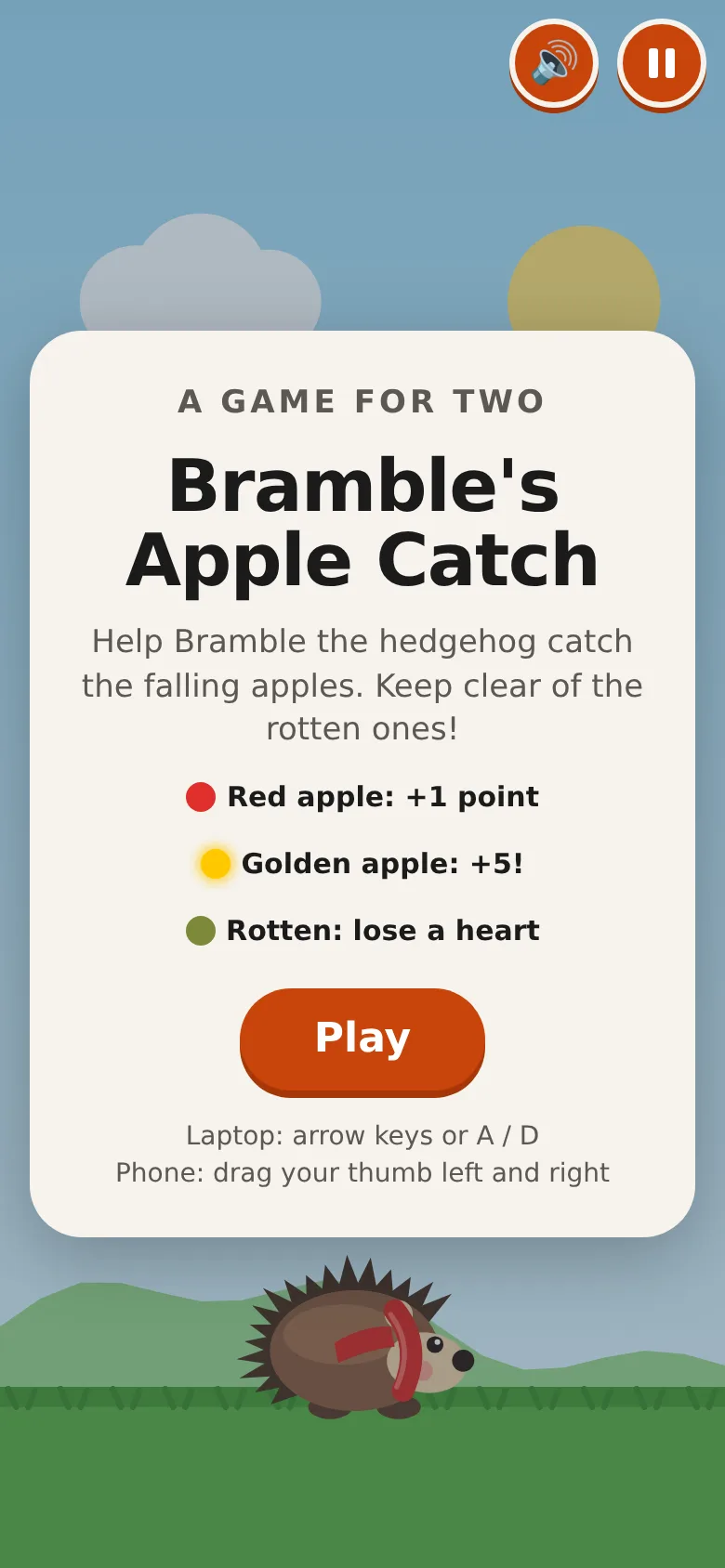
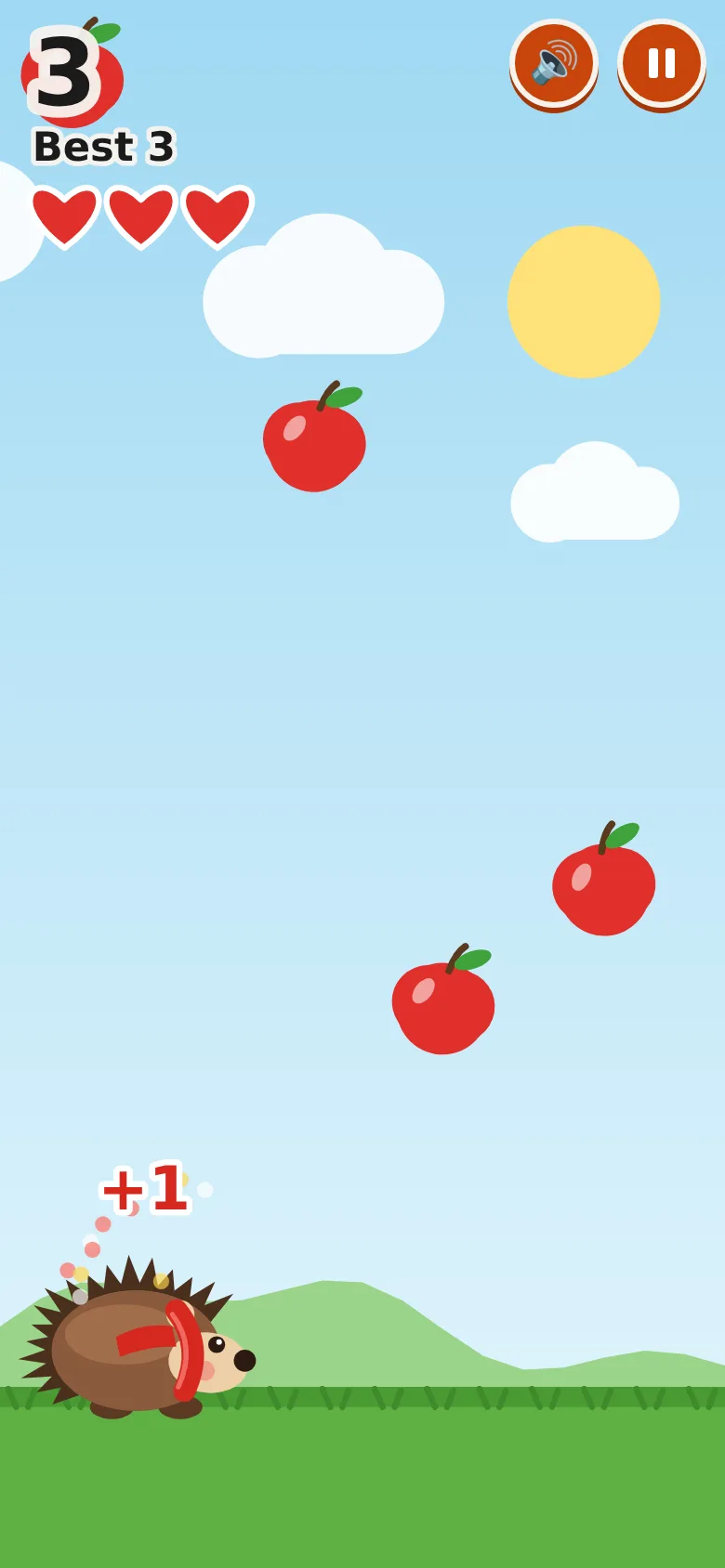
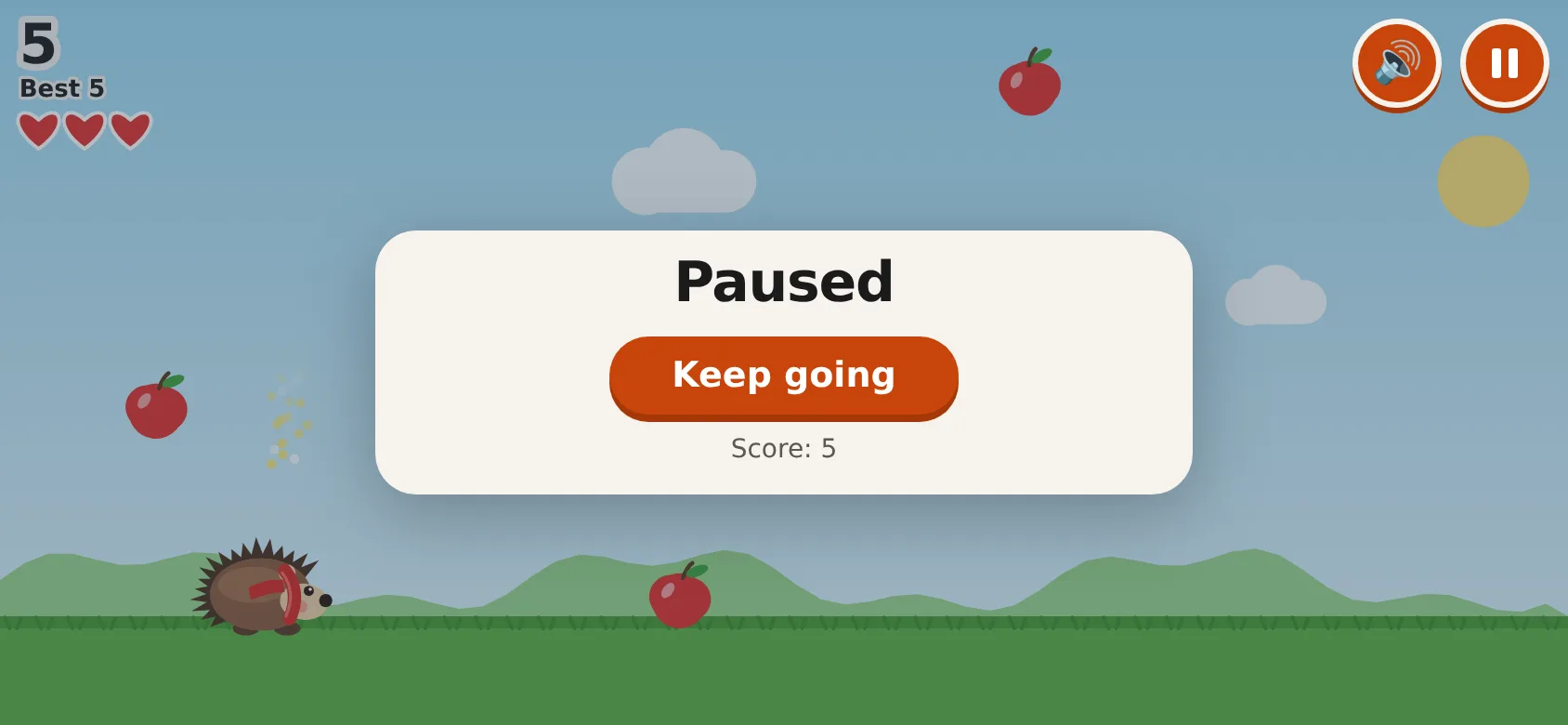
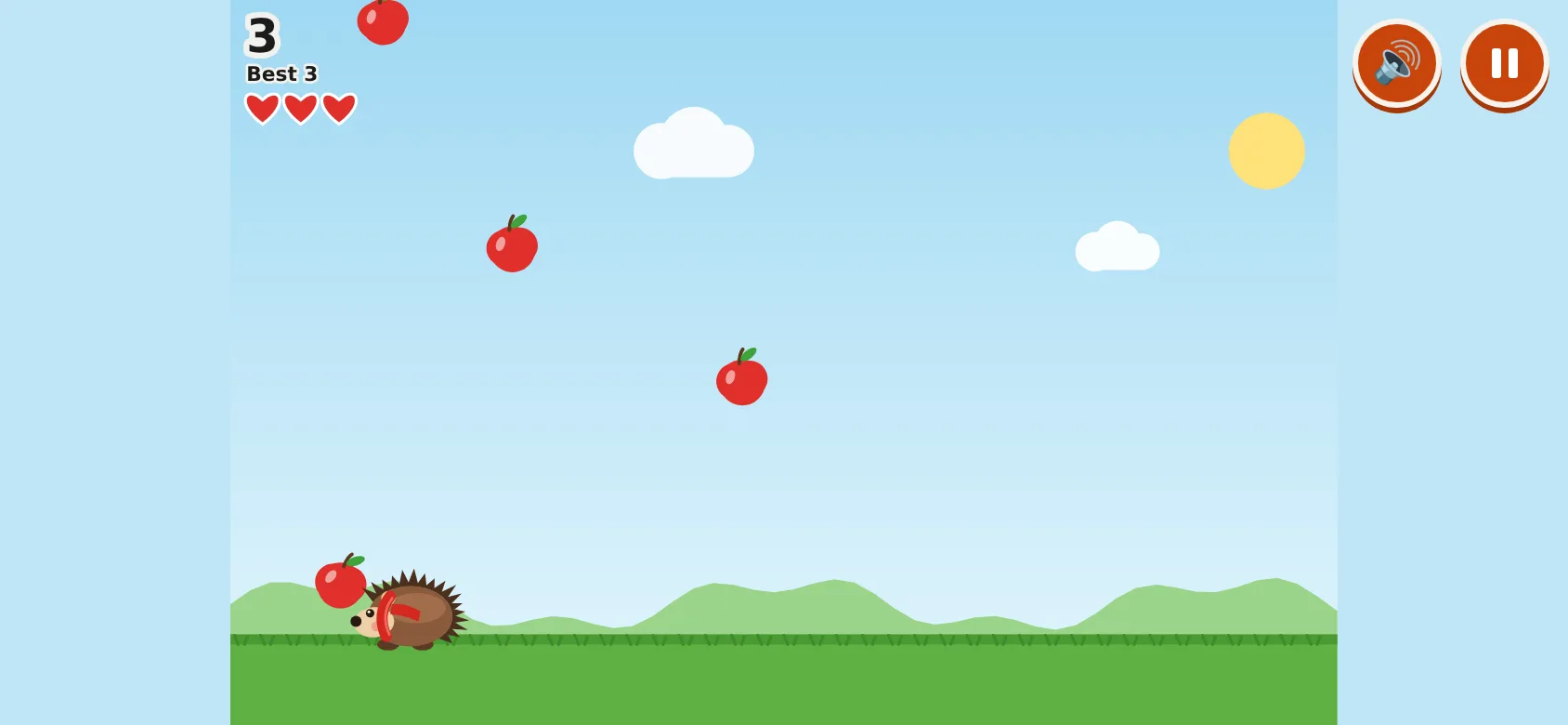
Screenshots of exactly what Claude produced, running on our machine on 1 October 2026. Nothing retouched.
We typed five plain-English prompts into one conversation with claude-sonnet-5-5 on 1 October 2026. We ran them through Anthropic’s own tool with only its file tools switched on, so Claude could save files into an empty folder, much like file creation on claude.ai. We didn’t use the claude.ai website itself, so your screen will look different. The replies are published as they came back and we edited nothing by hand. Claude spent 338.8 seconds on them.
The first prompt described the game and asked Claude to ask questions before making anything. It asked six, and said the game would be one file, bramble.html, that you double-click to play.
The second prompt answered them (sounds with a mute button, a red scarf, an iPhone, a link for the grandparents) and attached a screenshot of one of our own sites, saying she liked the orange rounded buttons, the chunky writing and the warm cream. Claude saved bramble.html, with everything drawn by the game itself, and said it hadn’t opened it in a browser.
So we did. We played it with real key presses at laptop size and real finger drags at phone size. It passed 24 of 29 checks. Holding both arrow keys froze Bramble. Pressing Space just after losing restarted the game before the score appeared. And turning the phone sideways didn’t pause it: it kept playing in a 596-pixel strip of an 844-pixel screen.
The third prompt asked Claude to check the game as a 9-year-old on a small phone trying to break it, then fix the file. It listed 8 problems, including all of ours, and fixed them, while saying it had read the code rather than played it. Afterwards the game passed 31 of 31, and our test bot played for 80 seconds and scored 99 with no errors.
The fourth prompt is what keeping a game up to date looks like: add a golden apple worth 5 points. Claude made it glow and sparkle, fall a bit faster, and turn up at least 8 apples apart, and said only bramble.html had changed. The final file passed 33 of 33, including a golden apple that fell within 4 seconds and took the score from 5 to 10. One slip: the Game Over card still says “apples caught” under the score, which stops being true once a golden apple has added 5.
The fifth prompt said we’d made a GitHub repository, connected it to Cloudflare, and wanted to put the game in it without a terminal. Claude’s answer was short and mostly right. Its best tip came first: rename bramble.html to index.html, so the link opens straight onto the game. It also pointed out that the file we already had included the golden apple, and that best scores are kept per address, so players start from 0 if you move them to a new domain. Its domain steps used a slightly different button name from Cloudflare’s, and it suggested one fix we couldn’t find in Cloudflare’s documentation, so the steps below follow GitHub’s and Cloudflare’s own pages.
demo.iwantaito.com/make-me-a-game/: Claude's unedited files, a made-up example.
bramble.html
05 · What we tested
We tried to break it. 7 of 8 held.
Run on our own machine against the unedited files. Nothing deployed while testing.
| What we tried | What happened | Result |
|---|---|---|
| Final file (prompt 4), opened by double-click: real key presses at laptop size (1440x900) and real touch events at phone size (390x844) in headless Chrome | 33 of 33 checks passed: no errors, nothing loaded from other websites, arrow keys and finger drag both move Bramble and catch apples, pause freezes the apples, three rotten apples end the game, best score kept after a reload | Pass |
| Golden apple | One fell within 4 seconds; catching it took the score from 5 to 10 | Pass |
| Both arrow keys held, and Space pressed straight after Game Over | Bramble keeps moving; the Game Over card still appears. In the first build he froze, and Space restarted the game before the score showed | Pass |
| Phone turned sideways mid-game | Pauses and fills the 844x390 screen. The first build kept playing in a 596-pixel strip | Pass |
| Two fingers on the screen | Bramble follows the newest finger and goes back to the first when the second lifts (Claude's own choice) | Pass |
| Switch tab mid-game | Simulated (a headless browser never hides a tab): the game paused | Pass |
| Long play | Our bot played 80 seconds after prompt 3 and 57 seconds after prompt 4, scoring 99 and 100, with no errors | Pass |
| Prompt 2 first build, same checks | 24 of 29: the frozen arrows, the skipped score and three sideways-phone failures. Prompt 3 fixed all five | Fail |
06 · Ship it
Put it live from GitHub, no terminal.
Your files go into your GitHub repository and Cloudflare publishes them by itself. The steps start from Claude's own answer and are checked by us against GitHub's and Cloudflare's documentation, which the sources below link to.
These steps assume you’ve done the set-up page: a GitHub repository (ours would be bramblesapples, with “Add README” switched on) connected to a Cloudflare Pages project with Connect to Git. Claude’s unedited files are live at demo.iwantaito.com/make-me-a-game/ (we host them ourselves, with a thin bar on top saying it’s a made-up example); the screenshots are from our own machine.
- Download bramble.html from Claude and rename it index.html.
- On GitHub, open your repository. You should see one file, README.md. Select Add file, then Upload files.
- Drag index.html into the box. Drag the file, not a folder: a folder would arrive as a folder, and index.html has to sit at the top.
- Leave it set to commit to the main branch and select Commit changes. You should see README.md and index.html in the list.
- In Cloudflare, go to Workers & Pages and open your project. Under Deployments, wait for the new one to show as successful; it usually takes a minute or two. Your address is shown on the project, something like bramblesapples.pages.dev (with a few extra letters if the name was taken). Open it on a laptop and a phone, then send the link.
- To put a change live later, ask Claude in the same chat, download the new file, rename it index.html again, and upload it the same way: Add file, Upload files, Commit changes. A file with the same name replaces the old one. Cloudflare redeploys by itself and the link stays the same.
- Your own domain is optional. bramblesapples.co.uk has to be on Cloudflare first, with its nameservers changed at the company you bought it from to the two Cloudflare gives you. Then open the project, Custom domains, “Set up a domain”, type it and select Continue. It can take from minutes to a day to start working, and the pages.dev link keeps working too.
On Claude Pro, you can skip the downloading and uploading: ask Claude Code on the web for the change, and it saves it to a branch of your repository for you to merge on GitHub, after which Cloudflare puts it live. The set-up page shows how, from a real run.
No GitHub? Cloudflare’s “Drag and drop your files” works too, but each change means dragging the whole folder in again.
Free plan: Claude makes the files, you upload them
FreeTo change something: ask Claude, download the files it changed, and upload just those the same way. Files with the same name are replaced; the rest stay as they are.
£0: Claude Free, GitHub Free and Cloudflare's free plan.
Pro: you chat, Claude saves the change, Cloudflare publishes it
Claude Pro, $20 a monthClaude edits the files and saves them to GitHub on a separate branch, a draft copy. Cloudflare gives that branch its own preview address, so you can look before anything changes. Happy with it? Select Create PR, then on GitHub select Merge pull request, then Confirm merge. Cloudflare puts it live by itself.
07 · What it costs
What it costs.
£0 a month on Claude's Free plan, GitHub Free and Cloudflare's free plan; a domain is optional and the only cost.
Hosting is £0 a month. Cloudflare says requests to static files are free and unlimited, and the game is one file of 31,130 bytes. GitHub’s free plan is enough for the repository.
Claude’s Free plan covered everything here. A domain is the only possible cost, and it’s optional; we haven’t checked domain prices, so we won’t guess.
08 · What it got wrong
7 things Claude got wrong, or left to you.
If Claude gets something wrong, we say so here. We never fix its files by hand; a fix is a follow-up prompt you can see above.
The first build had five failures
Both arrows held froze Bramble, Space straight after Game Over skipped the score, and turning the phone sideways neither paused the game nor filled the screen. Claude found these itself when asked to check, and fixed them.
'Apples caught' after the golden apple
The Game Over card still says 'apples caught' under the score, but a golden apple adds 5 points, so the number is no longer a count of apples. Ask Claude to change it to 'points'.
Button name
Claude called Cloudflare's button 'Set up a custom domain'. Cloudflare's documentation says Custom domains, then 'Set up a domain'. It warned that names might differ.
A fix we couldn't back up
If the first build fails, Claude suggested framework None, a blank build command and an output directory of '/'. Cloudflare's documentation says to leave the build command blank for plain files and doesn't mention '/'. We didn't need or test it.
Domain order unchecked
Claude said to start under Custom domains and let Cloudflare ask you to add the domain. Cloudflare's documentation says a whole domain like bramblesapples.co.uk must already be on Cloudflare, with its nameservers changed. We had no real domain to check which screen comes first.
It suggested another host
After prompt 2 Claude suggested a different free host for sharing. It's a fine option; we asked about GitHub and Cloudflare, so the steps below are theirs.
It didn't mention Publish
On claude.ai you can publish a one-page creation to a public link from Claude itself. Claude never mentioned it; see 'Put it live'.
Ours, disclosed
Built it? Where we can help next.
Ours: made by the same studio that runs this site. None of them changes anything above.
Ours
Assets for three.js
If the next game is 3D, ready-made models you can drop into a three.js scene.
Ours
Launch Video Maker
A short launch video to send round with the link.
Questions
Questions people ask.
Can Claude make a game if I can't code?
For a simple browser game, yes. Five plain-English prompts gave us a working apple-catching game in one file that opens with a double-click. The first version had five failures in our tests, which Claude found and fixed when we asked it to check its work.
Do I need to use a terminal or install anything?
No. You type in a Claude chat, download the one file it makes, and upload it to your repository on the GitHub website. Cloudflare publishes it from there.
Can Claude put it online for me?
Not from a chat on the Free plan: Claude hands you the file and you upload it. Once your GitHub repository is connected to Cloudflare, that upload is what puts it live. On Claude Pro, Claude Code on the web can save a change to a branch of your repository, which you then merge on GitHub.
What's the quickest way to share it?
If Claude shows the game in a panel next to the chat on claude.ai, its Publish button gives you a public link; the Free plan can publish, and anyone with the link can play without a Claude account. For an address of your own, such as a pages.dev address or your own domain, use GitHub and Cloudflare.
Will it work on a phone?
Ours did once fixed: at phone size you steer by dragging a finger, the pause button is 48 pixels square, and turning the phone sideways pauses the game. Ask for phone controls in your prompt, as we did.
Do I have to test it myself?
Yes. Claude said each time that it had read the code rather than played it. Play it on a laptop and a phone, and try to break it, before you send the link.
Sources for this page
9- Claude help: publishing and sharing artifacts (Free, Pro and Max can publish; viewers need no Claude account)
- Claude help: create and edit files with Claude (all plans; Settings > Capabilities)
- Claude help: uploading files to Claude (screenshots, 20 files per chat)
- GitHub Docs: adding a file to a repository (Add file > Upload files; 100 files at once, 25 MiB each)
- Cloudflare Pages: Git integration (Connect to Git; build command blank; deploys on every commit)
- Cloudflare Pages custom domains (Set up a domain; apex must be a Cloudflare zone; CNAME without adding first gives a 522)
- Claude Code on the web: get started (Pro, Max and Team; saves changes to a branch)
- Cloudflare Workers pricing ('Requests to static assets are free and unlimited')
- Cloudflare Pages: Direct Upload, drag and drop (the no-GitHub alternative)
For developers
For developers.
Skip this if you've never used a terminal. You don't need it.
The command-line route
The git route: clone the repository, copy the game in as index.html, then commit and push to main. Cloudflare Pages builds every push to the production branch, and other branches get preview addresses.
git clone https://github.com/<you>/bramblesapples.gitcd bramblesapplescp ~/Downloads/bramble.html index.htmlgit add index.htmlgit commit -m "Add the game"git push origin mainFrom the first, command-line version of this page (claude-sonnet-5-5, 1 October 2026; Wrangler 4.145.0, which needs Node.js 22 or newer). That run served the game from a Worker with static assets: the game goes in bramble/public/index.html, with bramble/wrangler.jsonc next to public:
jsonc
{ "name": "bramblesapples", "compatibility_date": "2026-09-01", "assets": { "directory": "./public" } }npx wrangler devnpx wrangler loginnpx wrangler deployIn that run wrangler dev printed “Ready on http://localhost:8787” and the first version of the game passed its checks served that way; a --dry-run of the deploy read one asset. For a domain on an active Cloudflare zone, add "routes": [{ "pattern": "bramblesapples.co.uk", "custom_domain": true }] and deploy again. A Pages Direct Upload project also takes npx wrangler pages deploy bramble --project-name bramblesapples.